Home Assistant : Q&A, Tips & Tricks, Your Configs

Less painful to have a sensor separate anyway but then you need to have a whole other stack like Zigbee to manage.

So can be a catch twenty two depending how deep down the rabbit hole you plan to go.

I'm a bit confused - I have a couple of Sonoff switches that connect to my network and are picked up by HA without me having installed a specific ZigBee hub - I do have Amazon Alexa's dotted all over - are those serving as Zigbee hubs?
 
That link is not a sonoff sv, and has no input for a sensor to show open or close state. It's kinda horrible actually, the ori2sv is better, or as @SauRoNZA will tell you, the Shelly1 is by far the easiest of them all.
Thanks

I am a bit of a Noob where these things are concerned.

I have an extra zigbee extender and some zigbee reed switches, I will probably add those
 
I'm a bit confused - I have a couple of Sonoff switches that connect to my network and are picked up by HA without me having installed a specific ZigBee hub - I do have Amazon Alexa's dotted all over - are those serving as Zigbee hubs?

Referring to the open/close sensor status.

Those generally only make sense with Zigbee as WiFi is too heavy on the power drain.

Sonoff SV can be wired with a REID switch but it can be problematic or tricky to get done.
 
Thanks to everyone who helped me with my gate and the sonoff self inching switch.
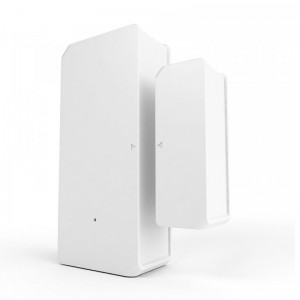
I ended up getting a wifi reed switch (The zigby one was very unstable and kept dropping off the network even with an extender close by and both has seemingly good link quality).

So now I use the reed switch for the gate state and also to trigger an automation to send me a picture if the gate opens and I am not home via telegram.
 

Attachments

  • Screenshot_20230323_123206_Home Assistant.jpg
    Screenshot_20230323_123206_Home Assistant.jpg
    291.1 KB · Views: 35
  • Screenshot_20230323_123813_Home Assistant.jpg
    Screenshot_20230323_123813_Home Assistant.jpg
    584.5 KB · Views: 34
Thanks to everyone who helped me with my gate and the sonoff self inching switch.
I ended up getting a wifi reed switch (The zigby one was very unstable and kept dropping off the network even with an extender close by and both has seemingly good link quality).

So now I use the reed switch for the gate state and also to trigger an automation to send me a picture if the gate opens and I am not home via telegram.
Which wireless reed did you get?
 
Which wireless reed did you get?
Would also love to know. Not finding any that will work for me.
This one:

The same one is much more expensive on takealot.
 
This one:

The same one is much more expensive on takealot.
I've got those. Not sure they are going to work outdoors though. Well not for long anyway.

Edit: Or did you find a way to waterproof them?
 
This one:

The same one is much more expensive on takealot.
Oh, i had those - sucked on battery life and connectivity. are they IP rated though for use on a gate?

NVM: i see you responded. Let us know how it goes
 
I'm going to take a gamble with some silicon sealant and see how well it lasts
They'll probably be fine - I had a few of the original Sonoff wifi PIR's, sealed with silicone and a bit of insulation tape outdoors (in quite a harsh coastal climate) in the rain etc and they're still good.
 
As my solution does not have to be wireless, I think I'll just go with the standard alarm types and some silicone.
 
HomeAssistant, MQTT, HASS.Agent, and SolarAssistant

Leaving this here for anyone else who might need to do the same.

Quite pleased that I muddled my way through getting MQTT configured/set up for different sources into HomeAssistant.

Prior to purchasing SolarAssistant, I had

1. MQTT (Mosquitto broker) integration running on HomeAssistant with

2. HASS.Agent* running on 2 PC's - interface with MQTT HomeAssistant was via Mosquitto broker on HA so the HASS.Agent instances were configured to use homeassistant.local for the Broker/Hostname

After adding SolarAssistant (running on a Pi4) into the mix, I realised that SolarAssistant runs it's own MQTT Broker, so

3. Pointed the two HASS.Agent instances running on the PC's to the IP address of the SolarAssistant host, and

4. Configured the MQTT integration in HomeAssistant to point to the IP address of the SolarAssistant host as well.


Voila! HA sees all 3 devices. Happiness


* HASS.Agent allows me to, amongst other things, hibernate my PCs and monitor CPU, memory, disk space, etc from within HomeAssisant.
 
HomeAssistant, MQTT, HASS.Agent, and SolarAssistant

Leaving this here for anyone else who might need to do the same.

Quite pleased that I muddled my way through getting MQTT configured/set up for different sources into HomeAssistant.

Prior to purchasing SolarAssistant, I had

1. MQTT (Mosquitto broker) integration running on HomeAssistant with

2. HASS.Agent* running on 2 PC's - interface with MQTT HomeAssistant was via Mosquitto broker on HA so the HASS.Agent instances were configured to use homeassistant.local for the Broker/Hostname

After adding SolarAssistant (running on a Pi4) into the mix, I realised that SolarAssistant runs it's own MQTT Broker, so

3. Pointed the two HASS.Agent instances running on the PC's to the IP address of the SolarAssistant host, and

4. Configured the MQTT integration in HomeAssistant to point to the IP address of the SolarAssistant host as well.


Voila! HA sees all 3 devices. Happiness


* HASS.Agent allows me to, amongst other things, hibernate my PCs and monitor CPU, memory, disk space, etc from within HomeAssisant.
Any particular reason you pointed them to the SA broker and not pointing the SA to the HA broker? Just curious
 
Any particular reason you pointed them to the SA broker and not pointing the SA to the HA broker? Just curious

I couldn't for the life of me figure out where to do that in SolarAssistant.

Edit: I also didn't read deep enough on the SolarAssistant website on how to configure MQTT on HA to use a bridge (https://solar-assistant.io/help/home-assistant/broker-setup) - ah well, this seems to be working ok so not sure if I'll go back to redo it.
 
Last edited:
On the point of Solar Assistant, I am about to invest in it as well. I am getting a Deye Inverter with Dyness batteries.

Should I connect the batteries to Solar Assistant as well or is the info for the batteries I can get through the inverter enough?
 
Top
Sign up to the MyBroadband newsletter
X