I Need to Buy Fibre Optic LAN Cable to Reduce LAG

AngelBoy

New Member
Joined
Mar 27, 2026
Messages
3
Reaction score
3
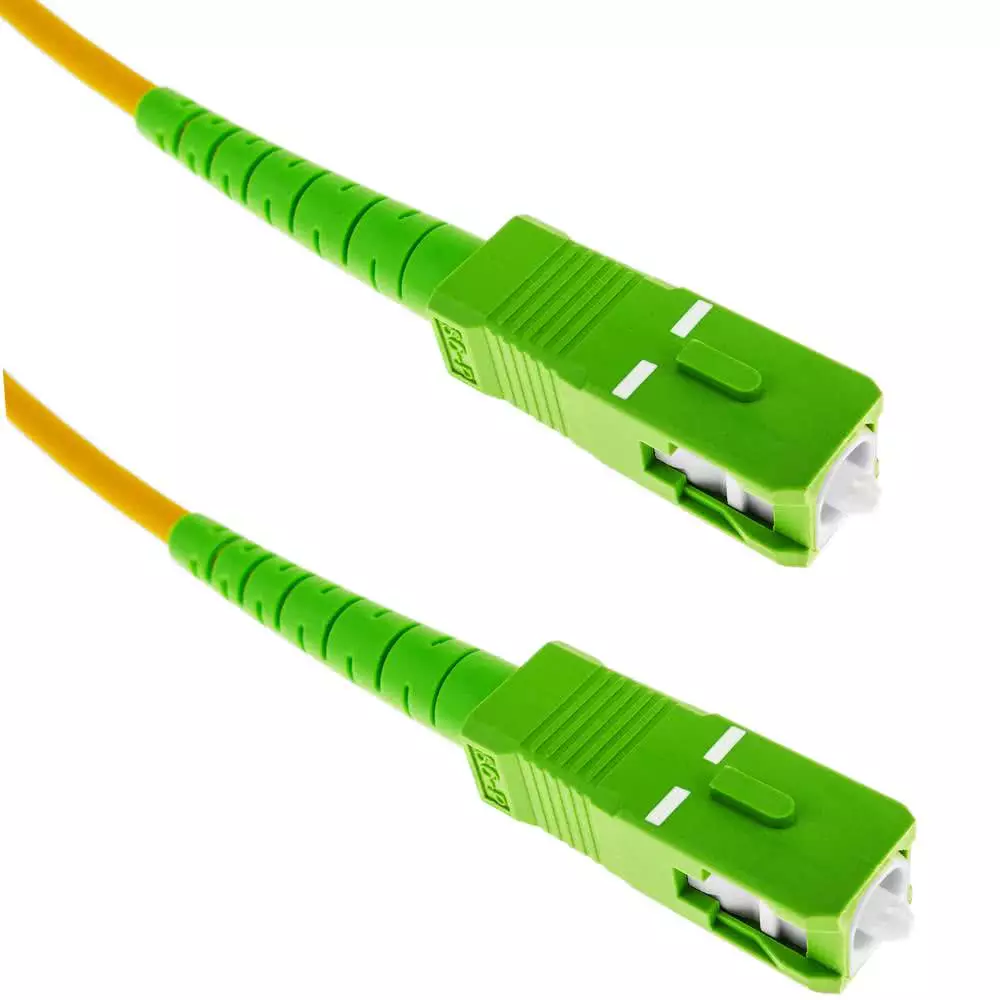
Hi, in 2012 I Found a Half a Meter LAN Cable which was 10 Gbps I Found it on Takealot Bought it and it was very Good Latency but i eventually lost it when moving house years later.. I have a 1 Meter Copper LAN Cable to My Openserve ONT and The Fibre router when my friend pings me from his Business Fibre there is lag on my Network... Where can i Buy a 1 Meter Fibre Optic LAN Cable to use for The Optical Network Terminal and the router. Please! Help 🙏
 
Damn dude, above my pay grade and IMO my pay is well enough.

What do you do at home that require that part to be fibre optic for latency?

I do some dodgy stuff and my bottleneck is and will always be the ISP speed, not the copper cables.
 
I asked chatgpt:

1️⃣ Copper is perfectly fine for 1 meter​


  • Copper Ethernet (Cat5e, Cat6, Cat6a, etc.) can easily handle 1 Gbps or even 10 Gbps over short distances.
  • For a 1-meter run, there is no signal loss, no interference, and no bandwidth limitation from copper.

💡 Conclusion: There’s absolutely no technical need to use fibre for a 1-meter connection. Copper works perfectly and is cheaper and simpler.


2️⃣ When fibre is even mentioned in this context​


  • Some ultra-high-end setups (10 Gbps+ with SFP+ modules) might come with fibre from ONT to router—but even then, for 1 meter, a Cat6a cable could do the same job.
  • Fibre might only be needed if the ONT only has a fibre LAN port (SFP/SFP+) and your router only accepts fibre input. But this is rare for home setups.
 

1️⃣ LAG (Link Aggregation)​


LAG is when you combine multiple physical links (usually Ethernet) into one logical link to increase bandwidth and provide redundancy.


  • Copper Ethernet: You can LAG multiple copper ports together (e.g., 2×1 Gbps → 2 Gbps total).
  • Fibre: You can LAG multiple fibre ports as well, often using SFP/SFP+ modules (10 Gbps+ per link).

Key point:


  • For a 1-meter run from ONT → router, LAG is almost never needed unless you’re doing multi-gigabit home Internet (>2 Gbps).
  • LAG does not require fibre inherently. You can aggregate copper Ethernet ports just fine.


2️⃣ Latency​


Latency is the time it takes for a signal to travel.


  • Fibreis slightly faster than copper in terms of propagation speed:
    • Fibre: ~200,000 km/s (light in glass)
    • Copper: ~230,000 km/s (signal in metal)
  • Over 1 meter, the difference is negligible:
    • Fibre: ~5 ns
    • Copper: ~4 ns

Even for gaming or high-frequency trading, a 1-meter difference is effectively zero.


✅ Summary​


  • For 1-meter ONT → router connections:
    • Copper Ethernet is perfectly fine.
    • LAG can be done over copper; fibre is not required.
    • Latency difference is insignificant.
 
No, you definitely don't need a fibre optic LAN cable...

Lag or latency is mostly determined by distance and at 1 meter you are going to have negligible if any difference in latency between fibre and copper..
 
Only reason I’ve used a fibre cable at home was actually with a dsl router and was intended to eliminate a copper connection to protect my precious home network.
 
7ms Ping.

What is your friend pinging from where?

Internal?
If so on wifi or ethernet?

External? (No icmp blocked on firewall)
If so, your public address is pointing to your router. 7ms is fast and he obviously lives somewhere in the same province. You can replace the connection with whatever you want and won’t see a bit of change. In fact the transceivers might actually add 0.5 microseconds or something.

External through a vpn?
 
Last edited:
7ms Ping.
If you are talking about ping, 7ms would be round trip time..

So that would include the time it takes packets to travel from his connection wherever he is located, to yours, which is probably a few km's away and is not going to reduce unless you two move closer together physically..
 
  • Haha
Reactions: rh1
As others have mentioned - Not gonna make much difference, or any at all! The latency is introduced on the FNO/ISP side. If your LAN is all cabled, LAN pings are usually about 1ms, but as soon as traffic leaves your network, that's where additional latency is picked up due to distance and routing.

Not to say you can't do it, but then you would need a router with SFP, and permission + setup from your FNO (which 99% don't do anyway) to remove the ONT and a converter from GPON to SFP on the router, and a SFP interface card on the machine your are using, and then you might shave off 0.2ms... And it won't be cheap either for all of that...
 
If my openserve ONT had a fibre out I would use it. It does not

If openserve allowed the use of a GPON SFP I would use it. They don't
 
Gold plated HDMI cables? Digital Snek super juice

Either way...

(option 1; "pro"/enterprise network gear)
If you have SFP cages (the fibre/copper thing has a half finger sticking out), then consider a SFP direct attach cable (generally cheaper than 2 SFP+cable).

(option 2; fibre only)
If no SFP cages and fibre only, check for single/multimode (essentially the thickness of the actual glass strand inside the fibre cable; affects distance), whether duplex(separate transmit/receive)/simplex (single glass) and APC/UPC (green vs blue connectors generally; don't get it wrong). Most household fibre internet is GPON which is a single big (SC) green (APC) single mode to small (LC) green clip/tab connector: so simplex (SC-LC)APC. Generally network device to network device is duplex LC-LC (2 blue clip connectors usually with a binder housing to keep them together) and then single mode for newer/faster or multimode for older/slower.

summary of fibre:
  • 1 or 2 actual fibre strands (more exist, and it gets colourful)
    • simplex / duplex
  • type of connector and strand tip is angled/flat
    • LC/SC/ST connector
    • APC/UPC: green or blue
    • these parts can be different for each end
  • thickness of the glass strand (single-mode or multi-mode)
(option3; most likely?)
Or just get a CAT6e patch cable if but sides are RJ45/LAN cable style.
Unless it you are on super high speed (>1Gig fibre internet), you can use any bog standard CAT5e/CAT6 patch cable

When recycling pre-loved cables, just make sure it has all 8 cable strands inside the connector. The older device cables (DSL routers / 802.11g APs) often only had 4 actual cables strands in the cable shipped in the box.

If you see CCA (contains aluminium): avoid like the plague. (electrical) Ethernet needs high quality copper, nevermind that it will drive you silly fault finding, just to save a few bucks.

(Finally)
Maybe a photo of the 2 devices next to each, showing their connection options?
 
Last edited:
Top
Sign up to the MyBroadband newsletter
X