


It looks like you have ubiquiti network equipment. Make sure that the IoT WiFi SSID is 2.4 gig only. Also ensure that the setting "Enhanced IoT connectivity" is on.This is the worst one, you can see the history for the day:
View attachment 1909446
And this is how far the AP is (also Ubiquiti)
View attachment 1909447
Looking at the history in Influxdb - its been like this since day 1.
-
- News
-
Categories
- 5G
- ADSL
- AI
- Banking
- Black Friday
- Broadband
- Broadcasting
- Business
- Business Telecoms
- Cellular
- Cloud and Hosting
- Columns
- Cryptocurrency
- Energy
- Enterprise
- Fibre
- Gadgets
- Gaming
- Government
- Hardware
- Industry News
- Internet
- Internet of Things
- Investing
- IT Services
- Motoring
- Reviews
- Science
- Security
- Smartphones
- Software
- Technology
- Telecoms
- Trending
- Wireless
- Press Office
- Forum
- Industry News
- Features
- Company hub
- Speed Test
- About us
- Advertise with us
- Contact
- Careers
-
Join the MyBroadband community
South Africa’s biggest forum. Discuss, discover, and connect with thousands of members.
-
Question of the Day: What is the ultimate French toast topping?
You are using an out of date browser. It may not display this or other websites correctly.
You should upgrade or use an alternative browser.
You should upgrade or use an alternative browser.
Home Assistant : Q&A, Tips & Tricks, Your Configs
- Thread starter TedLasso
- Start date

I'll have a look - can't recall what they are, but there are four APs over the property, and the least used channels were selected at the time.Simple fix may be to change channel on 2.4Ghz.... worth trying
It is 2.4ghz - I have a separate 5hgz for IoT network for camera'sIt looks like you have ubiquiti network equipment. Make sure that the IoT WiFi SSID is 2.4 gig only. Also ensure that the setting "Enhanced IoT connectivity" is on.
Wasn't aware of the "Enhanced IoT connectivity" option - will have a look
I have an HP Gen8 server running my home-assistant instance, and various other services (download, AI, etc) - I also have an 8 bay NAS - the combination chews through electricity, about 6-7kWh a day. (the heaviest user in the house - it uses double the heatpump)
I like the Gen8 because iLo - its saved me few times where I've been away and something brings the server down - I can remotely connect and bring it back up. I'd ideally like to keep it because of that.
I suspect the bigger power draw is from the NAS - its always on because I keep all the db's, HA logs, security snapshots, etc on it instead of the Gen8s SSD.
Any suggestions on getting power usage down? Thought of adding a 2-4TB 3.5" drive directly to the server and moving all my fast read/write to that - allowing the NAS to sleep when not being used. (streaming, backups, etc)
I like the Gen8 because iLo - its saved me few times where I've been away and something brings the server down - I can remotely connect and bring it back up. I'd ideally like to keep it because of that.
I suspect the bigger power draw is from the NAS - its always on because I keep all the db's, HA logs, security snapshots, etc on it instead of the Gen8s SSD.
Any suggestions on getting power usage down? Thought of adding a 2-4TB 3.5" drive directly to the server and moving all my fast read/write to that - allowing the NAS to sleep when not being used. (streaming, backups, etc)
WAslayer
Honorary Master
That gen8 ships with 150W power supply..? So max power draw is probably going to be around 100W.. So ~2.4kW every 24hours..I have an HP Gen8 server running my home-assistant instance, and various other services (download, AI, etc) - I also have an 8 bay NAS - the combination chews through electricity, about 6-7kWh a day. (the heaviest user in the house - it uses double the heatpump)
I like the Gen8 because iLo - its saved me few times where I've been away and something brings the server down - I can remotely connect and bring it back up. I'd ideally like to keep it because of that.
I suspect the bigger power draw is from the NAS - its always on because I keep all the db's, HA logs, security snapshots, etc on it instead of the Gen8s SSD.
Any suggestions on getting power usage down? Thought of adding a 2-4TB 3.5" drive directly to the server and moving all my fast read/write to that - allowing the NAS to sleep when not being used. (streaming, backups, etc)
7200 rpm HDD draw around 10-12W when active, so if you have 10 of those in your NAS, they alone will suck up ~2.6kW every 24hours not including power draw of the rest of the system..
Adding HDDs to the gen8 could cut some of the electricity usage down, depending how much the NAS will now get to go to sleep..
Yeh, was trying to work it out. The gen8 averages at about 30% utilisation.That gen8 ships with 150W power supply..? So max power draw is probably going to be around 100W.. So ~2.4kW every 24hours..
7200 rpm HDD draw around 10-12W when active, so if you have 10 of those in your NAS, they alone will suck up ~2.6kW every 24hours not including power draw of the rest of the system..
Adding HDDs to the gen8 could cut some of the electricity usage down, depending how much the NAS will now get to go to sleep..
I think adding a drive, and have the nas sleep when not in use will bring the usage to about 2kw a day.
The nas is used for backups, and streaming video - but I can also move frequent content to the server as well.

Neuk_
Honorary Master

SauRoNZA
Honorary Master
@SauRoNZA - Could you explain how you got Xtend Tuya to work in your HA? I tried yesterday while getting some new smart plugs up and running but ****ed up properly so rolled it all back.
It was a bit dodgy at first and hard to say what finally sealed the deal. Between a few restarts and what not.
Are you stuck with it not authenticating or just not working with adding extra stuff?
Neuk_
Honorary Master
It was a bit dodgy at first and hard to say what finally sealed the deal. Between a few restarts and what not.
Are you stuck with it not authenticating or just not working with adding extra stuff?
Thanks, authentication was an issue, with both the Tuya and Xtend Tuya integartions. So I just stopped the Xtend Tuya for now to get back to some stability before I try again. I am keen to get it to work, the Geyserwise TSE's I have work fine in HA but I want the ability to change the target temperature via HA for instance where I have to do it via Smart Life. I can only set the HVAC Mode in HA and view the geyser temperature at the moment.
SauRoNZA
Honorary Master
Thanks, authentication was an issue, with both the Tuya and Xtend Tuya integartions. So I just stopped the Xtend Tuya for now to get back to some stability before I try again. I am keen to get it to work, the Geyserwise TSE's I have work fine in HA but I want the ability to change the target temperature via HA for instance where I have to do it via Smart Life. I can only set the HVAC Mode in HA and view the geyser temperature at the moment.
Yeah so I also had the Tuya official one popup to authenticate and then rebooted and that sorted itself out.
Then somewhere in the middle I had read I need to enable the Beta API on the Tuya platform and then the Xtend stuff all populated.
In between I fiddled a lot with the devices screen and changing it to auto add in Tuya Platform so it’s very hard to say what really worked where.
Neuk_
Honorary Master
Yeah so I also had the Tuya official one popup to authenticate and then rebooted and that sorted itself out.
Then somewhere in the middle I had read I need to enable the Beta API on the Tuya platform and then the Xtend stuff all populated.
In between I fiddled a lot with the devices screen and changing it to auto add in Tuya Platform so it’s very hard to say what really worked where.
Thanks, I'll give it a go again when my HA has settled down and I have time.
SauRoNZA
Honorary Master
Thanks, I'll give it a go again when my HA has settled down and I have time.
Yeah sorry I don’t have anything more specific and concrete.
It was one of those hitting it with a hammer until it works situations.

ToxicBunny
Oi! Leave me out of this...
Yeah sorry I don’t have anything more specific and concrete.
It was one of those hitting it with a hammer until it works situations.
That seems to be the use case for many of the things with HA these days... Hammer until something goes "click"
That seems to be the use case for many of the things with HA these days... Hammer until something goes "click"
I'm not a fan of how they're moving away from code with all the integrations - I guess it makes it easier for the vast majority, but its a real pain to debug, and automate things (e.g. adding camera's in bulk)
ToxicBunny
Oi! Leave me out of this...
I'm not a fan of how they're moving away from code with all the integrations - I guess it makes it easier for the vast majority, but its a real pain to debug, and automate things (e.g. adding camera's in bulk)
I kinda have feet in both camps on this one personally.
I've also found the documentation around some things can be a bit difficult and it randomly just misses vital steps that if you aren't in your HA all the time, wouldn't even vaguely think is applicable.

Pho3nix
The Legend
Hey everyoen. looking for some plug points with connection to HA. Anyone have some recommendations?
Veroland
Executive Member
Like this:Hey everyoen. looking for some plug points with connection to HA. Anyone have some recommendations?
Smart plugs - SmartPad
 store.smartpad.co.za
Pho3nix
The Legend
Seen a few reviews stating these are a bit big and I need wall plugs preferably :/
Seems there isn’t much on the market though
Veroland
Executive Member
CBI has wall plugs, and I have one of their Isolators on my geyser, it works well but the downside with CBI is that it uses Tuya.Seen a few reviews stating these are a bit big and I need wall plugs preferably :/
Seems there isn’t much on the market though
Takealot.com: Online Shopping | SA's leading online store
South Africa's leading online store. Fast, reliable delivery to your door. Many ways to pay. Shop anything you can imagine: TVs, laptops, cellphones, kitchen appliances, toys, books, beauty & more. Shop the mobile app anytime, anywhere.
Neuk_
Honorary Master
Seen a few reviews stating these are a bit big and I need wall plugs preferably :/
Seems there isn’t much on the market though
I bought a number of the Tuya based smart plugs and so far so good, mainly using them for power/energy monitoring.
Smart sockets would be great but they are costly so I would only look at them if I had to replace existing or we are renovating or building.
JaseZA
Well-Known Member
Smartpad do ESPhome ad Tasmota versions of the wall socket as well:I need wall plugs preferably
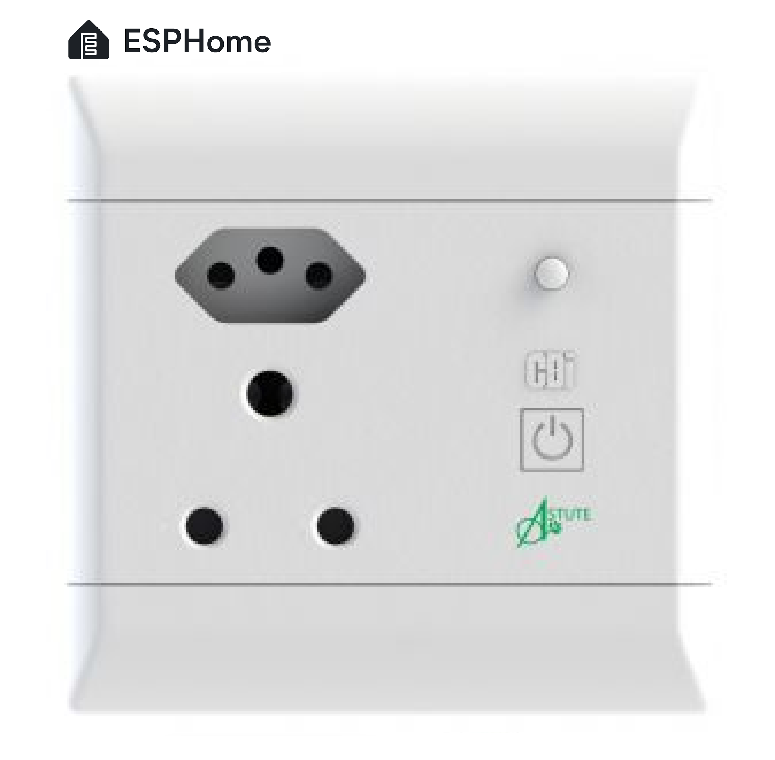
ESPHome Smart Socket (Energy Monitoring) - SmartPad
The CBI Astute Smart Plug (ASP) is an energy monitoring, scheduling and control device with load management and automation capability. This plug's firmware has been replaced with an ESPHome firmware. The ESPHome firmware allows the device to function on its own network away from the cloud.
store.smartpad.co.za