Capped accounts on 40Mbit VDSL (Comparison)

Edit: for those using unotelly, which servers are you using as primary and secondary ?

I switch between the JHB and London DNS servers, but randomly, I've not noticed any difference in performance. I haven't tested it properly, because I was pretty satisfied.

I'm using Afrihost's capped option, 20Mbps line, and noticed it switch back to 240p randomly last night. strange and annoying.
 
I switch between the JHB and London DNS servers, but randomly, I've not noticed any difference in performance. I haven't tested it properly, because I was pretty satisfied.

I'm using Afrihost's capped option, 20Mbps line, and noticed it switch back to 240p randomly last night. strange and annoying.

Thanks - same here.

I find that Unotelly does slow down page requests in browsing, versus having auto assigned or google public DNS.
 
For laughs - here's my Afrihost mobile router (MTN 3G) results from the Thinkbroadband test:

 
Afrihost Capped: 20Mbps line (Can't get higher in my neighbourhood)

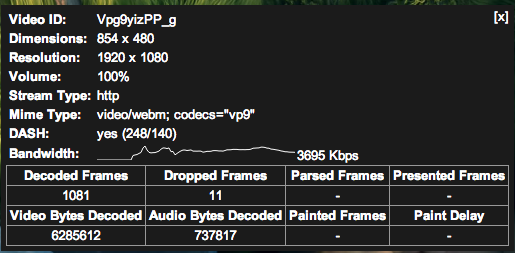
Same video that you tested:

Screen%20Shot%202014-07-11%20at%205.07.58%20PM.png


The traceroute to the same IP:

Code:
 traceroute to 23.42.5.249 (23.42.5.249), 64 hops max, 52 byte packets
 2 mtnbusiness.co.za  6.542 ms  7.039 ms  6.378 ms
 3 za.mtnbusiness.net  8.718 ms  9.659 ms  8.419 ms
 4  rb-cr-1.za--rb-dca-1.za-a.mtnns.net (196.44.0.146)  27.420 ms  8.787 ms  9.169 ms
 5  jh-cr-2.za--rb-cr-1.za-a.mtnns.net (196.44.31.95)  9.854 ms  8.775 ms  12.898 ms
 6  qux-jh-dca-2.za-b.za.mtnbusiness.net (41.181.165.115)  8.686 ms  8.633 ms  8.456 ms
 7  jh-pr-1.za--jh-cr-2.za.mtnns.net (196.44.0.222)  27.585 ms
    196.44.0.72 (196.44.0.72)  9.353 ms
    jh-pr-1.za--jh-cr-2.za.mtnns.net (196.44.0.222)  8.961 ms
 8  41-208-29-125.mtnns.net (41.208.29.125)  9.104 ms  10.620 ms  12.278 ms
 9  csw4-rba-gi8-4.ip.isnet.net (196.26.0.249)  10.331 ms  9.327 ms  9.500 ms
 10  * * *

Which server is that by the way?

Here's one to 8.8.8.8

Code:
traceroute to 8.8.8.8 (8.8.8.8), 64 hops max, 52 byte packets
 2  mtnbusiness.co.za 7.158 ms  6.689 ms  6.801 ms
 3  za.mtnbusiness.net  9.209 ms  8.509 ms  8.946 ms
 4  rb-cr-1.za--rb-dca-1.za-a.mtnns.net (196.44.0.146)  51.281 ms  49.695 ms  25.307 ms
 5  jh-cr-2.za--rb-cr-1.za-a.mtnns.net (196.44.31.95)  9.596 ms  9.586 ms  9.376 ms
 6  qux-jh-dca-2.za-b.za.mtnbusiness.net (41.181.165.115)  9.772 ms  8.865 ms  8.959 ms
 7  rb-ad-1--msbm-rbg-1-a.mtnns.net (209.212.99.13)  193.795 ms  185.916 ms  186.135 ms
 8  209.85.255.76 (209.85.255.76)  197.055 ms * *
 9  209.85.253.94 (209.85.253.94)  198.444 ms
    209.85.245.2 (209.85.245.2)  197.315 ms
    209.85.253.94 (209.85.253.94)  197.426 ms
10  72.14.238.16 (72.14.238.16)  203.160 ms
    72.14.238.18 (72.14.238.18)  192.149 ms
    72.14.232.134 (72.14.232.134)  306.545 ms
11  209.85.250.165 (209.85.250.165)  203.037 ms
    google-public-dns-a.google.com (8.8.8.8)  192.880 ms
    209.85.250.163 (209.85.250.163)  211.768 ms
 
Last edited:
Why? Is Afrihost forcing you to change your bundle or does the bundle deal "expire"? How much will your saving be from 40 -> 20Mbps?

I'm moving and I have to unbundle to move the line, but I cannot get the same price if I re-bundle again.

This is why:

Screenshot%202014-07-11%2017.41.06.png


:(
 
Last edited:
More thoughts but without data (yet):

WebAfrica home capped pro:
+ Good for downloads and streaming video on appleTV and Samsung smarthub apps (hulu, netflix);
+ NNTP works well, full line speed;
- Torrents seem shaped during office hours quite a bit, this includes things like XBMCtorrent and Popcorn Time which use torrent protocols.


Afrihost capped:
+ Also good for downloads and streaming video on appleTV and Samsung smarthub apps (hulu, netflix), but not quite as good or as "instant";
+ solid NNTP downloads (max out line speed);
+ Torrents not shaped like WA above;
- can be a bit slow at random times (IPC capacity).

To early to say for Vox, will do more testing.

IPC capacity was supposedly sorted out at the beginning of the month. Now they are just "testing" the home uncapped and shaping us to oblivion on torrents and http downloads.
 
Checking in this morning for testmy.net using a custom 25meg of random data on 20Mbps VDSL:

AH capped: 5.5Mbps

WA home pro capped: 7.4Mbps

VOX fatpipe: 7.7Mbps

I'm now more interested in collating data that shows performance across a variety of protocols.

Anyone used Glasnost speed test before ? they seem to test a variety of protocols to check for shaping http://broadband.mpi-sws.org/transparency/bttest.php

Will report back later, as I have a suspicion WA shape torrents quite aggressively compared to AH or VOX.
 
Glasnost BitTorrent Speedtest

Web Africa home pro capped
Results for your host (196-215-96-2.dynamic.isadsl.co.za - 196.215.96.2):
Details:
* There is no indication that your ISP rate limits your BitTorrent downloads. In our tests, downloads using control flows achieved up to 11944 Kbps while downloads using BitTorrent achieved up to 10389 Kbps.
* There is no indication that your ISP rate limits downloads on port 6881 or 52495. In our tests, downloads on port 6881 achieved up to 11023 Kbps while downloads on port 52495 achieved up to 10389 Kbps.

VOX fatpipe
Results for your host (dsl-197-245-41-47.voxdsl.co.za - 197.245.41.47):
Details:
* There is no indication that your ISP rate limits your BitTorrent downloads. In our tests, downloads using control flows achieved up to 6032 Kbps while downloads using BitTorrent achieved up to 8350 Kbps.
* The measurement data is too noisy to detect whether your ISP rate limits traffic on port 6881. Re-running the test while ensuring that no other downloads or uploads are running in the background might fix this problem.

Afrihost capped:
Details:
* There is no indication that your ISP rate limits your BitTorrent downloads. In our tests, downloads using control flows achieved up to 4498 Kbps while downloads using BitTorrent achieved up to 4136 Kbps.
* The measurement data is too noisy to detect whether your ISP rate limits traffic on port 6881. Re-running the test while ensuring that no other downloads or uploads are running in the background.

Well call me surprised.

WebAfrica leading the pack, Vox running second, and - no surprise - Afrihost a distant third.
 
And then WebAfrica goes and kills torrents, like I suspected.

2 additional tests and WA cannot resolve the Glasnost BT test:

Are certain ports blocked for all traffic?

2 out of 3 BitTorrent transfers on port 6881 failed to upload any data. It seems like your ISP hinders you from uploading BitTorrent traffic on port 6881 to our test server.

1 out of 3 BitTorrent transfers on port 52597 failed to upload any data. It seems like your ISP hinders you from uploading BitTorrent traffic on port 52597 to our test server.

1 out of 3 BitTorrent transfers on port 52597 failed to download any data. It seems like your ISP hinders you from downloading BitTorrent traffic on port 52597 to our test server.


Is your upload traffic rate limited?

Your ISP appears to rate limit your uploads.
However, some of the measurements were affected by noise, which limits Glasnost ability to detect rate limiting.

Details:
* The measurement data is too noisy to detect whether your ISP rate limits your BitTorrent uploads. Re-running the test while ensuring that no other downloads or uploads are running in the background might fix this problem.

* Your ISP appears to rate limit uploads on port 6881. In our tests, uploads on port 6881 achieved up to 189 Kbps while uploads on port 52597 achieved up to 2 Kbps.
 
Top
Sign up to the MyBroadband newsletter
X