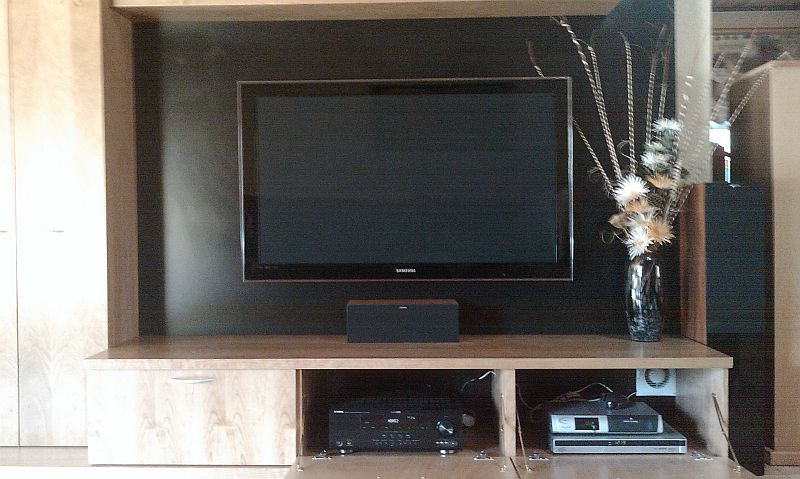
Please crit/advise on HT setup wall unit

Check the height measurements - above the tv would be the wrong place for that speaker imo...

Thats why I said, what evers closer to ear level... on the floor would be too low :) or he could be sitting on bar stools :p
 
Wow, all the hating on the wall units. :D

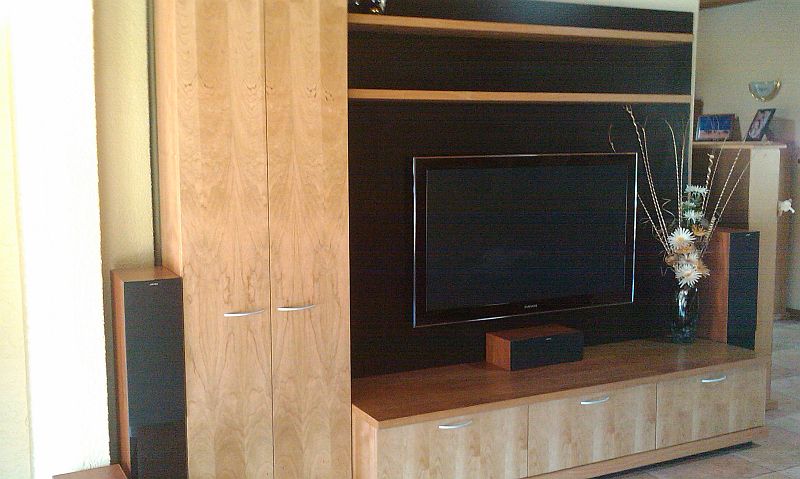
I went with a wall unit - PP here's a link to it for some ideas if you are after something minimal? http://mybroadband.co.za/photos/data/636/IMAGE_018.jpg or http://mybroadband.co.za/photos/data/636/IMAGE_019.jpg

I went with it because I had to cover an indent in my wall which the unit did nicely and imo looks pretty good. Luckily the plant went when my ex did too. She felt like she had to make a contribution - poor thing...:D

How do the PVR & Reciever recieve IR signals? Do you have to have the flaps down when you're watching TV?
 
How do the PVR & Reciever recieve IR signals? Do you have to have the flaps down when you're watching TV?

I have 3 remote extenders installed that protrude just behind the tv so that I can watch with the doors closed. PVR, Receiver and for the BluRay Player...
 
How do the PVR & Reciever recieve IR signals? Do you have to have the flaps down when you're watching TV?

In my case, I use a universal remote with IR transmitter in the cupboard, receives wireless signals (Logitech Harmony)
 
In my case, I use a universal remote with IR transmitter in the cupboard, receives wireless signals (Logitech Harmony)

It's unfortunate that that wouldn't work for me because the components are all in different compartments...
 
It's unfortunate that that wouldn't work for me because the components are all in different compartments...

you get four wires with two IR transmitters on ... the wires are quite long.
 
you get four wires with two IR transmitters on ... the wires are quite long.

Too late now considering all that effort. The wall unit weighs a ton - it took 6 adults to bring the thing in without damaging it. I added cardboard and felt underneath to slide it around but not even that helped...
 
Wow, all the hating on the wall units. :D

I went with a wall unit - PP here's a link to it for some ideas if you are after something minimal? http://mybroadband.co.za/photos/data/636/IMAGE_018.jpg or http://mybroadband.co.za/photos/data/636/IMAGE_019.jpg

I went with it because I had to cover an indent in my wall which the unit did nicely and imo looks pretty good. Luckily the plant went when my ex did too. She felt like she had to make a contribution - poor thing...:D

That is seriously nicely done.

I love the black behind the tv, a sort of on/off contrast effect.
 
I got my TV in November last year and with that, I was also in the market to get a new home entertainment unit for my setup. Since I had a wall unit, I gave it (with my 72cm TV) to my parents and decided to custom design my own one again. This time, I decided on a "plasma" unit. There was nothing in retail that I liked, so going the custom design route was the best option. See below.

This I designed myself and had a furnature manufacturer custom make it for me. Let me go through some of the reasons behind my design choices and I'm hoping that you'll take these opionions into consideration. If you want, I'll be more than happy to give anybody the Google SketchUp! designs.

1) Put your center speaker BELOW your TV! On my previous unit, my center was above my TV and found that the sound just didn't project well at all. Keep it below your TV, but also make sure that you leave enough space to expand. As you can see in the picture, I have left some room to replace the centre with a bigger one.

2) I didn't want to mount my plasma on the wall because mounting it would make it sit too high plus conduat would be visable in which the wiring would run, so that is why my TV is sitting on top of the unit.

3) The plus on my side is that I can go bigger! If I want to go 68 inch in the future, I can do so with ease. Don't restrict your cabinet based on the size of the TV.

4) As you can see, all my components are located on the left and right sides of the center. I have room to move if I want to add more components. On the right, that DVD player will go and will be replaced with a PS3 plus I can add more gear later on. The 1110 decoder has moved to the right above the DVD player and I've put a HD PVR 2P in its place. I can even put a Nintendo Wii next to the center speaker if I wanted to as well.

5) Adjustable shelving! This is a definate MUST !!! Don't permanently fix your shelves based on the size of your components. Allow for flexability.

6) My left and right speakers aren't intergrated into my unit at all. Don't make them part of the unit. Remember that your unit must last you a VERY long time and you'll eventually want to upgrade your speakers and you don't want your unit to hold you back.

7) If you have toddlers, put locks on the doors. Believe me, that is a decision you won't regret!

8) Leave the cabinet open at the back where your components are. Good for airflow.

9) Although not in the photo, I have a indented area behind the center of the cabinet where I keep all cabling and run cables through holes from the left to the right so my cabling is restricted to the cabinet and I barely have wires running along the back. Only speaker wires, DSTV and the HDMI cables from the Mede8er and PVR are seen.

10) I decided on a drawer to store DVDs, etc.

11) Last weekend we put up 2 HUGE photo frames above the TV since we have a double volume ceiling and needed to cut down on the bare well - worked quite well.

I think that's about it. Hope that these help in your design.

http://mybroadband.co.za/vb/album.php?albumid=717&attachmentid=4246

Good luck!
 
I got my TV in November last year and with that, I was also in the market to get a new home entertainment unit for my setup. Since I had a wall unit, I gave it (with my 72cm TV) to my parents and decided to custom design my own one again. This time, I decided on a "plasma" unit. There was nothing in retail that I liked, so going the custom design route was the best option. See below.

This I designed myself and had a furnature manufacturer custom make it for me. Let me go through some of the reasons behind my design choices and I'm hoping that you'll take these opionions into consideration. If you want, I'll be more than happy to give anybody the Google SketchUp! designs.

1) Put your center speaker BELOW your TV! On my previous unit, my center was above my TV and found that the sound just didn't project well at all. Keep it below your TV, but also make sure that you leave enough space to expand. As you can see in the picture, I have left some room to replace the centre with a bigger one.

2) I didn't want to mount my plasma on the wall because mounting it would make it sit too high plus conduat would be visable in which the wiring would run, so that is why my TV is sitting on top of the unit.

3) The plus on my side is that I can go bigger! If I want to go 68 inch in the future, I can do so with ease. Don't restrict your cabinet based on the size of the TV.

4) As you can see, all my components are located on the left and right sides of the center. I have room to move if I want to add more components. On the right, that DVD player will go and will be replaced with a PS3 plus I can add more gear later on. The 1110 decoder has moved to the right above the DVD player and I've put a HD PVR 2P in its place. I can even put a Nintendo Wii next to the center speaker if I wanted to as well.

5) Adjustable shelving! This is a definate MUST !!! Don't permanently fix your shelves based on the size of your components. Allow for flexability.

6) My left and right speakers aren't intergrated into my unit at all. Don't make them part of the unit. Remember that your unit must last you a VERY long time and you'll eventually want to upgrade your speakers and you don't want your unit to hold you back.

7) If you have toddlers, put locks on the doors. Believe me, that is a decision you won't regret!

8) Leave the cabinet open at the back where your components are. Good for airflow.

9) Although not in the photo, I have a indented area behind the center of the cabinet where I keep all cabling and run cables through holes from the left to the right so my cabling is restricted to the cabinet and I barely have wires running along the back. Only speaker wires, DSTV and the HDMI cables from the Mede8er and PVR are seen.

10) I decided on a drawer to store DVDs, etc.

11) Last weekend we put up 2 HUGE photo frames above the TV since we have a double volume ceiling and needed to cut down on the bare well - worked quite well.

I think that's about it. Hope that these help in your design.

http://mybroadband.co.za/vb/album.php?albumid=717&attachmentid=4246

Good luck!

Many thanks for taking the time to write this reply.
 
Sooo, carpenter coming to finalise plans today. :) Got the centre speaker above the components. Won't be able to cut the sides off the unit to allow more space for the speakers, but there will be enough space for them to be angled. Plasma and components sections won't have backs. Oh, and the sub section and probably speakers sections.

Anyone got the dimensions of the silver UEC HD PVR?

The silver UEC HD PVR is the one to get, yes? :confused:
 
I'm actually debating mine with myself :p its bloody noisy. sounds like a PC.

I can check dimensions tonight.
 
Lol. I just don't want cr*p like audio out of sync, which I have read affects some of the HD PVRs.

Anyone else's silver UEC noisy? DJ...?
 
According to the DSTV forums its normal.

The sync issue seem to have gotten a lot better... haven't noticed it in ages.
 
Many thanks for taking the time to write this reply.

You're welcome. Hope the tips will help in your design. It took me quite a long time to really think about many of the features I built into my cabinet. If you're in Cape Town, you're welcome to make a turn to check it out, esp my idea of cable management at the back.

I noticed that your sub is located at the bottom in your cabinet. Just remember that your sub pumps out low frequencies which could possibly cause items in your cabinet to rattle as well as the cabinet itself, esp for those huge explosive moments in movies. My suggestion is to place your sub on the floor in a corner. Keep in mind that such low frequencies aren't directional. Also, there are some subs where the woofer faces downwards and it is better to face into the floor instead of the wood of the cabinet.

But at the end of the day, you need to keep a very long term view on your design so that when you upgrade any of your components that you are able to accomodate them in your existing cabinet.

One thing I can say is that the astetics committee (your wife, girlfriend, etc) will be very happy with your design because now they can fill thsoe shelves and the top with photos, plants, etc. Needless to say, that is one thing that my wife dearly misses. hehehehe.

Regarding the PVR, the silver UEC is a good option, but if you don't need 2 record watch 1, then geet the 2P instead .. R1k cheaper and I found that I've so far never needed to record 2 different channels at the same time.
 
Lol. I just don't want cr*p like audio out of sync, which I have read affects some of the HD PVRs.

Anyone else's silver UEC noisy? DJ...?
Mine is a little noisy, yes. But the new ones don't have On Demand functionality so I'm not interested in getting one of them. BTW, the audio sync issues can be easily resolved in the HD PVR - there is a function to fix the timing of audio in the setting options...
 
Top
Sign up to the MyBroadband newsletter
X