
WhatsApp free data SIM tested

Roaming-focused operator Zeromobile recently launched a product it called “WhatSIM”, which was set to offer unlimited WhatsApp messaging anywhere in the world for a flat annual fee of €10.
MyBroadband ordered a number of the SIMs from Zeromobile when it launched, and after weeks of waiting received them and put the product through its paces.
Between the launch and receiving the SIMs at the beginning of March, WhatSIM was renamed to ChatSim and received improvements to its feature-set.
No longer limited to WhatsApp, ChatSim offered free messages across all instant messaging services, including WhatsApp, Telegram, Facebook Messenger, WeChat, Skype, Viber, Line, Google Hangouts, iMessage, and QQ.
ChatSim’s usefulness, though, must be based on the quality of the roaming service it provides.
In terms of coverage in South Africa, ChatSim is off to a promising start as it roams on the Vodacom network.
However, it soon emerged the performance of the ChatSim data roaming service does not compare favourably to Vodacom’s mobile data network.
Initial set-up

ChatSim activation via the web portal
The first step in testing ChatSim was to get it working.
Before you start using ChatSim you have to login to the service’s web portal and activate the SIM.
Your phone must also be configured to connect to the correct access point name (APN) and allow data roaming. ChatSim provides easy instructions to do this.
Once we registered, activated, and configured the SIM, however, it was hardly smooth sailing.
We wanted to know: if all you have is a ChatSim, would it be possible to switch out your SIM and reconfigure WhatsApp without access to Wi-Fi?
To which the answer is: with great difficulty.
Boxing with APN settings

ChatSim tested on iPhone
Our first tests were conducted on an iPhone. After retrying the SMS verification numerous times, killing WhatsApp and restarting it, and switching the phone into Airplane mode and back out again, it finally registered a new WhatsApp profile for the ChatSim number.
After WhatsApp was configured, messaging worked without a hitch.
We then decided to switch to an Android device to try a WhatsApp voice call.
We also wanted to conduct the same messaging tests as on the iPhone.
As the Android device we used for testing had not been switched on in a while, it received a number of push notifications and downloaded a few hundred kilobytes of Gmail messages, Facebook updates, and miscellaneous data categorised as “Android OS” and “Google Service”.
In total, the Android device consumed around 2.5MB of non-IM data.
Somewhere in the middle of using this 2.5MB, ChatSim sent a warning saying it had detected abnormal data traffic on the SIM and would block it if the usage continued.
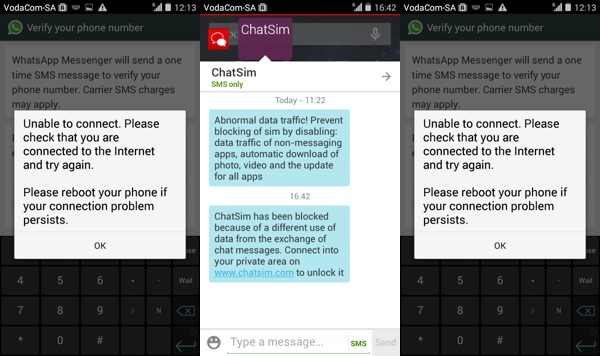
ChatSim chat APN connectivity issues on Android
From that point it simply refused to co-operate. WhatsApp would also not send the verification SMS needed to complete its setup.
It is worth noting that ChatSim offers three different APNs depending on the type of service you would like to use:
- send.ee: for normal ChatSim users.
- chat: for ChatSim Plus users who wish to block all non-IM protocols.
- apn: for ChatSim Plus users who would still like to use non-IM apps on their phone by paying an additional recharge fee.
Eventually after messing around with the APN settings, ChatSim sent an e-mail to let us know that the SIM had been blocked, and instructions for what we needed to do to unblock it.
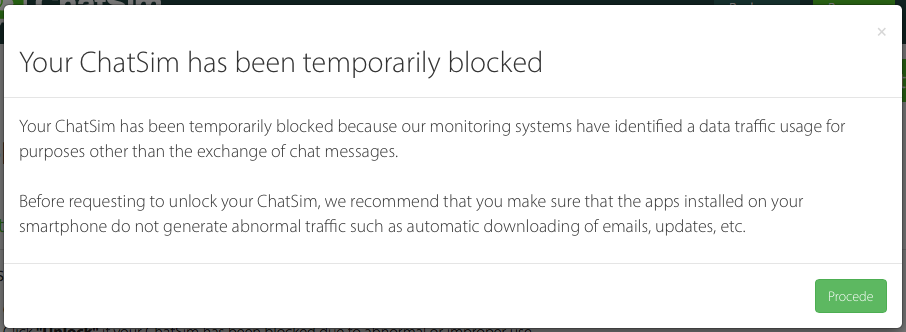
ChatSIM blocked
It also offered the following advice.
To prevent blocking your ChatSim we recommend:
- Avoid exchanging multimedia messages or uses other than receiving and/or sending text messages and emoticons.
- Deactivate the automatic download of photos and videos in messaging apps.
- Deactivate the automatic update of all apps on your device.
- Deactivate data traffic for all “non-messaging” apps.
Once the SIM had been unblocked, WhatsApp finally managed to get its validation SMS through.
It would seem the chat APN allows “abnormal” traffic”, though, despite ChatSim saying it is meant for users who wish to block non-messaging data.
Messaging with ChatSim

ChatSim working on Android after being blocked and unblocked
Although the focus was testing ChatSim’s WhatsApp capabilities, we also tested Telegram and Google Hangouts, both of which worked as well as WhatsApp did.
Sadly, WhatsApp did not work very well at all.
Regardless of whether it was on the “chat” or “apn” APN, the data connection dropped entirely at times, with messages neither coming in nor delivering.
The SIM would sporadically reconnect to the network, exchange all the queued up messages in a batch, stay online for awhile during which time it was able to send and receive with much less latency, and then fall off the network again.
As for the WhatsApp voice call: we got it to ring on our ChatSim device, but it was clear the network latency was far too high for a voice over IP call to be held.
For those who are used to and expect near-instantaneous message delivery all the time, this may not be the best solution for your overseas travelling needs.
However, for €10 per year, slightly slower message delivery and struggling a bit with background data consumption may be worth the price.
More WhatsApp and ChatSim news
WhatSim: free WhatsApp chat anywhere in the world
WhatsApp killing SMS, but too early for funeral arrangements
WhatsApp voice calling is here for Android
Free WhatsApp on Cell C – will it work for voice?


 Loading ...