
iPhone 4S versus Galaxy Nexus

With the iPhone 4S having been available in South Africa for a few months and the local launch of the Galaxy Nexus drawing near, the inevitable question of which device is better is being debated.
As fun as a head-to-head comparison is, there is simply no way to claim that one device is better without personal preference factoring in.
The specs
One could look at the specifications of the devices and say that the Galaxy Nexus has the faster processor and more RAM, while the iPhone 4S has more pixels on its camera.
Unfortunately, a simple comparison of specifications tells us almost nothing of value. Even in the case of the processor, camera, or display, more isn’t necessarily better.
Faster processors and higher resolution displays typically translate to a greater burden on the battery, and in some cases a camera with a higher pixel count can actually result in worse pictures.
That said, it would be remiss to exclude the specifications from a comparison.
| iPhone 4S | Galaxy Nexus | |
| Maker | Apple | Samsung/Google |
| Display | 3.5″ Retina (640×960) LED IPS | 4.65″ 720p HD (720×1280) Super AMOLED |
| Camera, primary | 8MP | 5MP |
| Camera, secondary | VGA | 1.3MP |
| Storage, internal | 16/32/64GB | 16GB |
| Storage, expandable | No | No |
| RAM | 512MB | 1GB |
| Processor | 800MHz Apple A5 (dual-core ARM Cortex A9, underclocked 1GHz) | 1.2GHz TI OMAP 4460 (dual core ARM Cortex-A9) |
| Graphics | PowerVR SGX543MP2 GPU | PowerVR SGX540 @ 384 MHz |
| Cellular data | “World phone” (HSPA+CDMA) | HSPA+ |
| Battery | 1430mAh / 5.254Whr | 1750mAh / 6.475Whr (standard) |
| SIM type | Micro SIM | Mini SIM |
With that out of the way, let’s get to what’s really important, beginning with the superficial.
Lovely to look at, lovely to hold…
The iPhone is somewhat smaller but a little heavier than the Galaxy Nexus and neither device feels awkward in the hand or pocket. Where size does make a difference is in the display, with the Nexus boasting a significantly larger screen than the iPhone 4S.
Both devices have their volume rockers on the left and cable connectors along the bottom.
While the top edge of the Galaxy Nexus is bare, Apple elects to put the headset jack and power button of the iPhone there.
As with other Samsung-made Android devices, the Nexus’ power button sits on the right edge where either your right thumb or left index finger would naturally find themselves, depending on with which hand you hold the device.
The headset jack of the Galaxy Nexus, on the other hand, is on the bottom edge next to the micro USB plug. This has attracted criticism in some reviews, but makes perfect sense when pocketing your phone as it naturally sits in hand without re-orienting it first.

iPhone 4S vs Galaxy Nexus
One hardware feature the iPhone 4S offers that I missed on the Galaxy Nexus was the switch at the top of the left edge that can be configured to either mute the ringer or lock the screen orientation.
The iPhone’s volume+ button also doubles as an optional hardware trigger for the camera, but is rendered useless by the cover my paranoia requires I use to protect the fragile glass that covers the back of the device.
Using a volume button for the shutter comes across as poorly tacked on, especially when you consider that the camera sits in the top right corner of the device. This results in your fingers constantly getting in the way unless you hold the phone in a very specific, and precarious, way.
Along the right of the iPhone you’ll find nothing but the micro SIM tray which you can only open with the aid of a pin.
The Nexus opted for a more straight-forward removable back cover behind which the mini SIM slot can be found.
Though some may find the wafer thin backplate a little flimsy, it does allow for the Galaxy Nexus to have a removable battery.

iPhone 4S vs Galaxy Nexus - left
Battery life
Which brings us to battery life – a difficult topic for these devices since both have had numerous reports of problems in this area.
However, I’ve had no problems with battery life on the iPhone 4S. The issue seems to be related to a glitch in synchronising your contacts with iCloud – something I don’t do.
The reports of poor battery life on the Galaxy Nexus usually involve the LTE-capable model available on the Verizon network in the United States. It seems the device loses its connection to the LTE network and then drains the battery.
I’ve seen similar but less pronounced behaviour on MTN in an HSPA+ Galaxy Nexus. When the device goes outside 3G coverage, or the high speed connection is dropped for whatever reason, the battery charge graph takes a nose dive.
It is worth noting that MTN will not be offering the Galaxy Nexus on its network, though it will be sold by Vodacom, Cell C, and 8ta, with Virgin Mobile bringing in a limited number.

Galaxy Nexus with back cover removed
Getting around
All the processing power and battery life in the world isn’t worth much if the user experience isn’t up to par.
Apple’s simple and responsive user interface has received much praise and not much has changed in the iPhone 4S. As a commenter so eloquently put previously: “It’s a grid of icons. How do you mess that up?”
The iPhone 4S does offer a new natural language command assistant called Siri. Though Siri’s voice recognition and interpretation are advanced, in countries like South Africa it is limited.
For example, Siri can set a reminder for you to do something after you leave home or work, or at a specific time, but it can’t find the nearest petrol station. This is because Siri’s location services only work for a small number of countries right now.
The Galaxy Nexus sports a user interface that is fairly typical for Android: three buttons along the bottom of the device – capacitive and not physical in this case, a number (5) of home screens, and a customisable dock bar that is shown on every home screen.
Where the iPhone focuses on simplicity, the Nexus prefers customisability. Each home screen can contain any combinations of widgets, app launcher icons, or groups/folders of icons. Home screens are also 4×4 grids, though widgets can span multiple squares.
Unlike the iPhone 4S, the Galaxy Nexus lets you create a folder of icons on the dock bar.
Also unlike the iPhone 4S, there is a perceptible delay when you press any of the three capacitive buttons. The “Back” and “Home” buttons don’t exhibit as much latency as the “Recents” button, but neither button responds as quickly as they should.
It is understood that the delay in opening the recently used app list when the “Recents” button is pressed is a known issue that is being looked into.

iPhone 4S vs Galaxy Nexus - rear
Camera
From a pure hardware and pure software comparison we move to looking at the cameras of the two devices.
The quality of a smartphone’s camera is a function of not just the hardware, but the software as well.
Obviously no amount of software can compensate for a poor lens and sensor, but poor software may not make the most effective use of the camera hardware.
Subjectively, the iPhone’s camera inches ahead of the shooter on the Galaxy Nexus, offering better-looking shots more consistently.
Full HD (1080p) videos recorded with the iPhone 4S also feel smoother than those shot with the Nexus. I wouldn’t recommend that you record your favourite song at a concert with either device, however.
Though the camera on the iPhone generally performs better than that of the Galaxy Nexus, the Android flagship’s shooter certainly doesn’t disappoint.
In addition to taking great shots most of the time, the camera on the Nexus also has no shutter lag. You can take pictures as fast as you can touch the shutter button.
Another much-toted feature of the Galaxy Nexus camera is its panorama mode which lets you take an ultra wide-angle shot by automatically stitching a series of photos together.
With the Galaxy Nexus it doesn’t even look like you’re taking multiple photos, however. You just slowly pan the camera from the start point of the photo to the end and it creates the photo.
While it’s great that this feature comes built into the camera app on the Galaxy Nexus, the iPhone can get similar functionality through third-party applications. Some of these apps are free, such as Microsoft’s Photosynth, while others like Darmendar Panorama and 360 Panorama sell for $1 or $2 (USD).
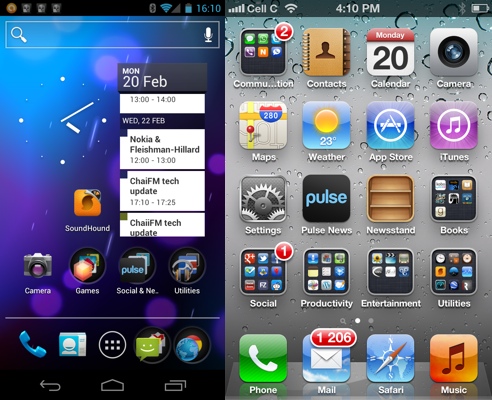
Android 4.0 Ice Cream Sandwich versus iOS5
Ecosystems
Which brings us to another hotly debated platform issue: Apple App Store versus Google Android Market.
The latest round of statistics indicates that Apple is still ahead in app volume, at over 500,000 apps in the App Store, with Google hitting the 400,000 mark in January 2012 according to Distomo. App Brain pegs the number of Android apps in Google’s market at 386,851, slightly lower than Distomo’s findings.
All these numbers really show is that both Apple and Google have significant app stores. Both platforms enjoy certain exclusives, with the more popular apps such as Facebook, Twitter, Dropbox, Evernote, and Skype available on both Android and iOS.
Where Android devices like the Galaxy Nexus offer tight integration with Google services such as Contacts, Calendar, and Photos, Apple offers iCloud.
The biggest difference between the cloud services offered by Google and Apple is that many of Google’s web applications can actually be made to sync to the iPhone. The reverse is not true.
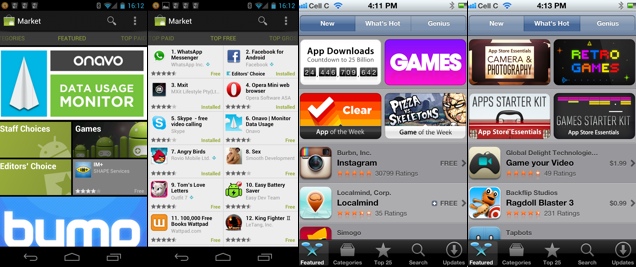
Google Android Market versus Apple App Store
So which is best already?
No head-to-head comparison is complete without a pronouncement of superiority. Most unsatisfactorily, the answer to the question of which device is best is: it depends.
Both the iPhone 4S and the Galaxy Nexus are fantastic and yet neither is perfect. You have to decide for yourself which trade-offs you’re willing to make and hopefully this novella of an article has helped enable you to do so.
That said, I won’t leave you high and dry. The Galaxy Nexus is best. Why? Because it’s the first Android device that has the BlackBerry loyalists in the MyBroadband office considering a switch to a different platform.
No iPhone has ever been able to do that.
Related articles





 Loading ...