GFX Signal mystery

HavocXphere

Honorary Master
Joined
Oct 19, 2007
Messages
33,153
Reaction score
1,297
Location
Europe
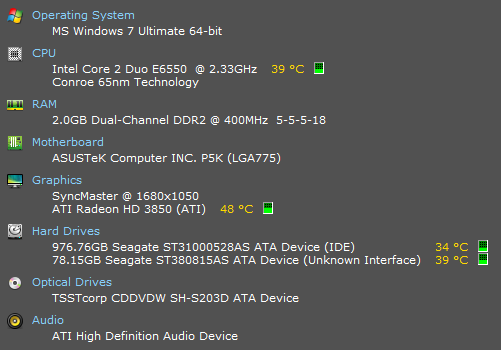
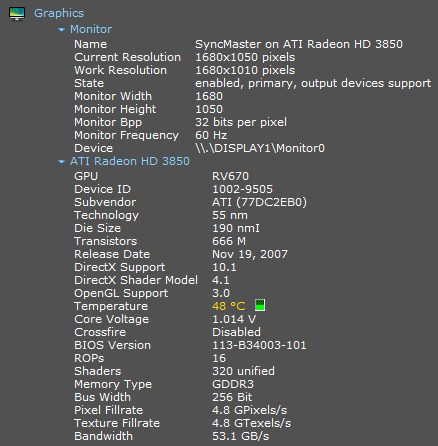
My PC is working perfectly...except that the monitor gets no GFX signal...from boot until the W7 login screen. So obviously the radeon driver is fixing something when it initializes.

I haven't been paying attention to when it started, but I think maybe 3 days ago and it might coincide with a radeon driver update .10 -> .12. Maybe.

I'm suspect some setting flipped in the BIOS but I don't know how to check without being able to see anything?:confused:

Any ideas on how to proceed?
Thanks

PC1.PNG

PC2.PNG
http://mybroadband.co.za/photos/data/500/PC1.PNG
http://mybroadband.co.za/photos/data/500/PC2.PNG
 
Have you tried updating the BIOS through ASUS update or whatever it was ASUS' Windows update utility was called? Granted, doing so will reset all your BIOS setting to factory defaults resulting in any tweaks you may have made being reset. Alternatively, have you tried entering BIOS blindly (as in, guessing when the opportunity arises during POST) and seeing if a switch doesn't flip (that it might just take a while for the monitor to find a signal)?

And, last thing I can think of--is your monitor set to automatically find signal or is it manually set to receive signal from DVI?

I'm curious--what program did you use for the system info?
 
Have you tried updating the BIOS through ASUS update or whatever it was ASUS' Windows update utility was called?Granted, doing so will reset all your BIOS setting to factory defaults resulting in any tweaks you may have made being reset.
Thats an option I guess. Kinda reluctant to go that route though. It'll reset boot device etc and if it doesn't fix the problem then I've got no bios *and* no usable OS.

Alternatively, have you tried entering BIOS blindly (as in, guessing when the opportunity arises during POST) and seeing if a switch doesn't flip (that it might just take a while for the monitor to find a signal)?
Worth a shot.

And, last thing I can think of--is your monitor set to automatically find signal or is it manually set to receive signal from DVI?
Just changed it to manual.

I'm curious--what program did you use for the system info?
Speccy from Piriform screenshot'd...same co that made cccleaner.

Gonna see if anything changed. brb
 
Hmm that was easy. Either the manual signal detection or disabling "Alternate DVI operational mode" in CCC fixed it.

Anyway thanks Lycan
 
Speccy from Piriform screenshot'd...same co that made cccleaner.

Snazzy, thanks :) And that's CCleaner, one C :o Bloody ATi fanbois and their triple-Cs :p

I'm quite partial to Everest but it's terribly bloated for just a simple info sheet :p

Hmm that was easy. Either the manual signal detection or disabling "Alternate DVI operational mode" in CCC fixed it.

Anyway thanks Lycan

I'm glad you sorted it! I keep my monitor on manual signal detection too (irritates the bejebus out of me when it spends half the day looking for a signal that's RIGHT THERE) and it's simpler just manually switching to another input it when the need arises.
 
Yep. Now I'm just holding thumbs that it stays fixed when I do a cold boot tomorrow. Should be fine.

Yeah..Speccy is cool. I wish it had a button to automate the screenshotting step.
 
Yep. Now I'm just holding thumbs that it stays fixed when I do a cold boot tomorrow. Should be fine.
Its not.

Same thing on every cold boot. I should probably also mention that the PC doesn't get any juice when its off (Switching off UPS at night)...might be related to this. Hmmm...maybe CMOS batt is the problem...gonna test that.

Any other ideas?
 
Random thought does it revert to automatic signal detection after the UPS has been turned off?
If you have another screen test it with that one to rule out a monitor problem
 
Random thought does it revert to automatic signal detection after the UPS has been turned off?
Still on manual.

If you have another screen test it with that one to rule out a monitor problem
Yeah I've got a screen. Just discovered though that I can't reproduce it easily. i.e. It only causes trouble if its disconnected for a while. Disconnect & reconnect doesn't reproduce it. :/

I've bypassed the UPS now. I'll test the screen after that. Time for some systematic troubleshooting. :)
 
Top
Sign up to the MyBroadband newsletter
X