So after buying the ATI 6970 I found longing for the quiet, cooled environment I had with my ATI 5850.
The 6970 is a monster card sure, but it runs hotter than the sun and louder than passenger jet plan.
My idle temps sat around the 65 degree mark with 2 monitors plugged in and around 48 - 55 with a single monitor. Personally I don't think these are healthy temps if you want your card to last.
Load temps were pretty high at times sometimes going up to around 90 degrees.
So after taking the card apart and applying some fresh aftermarket thermal paste I still hadn't noticed a difference in the temps.
I decided to go for this: http://www.arctic.ac/en/p/cooling/vga/376/accelero-xtreme-plus-ii.html
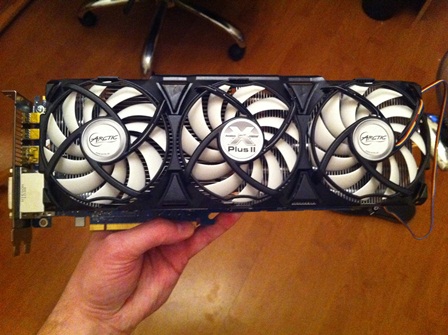
I ridiculously overkill 3 fan, 5 pipe GPU cooler. Here is what I think about it:
What’s in the box:
You obviously get the cooler which comprises of a large heat sink with 5 copper heat pipes. On top are the 3 fans.
You also get a variety of heat sinks which are then "glued" to the ram modules on your card. The cooler is designed for a number of different cards including NVidia and ATI cards.
Best check if you card is compatible before you buy though, I have read of a very unhappy guys who didn't do their homework.
Installation
After reading a number of reviews for the Accelero the general consensus was that it was really easy to install. I wouldn’t say it was THAT easy, but it is also not rocket science.
I found the installation guide a little confusing at times, but then again I had had 3 beers by the time I got to the installation
The first step is to clean all RAM modules, and apparently this is paramount in ensuring that the heat sinks bind to the modules properly.
You then have 2 sachets of thermal glue which you need to mix together for 5 minutes and you then only have 15 minutes in which to apply the paste.
Applying the paste and gluing the heat sinks on was pretty straight forward, no rocket science degree needed.
After that is all done you have to leave the card to allow the thermal glue to "set". The guide indicates 5 hours but some reviews say 1 hour is enough. Personally after 1 hour my heat sinks were still fairly loose and the thermal glue still looked wet so I left mine overnight. By the next morning it was good to go.
Installing the heat sink also is not too much of a mission. There however spacers that you need to apply to the bracket which I found a mission as the double sided tap they give you is near impossible to peel off, just plain stupid.
Once screwed on that’s it. You have the option of plugging in the fans directly to the PSU or to the fan slot on the VGA card. I just stuck it onto the card.
Performance:
Right off the bat my temps had dropped significantly. I was now idling in the 30's. Around 35 was the norm. And that was with the fan speed on auto which was at around 24%.
As the ambient temp in my room went up it did get a little warmer and idled around 40.
Load temps had dropped by a staggering 30+ degrees. Normal load temps were around 85 - 90 and were now between 48 - 53. Massive difference.
But where this cooler really shines are the fans. They are near DEAD silent. I even pumped the fans up to 100% and seriously you can hardly hear them. That is what makes this card a winner for me.
Conclusion:
This is a super cooler; it really does do what it was designed for.
If you have a top end card and are unhappy with the temps I would highly recommend one of these puppies. Besides from dropping the temps significantly from the get go, it also has 3 x 2000RPM fans that run almost silently at full tilt. I can't stand a noisy rig so the stock standard 6970 cooler was just not an option.
There is only 1 con I have with this cooler and that is the price. It is damn expensive coming in at around R700. But as they say, you get what you pay for.
Pros:
Drops temps by a significantly amount compared to stock VGA coolers
Fairly easy to install
The 3 fans run almost silently even @ 100%
Cons:
Installation guide a bit confusing at points (may have just been the beer though)
Price! Its really expensive, but well worth it in my opinion.
The 6970 is a monster card sure, but it runs hotter than the sun and louder than passenger jet plan.
My idle temps sat around the 65 degree mark with 2 monitors plugged in and around 48 - 55 with a single monitor. Personally I don't think these are healthy temps if you want your card to last.
Load temps were pretty high at times sometimes going up to around 90 degrees.
So after taking the card apart and applying some fresh aftermarket thermal paste I still hadn't noticed a difference in the temps.
I decided to go for this: http://www.arctic.ac/en/p/cooling/vga/376/accelero-xtreme-plus-ii.html
I ridiculously overkill 3 fan, 5 pipe GPU cooler. Here is what I think about it:
What’s in the box:
You obviously get the cooler which comprises of a large heat sink with 5 copper heat pipes. On top are the 3 fans.
You also get a variety of heat sinks which are then "glued" to the ram modules on your card. The cooler is designed for a number of different cards including NVidia and ATI cards.
Best check if you card is compatible before you buy though, I have read of a very unhappy guys who didn't do their homework.
Installation
After reading a number of reviews for the Accelero the general consensus was that it was really easy to install. I wouldn’t say it was THAT easy, but it is also not rocket science.
I found the installation guide a little confusing at times, but then again I had had 3 beers by the time I got to the installation
The first step is to clean all RAM modules, and apparently this is paramount in ensuring that the heat sinks bind to the modules properly.
You then have 2 sachets of thermal glue which you need to mix together for 5 minutes and you then only have 15 minutes in which to apply the paste.
Applying the paste and gluing the heat sinks on was pretty straight forward, no rocket science degree needed.
After that is all done you have to leave the card to allow the thermal glue to "set". The guide indicates 5 hours but some reviews say 1 hour is enough. Personally after 1 hour my heat sinks were still fairly loose and the thermal glue still looked wet so I left mine overnight. By the next morning it was good to go.
Installing the heat sink also is not too much of a mission. There however spacers that you need to apply to the bracket which I found a mission as the double sided tap they give you is near impossible to peel off, just plain stupid.
Once screwed on that’s it. You have the option of plugging in the fans directly to the PSU or to the fan slot on the VGA card. I just stuck it onto the card.
Performance:
Right off the bat my temps had dropped significantly. I was now idling in the 30's. Around 35 was the norm. And that was with the fan speed on auto which was at around 24%.
As the ambient temp in my room went up it did get a little warmer and idled around 40.
Load temps had dropped by a staggering 30+ degrees. Normal load temps were around 85 - 90 and were now between 48 - 53. Massive difference.
But where this cooler really shines are the fans. They are near DEAD silent. I even pumped the fans up to 100% and seriously you can hardly hear them. That is what makes this card a winner for me.
Conclusion:
This is a super cooler; it really does do what it was designed for.
If you have a top end card and are unhappy with the temps I would highly recommend one of these puppies. Besides from dropping the temps significantly from the get go, it also has 3 x 2000RPM fans that run almost silently at full tilt. I can't stand a noisy rig so the stock standard 6970 cooler was just not an option.
There is only 1 con I have with this cooler and that is the price. It is damn expensive coming in at around R700. But as they say, you get what you pay for.
Pros:
Drops temps by a significantly amount compared to stock VGA coolers
Fairly easy to install
The 3 fans run almost silently even @ 100%
Cons:
Installation guide a bit confusing at points (may have just been the beer though)
Price! Its really expensive, but well worth it in my opinion.