-
- News
-
Categories
- 5G
- ADSL
- AI
- Banking
- Black Friday
- Broadband
- Broadcasting
- Business
- Business Telecoms
- Cellular
- Cloud and Hosting
- Columns
- Cryptocurrency
- Energy
- Enterprise
- Fibre
- Gadgets
- Gaming
- Government
- Hardware
- Industry News
- Internet
- Internet of Things
- Investing
- IT Services
- Motoring
- Reviews
- Science
- Security
- Smartphones
- Software
- Technology
- Telecoms
- Trending
- Wireless
- Press Office
- Forum
- Industry News
- Features
- Company hub
- Speed Test
- About us
- Advertise with us
- Contact
- Careers


-
Join the MyBroadband community
South Africa’s biggest forum. Discuss, discover, and connect with thousands of members.
-
Question of the Day: What's the most interesting small town you've visited in South Africa?

You are using an out of date browser. It may not display this or other websites correctly.
You should upgrade or use an alternative browser.
You should upgrade or use an alternative browser.
Home Automation - Siemens Logo
- Thread starter DuncanCT
- Start date

kang
Senior Member
Here you go

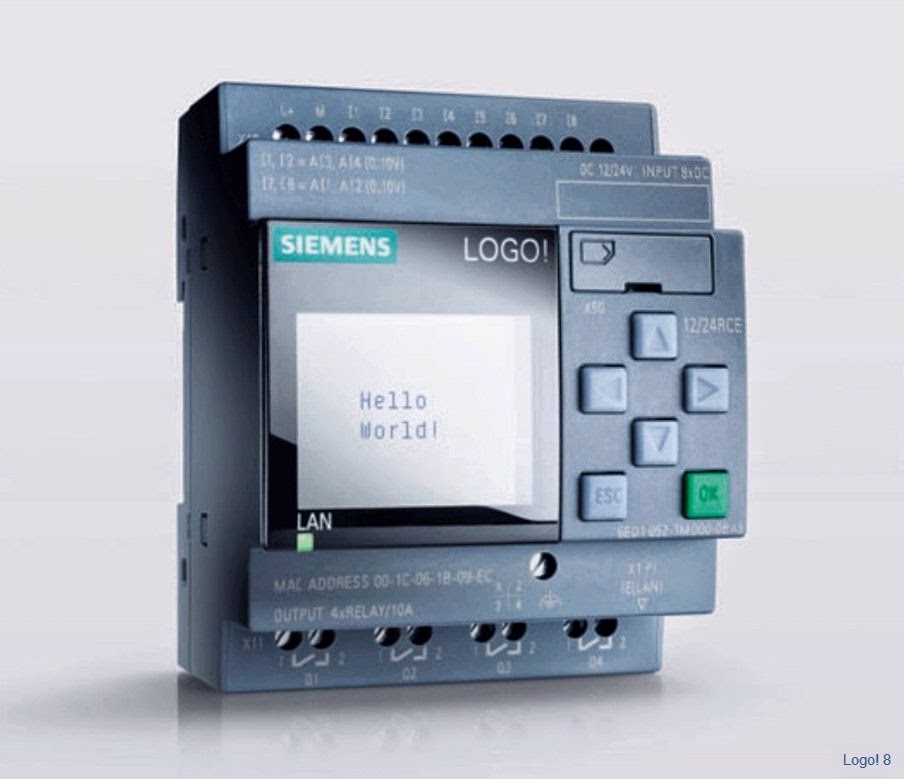

It looks pretty cool but this is the first time I've seen it are you looking for information on only the above product?
Is this for a hobby project or what are you planning? You can also achieve the same with an arduino and a relay board.
Is this for a hobby project or what are you planning? You can also achieve the same with an arduino and a relay board.
Just looking to do basic home automation lights, garage door, etc. Nothing too fancy or complicated.
I have messed around with an Arduino but I don't have any extensive knowledge of coding.
This looks like it could would work and isn't massively expensive. Just triying to find somone who has used it in any application who has any suggestions.
I have messed around with an Arduino but I don't have any extensive knowledge of coding.
This looks like it could would work and isn't massively expensive. Just triying to find somone who has used it in any application who has any suggestions.
Have you considered some of the home automation applications out there? There are a few hardware options for instance x10, Phillips hue, Z-Wave, etc and then you can control them through various sources.
The LOGO! is more for automating your mini brewery or some such I think devices that interface over the power lines will be better if you want to do the odd device and light there are a few applications for example:
http://www.homegenie.it/docs/index.php
http://misterhouse.sourceforge.net/
The LOGO! is more for automating your mini brewery or some such I think devices that interface over the power lines will be better if you want to do the odd device and light there are a few applications for example:
http://www.homegenie.it/docs/index.php
http://misterhouse.sourceforge.net/
Last edited:
CraZee
Well-Known Member
Does anyone have suggestions or advice on the above topic?
What information are you looking for?
The logo is a robust little PLC with a very easy to user programming tool (Drag and Drop)
As with any PLC there are addons that you would need depending on your requirements - digital, analog...
What information are you looking for?
The logo is a robust little PLC with a very easy to user programming tool (Drag and Drop)
As with any PLC there are addons that you would need depending on your requirements - digital, analog...
We're busy doing renovations at the moment and the electrician is just about to chase new conduit for switches and plug point. How would the light switches be wired? Would they be low voltage signal or mains? Are voltage drops going to be a problem if using low voltage signals?
That would be the starting point for my learning curve.

Seriously
Honorary Master
- Joined
- Nov 29, 2012
- Messages
- 16,595
- Reaction score
- 220
We're busy doing renovations at the moment and the electrician is just about to chase new conduit for switches and plug point. How would the light switches be wired? Would they be low voltage signal or mains? Are voltage drops going to be a problem if using low voltage signals?
That would be the starting point for my learning curve.
To use any of the modern electric control gadgets the electrician will have to wire both a live and a neutral to the switches for proper operation whereas normally they only wire a live line to the switch boxes. Also make sure they install the larger switch boxes leaving ample space for electronics inside. Let them also install boxes at key point for functional devices and connections for instance plug boxes with usb, tv, HDMI, etc connections. Ceiling boxes with plug connections for lights fans and possible projectors are also handy. Remember you need a automation wiring harness or bus throughout the home and the existing or new power wiring is a suitable transport medium for control signals and power. It also does not harm installing the larger 20-25mm conduit as later once the bug have bitten you well you may want to pull in extra wires for gadgets or functions.
Last edited:
Seriously
Honorary Master
- Joined
- Nov 29, 2012
- Messages
- 16,595
- Reaction score
- 220
What information are you looking for?
The logo is a robust little PLC with a very easy to user programming tool (Drag and Drop)
As with any PLC there are addons that you would need depending on your requirements - digital, analog...
The LOGO is everything but a PLC. It's rather an intelligent programmable relay.

The logo is not designed for home automation per se' but can be used but IMHO too expensive for the task at hand. Rather get real home automation hardware designed for the application in mind.
Even Google is getting on the bandwagon I can be sure that that means great things in cobination with Android devices.
https://www.google.co.za/search?q=g...=X&ei=b6ZXVM_uAoXjO83XgIgC&sqi=2&ved=0CC4QqAI
http://www.theverge.com/2014/7/15/5900893/wireless-protocol-standard-nest-thread-group
http://www.theaustralian.com.au/exe...106358750?nk=dba34bb74b7bbd359d499c0af3aaaf68
Last edited:
To use any of the modern electric control gadgets the electrician will have to wire both a live and a neutral to the switches for proper operation whereas normally they only wire a live line to the switch boxes.
Could you wire push button switches with low voltage comms wire back to the Logo?
Seriously
Honorary Master
- Joined
- Nov 29, 2012
- Messages
- 16,595
- Reaction score
- 220
Could you wire push button switches with low voltage comms wire back to the Logo?
Yes you can but doing it that hardwired primitive way will be proprietary and requiring lots of wiring and really is not the recommended way. Modern technology requires the recommended methodology using bus systems, single wire over existing electricity or other, for data communication to various intelligent automation devices. If you want to use the logo you can still interface the logo input and output switches with such same technology as well. You will miss the opportunity of features like controlling devices with a remote or remote application on a android phone or via the internet if you just harwire a PLC for instance. If you are serious about home automation study the options before you dive in. As for the electrician follow my advise given as large conduit to various key points in the home will be making your home automation endeavours easier as you plan and change your system. also its not wise to use electrical wire and control signals in the same pipe or conduit as it may lead to interference issues. So either decide to use the existing electrical wire system as there is already technology for it or separate conduits for the home automation wiring with the electrical wires in metal pipe where its to close to automation wiring or use screened automation wiring.
CraZee
Well-Known Member
Could you wire push button switches with low voltage comms wire back to the Logo?
You could do this, but whats the point?
If for example your LOGO is sitting in your DB then you need to run a cable for the light AND a push button back to the LOGO.
What exactly are you trying to achieve, perhaps I can help.
I run Control4 at home and it works a treat. Never have to reboot and have had 0 issues. Runs my lights, alarm, media, multizone plus can do a hec of a lot more.
Has IOS as well as Android app as well as PC/Mac app.
Kids (7&11) both know how to navigate.
The only snag is that you have to have an "installer" set it up which will cost. Fortunately I have an installer licence as well as the software so can tinker as needed.
EG, my passive in the kitchen is set to turn on after 11PM and dim to 50% if it senses motion. After 5 mins of no motion it switches off. This is for the kids who are needing some water or something and they dont have to worry about switching lights on and off.
I get notified via Prowl/Growl app whenever my alarm is set, deactivated or activated. Bust my maid once. Got an armed notification and phoned to see what was up. She had gone out.
Media is controlled by XBMC via Control4. My HP server running MyMovies rips all media and then notifies XBMC.
The system is totally expandable depending on budget off course. We did a 1mill installation for a customer a few years back.
Has IOS as well as Android app as well as PC/Mac app.
Kids (7&11) both know how to navigate.
The only snag is that you have to have an "installer" set it up which will cost. Fortunately I have an installer licence as well as the software so can tinker as needed.
EG, my passive in the kitchen is set to turn on after 11PM and dim to 50% if it senses motion. After 5 mins of no motion it switches off. This is for the kids who are needing some water or something and they dont have to worry about switching lights on and off.
I get notified via Prowl/Growl app whenever my alarm is set, deactivated or activated. Bust my maid once. Got an armed notification and phoned to see what was up. She had gone out.
Media is controlled by XBMC via Control4. My HP server running MyMovies rips all media and then notifies XBMC.
The system is totally expandable depending on budget off course. We did a 1mill installation for a customer a few years back.
Please excuse my ignorance, I have very basic knowledge of all of this stuff so thanks for everyone's feed back so far. I had trouble finding information online and this is all very useful/informative! Thanks!
If you use a bus system you would need intellagence at each switch point? As I understand Siemens have a KNX module that would be able to interface with the LOGO but that would cost more and so would the additional intellagence at the switch points? I can understand this in larger job but my property isn't that big.
The main reason I like the Logo is that it seams budget friendly. Main unit is about 2k depending on which model you choose. Software is less than 1k. And it allows me to tinker when I want. And I don't have to be an installer.
The new LOGO!8 has a ethernet port with web server/hosting (not sure if thats correct terminology) and an Android and iOS app. Although I don't think it is very polished like some of the other offerings, but i'm ok with that.
My electrician has already suggested that all the conduit be 25mm I think. So I'll make sure that happens. Thanks. Also having a chat with an installer for Control4 today, but i'm scared of the costs.
As I have stated above I'm looking for basic lighting control on a budget and potentially the option to tinker if I want. I know there will be more cable than normal but that will reduce the cost of having intelligence at each switch point. I have a Paradox alarm panel and monitor it from the app, so no need to integrate the alarm.
Here is a link to a video on the LOGO for home automation - https://www.youtube.com/watch?v=AeomIXQpqnc
Any comments on this?
Modern technology requires the recommended methodology using bus systems, single wire over
existing electricity or other, for data communication to various intelligent automation devices.
If you use a bus system you would need intellagence at each switch point? As I understand Siemens have a KNX module that would be able to interface with the LOGO but that would cost more and so would the additional intellagence at the switch points? I can understand this in larger job but my property isn't that big.
The main reason I like the Logo is that it seams budget friendly. Main unit is about 2k depending on which model you choose. Software is less than 1k. And it allows me to tinker when I want. And I don't have to be an installer.
If you want to use the logo you can still interface the logo input and output switches with such same technology as well. You will miss the opportunity of features like controlling devices with a remote or remote application on a android phone or via the internet if you just harwire a PLC for instance.
The new LOGO!8 has a ethernet port with web server/hosting (not sure if thats correct terminology) and an Android and iOS app. Although I don't think it is very polished like some of the other offerings, but i'm ok with that.
If you are serious about home automation study the options before you dive in. As for the electrician follow my advise given as large conduit to various key points in the home will be making your home automation endeavours easier as you plan and change your system.
My electrician has already suggested that all the conduit be 25mm I think. So I'll make sure that happens. Thanks. Also having a chat with an installer for Control4 today, but i'm scared of the costs.
You could do this, but whats the point?
If for example your LOGO is sitting in your DB then you need to run a cable for the light AND a push button back to the LOGO.
What exactly are you trying to achieve, perhaps I can help.
As I have stated above I'm looking for basic lighting control on a budget and potentially the option to tinker if I want. I know there will be more cable than normal but that will reduce the cost of having intelligence at each switch point. I have a Paradox alarm panel and monitor it from the app, so no need to integrate the alarm.
Here is a link to a video on the LOGO for home automation - https://www.youtube.com/watch?v=AeomIXQpqnc
Any comments on this?
CraZee
Well-Known Member
Here is a link to a video on the LOGO for home automation - https://www.youtube.com/watch?v=AeomIXQpqnc
Any comments on this?
Ok I get what you want. Basically you will need to wire all your devices - inputs (sensors,switch etcs) and outputs(lights, blinds, etc) to a central location. You dont need to have a bus, this is probably overkill for your purposes but would allow cheaper expansion in the future.
The LOGO has input and output modules (Analog and digital) so you will need to check the specs of your devices and work out your requirements. A switch is obviously a digital input but a temperature sensor for example will be an analog input which you will need to program set points for activating outputs.
Essentially once you have everything wired to the PLC its very simple to automate. You could use the web interface to manually toggle outputs.
I hope this makes sense
What would be the best way to wire the input sensors. 12, 24 or 230V? Those seem to be the 3 options avalible. Not sure if that is for the PLC only or also input/output voltages as well?
If I go for the lower voltages, is voltage drop going to be a problem?
Here are the options...
http://za.rs-online.com/web/c/?sear...eakPrice1&sort-order=desc&pn=1&rpp=1#products
If I go for the lower voltages, is voltage drop going to be a problem?
Here are the options...
http://za.rs-online.com/web/c/?sear...eakPrice1&sort-order=desc&pn=1&rpp=1#products
CraZee
Well-Known Member
What would be the best way to wire the input sensors. 12, 24 or 230V? Those seem to be the 3 options avalible. Not sure if that is for the PLC only or also input/output voltages as well?
If I go for the lower voltages, is voltage drop going to be a problem?
Here are the options...
http://za.rs-online.com/web/c/?sear...eakPrice1&sort-order=desc&pn=1&rpp=1#products
I wouldnt stress too much about voltage drop.
But those options are exactly the requirements you will need to work out. I would imagine you are switching normal 230V lights so then obviously the outputs would need that module. The light sensor is normally 12/24V but again you will needs consult the specs of each individual sensor/input and choose wisely so you dont buy a 12 and 24V module for only 2 inputs.
Again there is also the option of analog which would allow more specific input and output ranges, ie measuring temperature or controlling motor speed.
Cool project, I would like to play around with the Logo,
but I have too many other stuff that I haven't played with.
haven't been to RS Components in a long time,
but I remember they had a little demo unit Logo there to show off some home automation,
they were just switching LED's if I remember.
quickly read through some of the data sheets on the Siemens Logo,
and there are a lot of different options/considerations.
for the voltages, I would not use 12VAC or 24VAC,
personally I like to use 24VDC.
You would need an external power supply for 24VDC,
you would need a transformer for 12/24 VAC.
as for the digital outputs, you get the logo in solid state outputs and relay outputs,
if you go for solid state(transistor) outputs then you would need to spec the correct voltage
and also your current needs might be higher that what the outputs can deliver.
other considerations are that the logo probably doesn't have internal protection, so if you drive your outputs
directly from your transistor output and you have a short then you would probably blow the output on the logo.
Relay outputs would be better, as you could use either AC or DC Voltages upto a maximum of 240VAC/DC.
Looks like you could get around 10 Amps max at 240VAC.
or you could just buy external relays for switching your equipment, and drive them from your transistor/relay outputs.
Have a look at some of the Clipsal(part of schneider electric) range of products, geared towards buildings/homes.
but I have too many other stuff that I haven't played with.
haven't been to RS Components in a long time,
but I remember they had a little demo unit Logo there to show off some home automation,
they were just switching LED's if I remember.
quickly read through some of the data sheets on the Siemens Logo,
and there are a lot of different options/considerations.
for the voltages, I would not use 12VAC or 24VAC,
personally I like to use 24VDC.
You would need an external power supply for 24VDC,
you would need a transformer for 12/24 VAC.
as for the digital outputs, you get the logo in solid state outputs and relay outputs,
if you go for solid state(transistor) outputs then you would need to spec the correct voltage
and also your current needs might be higher that what the outputs can deliver.
other considerations are that the logo probably doesn't have internal protection, so if you drive your outputs
directly from your transistor output and you have a short then you would probably blow the output on the logo.
Relay outputs would be better, as you could use either AC or DC Voltages upto a maximum of 240VAC/DC.
Looks like you could get around 10 Amps max at 240VAC.
or you could just buy external relays for switching your equipment, and drive them from your transistor/relay outputs.
Have a look at some of the Clipsal(part of schneider electric) range of products, geared towards buildings/homes.