5 Drive solution please

george_vg

Well-Known Member
Joined
Feb 12, 2009
Messages
182
Reaction score
0
Hi

My setup -
5 external drives (3 singles and 2 in a dual enclosure)
1 x 5 m USB cable to the dual enclosure, which is in a more secure location. The dual enclosure (VANTEC) is starting to "drop" the drives occasionally.

So now I want to replace the faulty enclosure and move all my external drives away from my pc, mainly for security concerns.

Please bare cost in consideration when giving your input, as I know that I could simply just go one fat NAS enclosure route, but that is basically just too expensive. I could also run 5 x 5m usb cables, but the 20 mm conduit will not allow that.

I was thinking along the lines of a USB hub even, but 5 drives through one cable and port should affect performance, surely?

Maybe a device exist that can accept usb external drives into a hub of sorts with one or more gigabit network cables to another switch maybe (CHEAP NAS :) ) ?
Thus my reason for asking, I'm sure there are a lot of clever ppl here that might have clever ideas :D

OS - Win7 Enterprise - if that makes any difference

Thanks
George
 
Last edited:
I'm currently running a NAS. I bought 4 x 2TB Western Digital Green Drives and used a old PC I had (AMD 6000+ on a Asus M2N32 SLI Wireless Edition Mobo with DDR800 CL4).

The NAS solutions I looked at where
FreeNAS: http://www.freenas.org
OpenFiler: http://www.openfiler.com

I recommend FreeNAS but I used OpenFiler because I needed to do some low level Linux stuff and I'm not very competent with BSD (Freenas is based on BSD).

FreeNAS is very easy to setup. Both work VIA web-interface but I found OpenFiler more difficult to setup due to lack of documentation.

Currently I'm running RAID 5, get around 50mb/s over Gigabit lan (write speed) and about 90mb/s (read speed). It's been partitioned as a single 6TB volume with redundancy.

You should go look at different RAID solutions if you want redundancy but I used RAID 5 because you can add any amount of drives and then you get (n-1) amount of space. n being the amount of drives. What I mean is, if you have 4 x 2TB you get 6tb, if you have 4x1tb you get 3tb, if you have 10x 1TB you get 9TB, etc.

If any drive fails, all data can still be recovered, you can still read and write to the volume but it will be slower until you replace the damaged drive. If more than 1 drive fails recovery is impossible. Once you get a new drive the array must be rebuilt. Takes about a day or so.

Drives must be equal size. Else you can just use a NAS to expose the drives if you don't want RAID.

Both those solutions are incredibly vast, I can access my files from Windows, Linux, Mac using normal shares (like in Windows it just looks like normal file sharing, in Linux & Mac you mount the shares). Can also be done via FTP, WebDAV, etc. The solution is vast. Outstrips many purpose built NAS solutions, for R10k you can build a badass computer that would put R50K NAS solutions to shame.

Naturally you can also just use a computer you have lying around. If you don't, no other solution exists, been there, nothing else exists that is cheap.
 
Last edited:
I am also looking at a similar thing.
I share files at home from my PC to laptops on the home network but i don't like having to always leave my PC on.
Only problem with having a full sized pc running is it will use more electricity and there are more points of failure.
Plus if the Mobo dies and its old, then you can say good bye to your RAID array :-/.

And i thought that with RAID 5 you only get 2/3 of your total disk space?
 
I am also looking at a similar thing.
I share files at home from my PC to laptops on the home network but i don't like having to always leave my PC on.
Only problem with having a full sized pc running is it will use more electricity and there are more points of failure.

Well I'm willing to live with 1 extra PC running 24/7

Plus if the Mobo dies and its old, then you can say good bye to your RAID array :-/.

Then you replace the motherboard. On both FreeNAS and Openfiler the RAID is implemented at software level, you can plug the array into any PC with the OS running and the array will added automatically. Hardware RAID on the other hand isn't that gracious, if the RAID controller fails you probably need an exact replacement of the old card (both BIOS on the card and actual model).

And i thought that with RAID 5 you only get 2/3 of your total disk space?
Yes if you have 3 drives :P

RAID 5 can contain ANY amount of drives, you get the amount of space that you would have for all drives minus 1 drive. Redundancy is for 1 drive failure only, so should more than 1 drive fail, you are screwed. Else it's not only recoverable you can still use the array in it's degraded state (both reading and writing, although it's much slower).

RAID 5 does need a minimum of 3 drives tho. The confusion probably comes in because everyone uses the 3 drive example and then people think it is impossible for the array to be able to support 500 drives and you get the space of 499 drives with redundancy. There is no drive limit tho, and no matter the size of the array, you get the amount of space of all drive minus one drive.

On both freeNAS and OpenFiler the drives must be equal size tho. Else you get the amount of space on the smallest drive * drive amount - 1
 
Last edited:
Awesome, forgot that it would be running software RAID 5.
How much of a strain does the PC take when copying files? Wouldn't calculating the parity bit slow it down?
Personally i would rather get a RAID controller.
 
Awesome, forgot that it would be running software RAID 5.
How much of a strain does the PC take when copying files? Wouldn't calculating the parity bit slow it down?
Personally i would rather get a RAID controller.

Like I said I get around 50mb/s sustained write speed (that's megabytes not megabits) and about 90mb/s sustained read speed. Read speed is probably being limited by the gigabit LAN. Write speed is definitely limited by the hard-drives, the OS caches data to the memory, the system has 2GB of memory and the initial copy speed is 90mb/s until the memory buffer (2GB) is full at which point it slows down to 50mb/s.

CPU temperature reported by the web interface is 40 degrees Celsius, never fluctuates so I'm guessing the CPU isn't being utilized much, I rather think the system is being limited by the hard-drive performance and most importantly the SATA controller bandwidth.

In the BIOS I disabled the onboard 1394 (firewire), USB, HD audio, parallel port, serial port, just about everything EXCEPT the SATA port and removed the GFX card, so the PC doesn't generate much heat and I doubt it's using much power as it's only powering 5 HD's, 4 of which are Western Digital 2TB Green Power, last of which is a 80gig Seagate SATA drive for the OS. OS only needs 2gb for OpenFiler, 32mb for FreeNAS, but I don't have any IDE drives and I didn't have anything smaller than 80gig. FreeNAS can also run from a flash drive, but Openfiler uses swap space (that is what takes up most of the space), so unless you have a flash drive that allows a huge amount of writes it is a bad idea to use one.
 
Last edited:
Actually sounds like a better option over a dedicated NAS device.
Are the 2Tb hard drives 5400rpm i take it? or is it 5900 :p don't remember.
 
RPM isn't stated as per usual with Green Power drives.

It is a dedicated NAS ;) in my case. Remember just because you don't pay for a hardware solution does not mean it is not NAS. Or did you mean just RAID 5 on a normal PC? You can do that with Windows also but the HD overhead becomes a bit much IMHO.
 
I meant something like THIS
Guess going your route would be good if you have that spare PC lying around.
 
I meant something like THIS
Guess going your route would be good if you have that spare PC lying around.

Yeah I get what you mean. But the term NAS isn't limited to those "purpose built" solutions. That NAS you linked to doesn't compare to either OpenFiler or FreeNAS tho, they are much more powerful in terms of feature list.

Also I haven't compared the performance of purpose built RAID controllers but if you compare, you have to take price into consideration, I highly doubt a R4000 RAID 5 card x 4 will beat a 4 CORE I7 CPU running RAID Z (similar to RAID 5 but it cannot be easily implemented in hardware, it's faster than RAID 5 and more robust, developed by Sun Microsystems).

Also true hardware RAID 6 is almost non-existent, it's too complicated to be implemented in hardware so most NAS that offer them just use a general purpose processor anyway. With modern processors increasing at such a rapid rate, it's hardly the CPU of a NAS that is the bottleneck. The IO is the mayor problem!
 
What about an Addonics 1-5 SATA Multiplier in a seperate housing? Connects via eSata.
ShowImage.aspx


I'm considering something like this, as it would enable external expansion if needed... I think this is from Frontosa (ex-VAT), so you'd have to find someone with a reseller account. The price isn't that bad.
I recall seeing a 5-bay NAS/DAS somewhere, but just cannot find it at the moment.

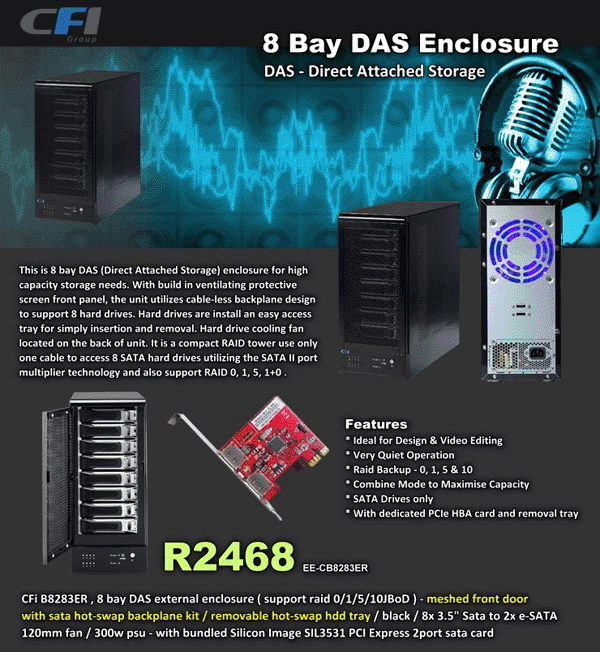
8_bay_das.gif


There's also these options available from 4 to 8 bay solutions - also reasonably priced - WantItAll have a 10% off at the moment...
 
Last edited:
That second deal is only an enclose with fans and Silicon Image PCI Express SATA card? Like the enclosure tho, wish I had the cash to splash, but for now I'll stick with my current enclosure.
 
That second deal is only an enclose with fans and Silicon Image PCI Express SATA card? Like the enclosure tho, wish I had the cash to splash, but for now I'll stick with my current enclosure.

Yip - is the enclosure with a PCIe dual eSata card for your PC. The enclosure includes the PSU, fans, 2x Sata II 1-to-4 multipliers with RAID support, so the price is really not bad at all - if you were to buy those components seperately, it's probably set you back 6-8k. Also considering the price of a decent stylish 8-bay self-made NAS box with motherboard, CPU, memory, PSU, boot HDD, 8 removable HDD trays, additional SATA controller, O/S, case, etc. - it's a bargain. :)

I wonder how something like that would work with one of the Nettop computers with an e-sata port.

It should work great if you have dual eSATA connectors (1x eSATA per 4 drives in the enclosure AFAIK) - not sure if you can run all 8 drives from 1 eSATA connection... maybe a 4-bay would work better with a Nettop.
 
Last edited:
Didn't realise it was 4 drives per e-sata connection.
Will look more into them. Thanks
 
Only "issue" I see and maybe there is a workaround, is the limit on the length of an eSata cable - IIRC it's less than 1m?
 
also if I understand it correctly.. port mulitiplers don't work with all Sata chip-sets
 
Only "issue" I see and maybe there is a workaround, is the limit on the length of an eSata cable - IIRC it's less than 1m?
You mean from the nettop to the storage device? I would probably have them like right next to each other anyway. And its 1m limit if its a passive adapter.

also if I understand it correctly.. port mulitiplers don't work with all Sata chip-sets
How would you find out??
 
From addionics site

Port Multiplier does not work with SATA controller that has no PM support. Check with your system supplier to confirm the PM support on your existing SATA port. Port Multiplier may require a utility to configure the drives to be seen inside the operating system.
 
From addionics site

Port Multiplier does not work with SATA controller that has no PM support. Check with your system supplier to confirm the PM support on your existing SATA port. Port Multiplier may require a utility to configure the drives to be seen inside the operating system.

Bugger. That sucks.

:-/ not supported by nVidia Ion.
 
Last edited:
Top
Sign up to the MyBroadband newsletter
X