Ajax MVC and DropdownList question

Solarion

Honorary Master
Joined
Nov 14, 2012
Messages
28,080
Reaction score
17,849
Hi everyone. I have a form with a dropdown which is Employee Type. Below that a label which should display the remuneration rate depending on what employee type was selected.

This is what I have so far. The controller action fires off fine. However the text field is not getting populated. My Ajax knowledge is next to nothing so really just feeling my way in the dark. What have I done wrong?

NOTE: If I hardcode a value into the jquery script then upon changing the dropdown then yes the text box gets populated with that hardcoded value so that is function fine too. It seems that this part here is not picking up the value: $("#RemunerationRate").val(vdata[0].RenumerationRate);

View

Code:
<div class="form-group row">
    <label asp-for="UserTypeId" class="col-sm-2 col-form-label"></label>
    <div class="col-sm-5">
        <select id="remunerationrate" asp-for="UserTypeId" class="form-control" asp-items="ViewBag.UserTypes" onchange="Action(this.value);">
            <option value="">-- Select User Type --</option>
        </select>
        <span asp-validation-for="UserTypeId" class="text-danger"></span>
    </div>
</div>

Code:
<div class="form-group row">
    <label asp-for="RemunerationRate" class="col-sm-2 col-form-label"></label>
    <div class="col-sm-5">
        @Html.TextBox("RemunerationRate", null, new { @class = "form-control" })
    </div>
</div>

Code:
<script type="text/javascript">
function Action(code) {
$.ajax({
url: '@Url.Action("Action", "User")',
     type: "POST",
         data: { "code": code },
         "success": function (data) {
         if (data != null) {
             var vdata = data;
             $("#RemunerationRate").val(vdata[0].RemunerationRate);
         }
     }
});
}
</script>

Controller

Code:
//Action Function
[HttpPost]
public async Task<ActionResult> Action(string code)
{
    var userTypes = await _usertypeService.Get();
    var type = userTypes.Where(x => x.Id == Convert.ToInt32(code));
    return Json(type);
}

What is being returned from usertypes service
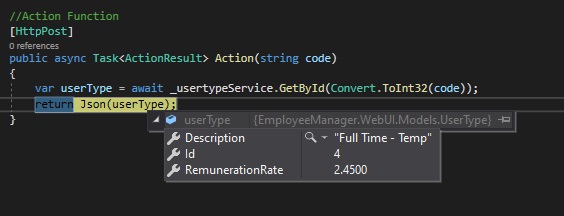
UserType.jpg
 
Last edited:
Just one other thing, I have put a modal popup and I also get an [object Object] message so it seems like something is in there I just don't know how to access it.

Code:
<script type="text/javascript">
function Action(code) {
    $.ajax({
        url: '@Url.Action("Action", "User")',
        type: "POST",
        data: { "code": code },
        "success": function (data) {

            if (data != null) {
                var vdata = data;

                alert(vdata); //TEST

                $("#RemunerationRate").val(vdata[0].RemunerationRate);
            }
        }
    });
}
</script>
 
Last edited:
Just one other thing, I have put a modal popup and I also get an [object Object] message so it seems like something is in there I just don't know how to access it.

Code:
<script type="text/javascript">
function Action(code) {
    $.ajax({
        url: '@Url.Action("Action", "User")',
        type: "POST",
        data: { "code": code },
        "success": function (data) {

            if (data != null) {
                var vdata = data;

                alert(vdata); //TEST

                $("#RemunerationRate").val(vdata[0].RemunerationRate);
            }
        }
    });
}
</script>
Set your datatype for the request.
 
Why are you accessing the response by index?

also, alert will not print correctly, do a console.log.

set the jquey ajax “dataType” to “json” to make it deserialise it automatically.

Strictly speaking, your endpoint should be a GET btw
 
^all what he said, but all this extra work you do @Solarion made me tired lol.
My JS is terrible but watch out for equality == vs === but something like below should work.

JavaScript:
if (data) {
//TODO embrace Razor
}
Seriously one line form fields will change your life :p
Code:
@Html.ValidationDiv()
@Html.HiddenFor(m => m.Data.Id)
@Html.FormBlock(m => m.Data.UserType, inputModifier: tag => tag.Attr("onChange", "Action(this.value);"))
@Html.FormBlock(m => m.Data.RemunerationRate)
 
I don't know. This won't even change the text value of the control even with a hard coded value. Starting to think I'm missing javascript libraries or something. The controller side fires off, checked that. Pretty stumped.

Code:
<div class="form-group row">
    <label asp-for="RemunerationRate" class="col-sm-2 col-form-label"></label>
    <div class="col-sm-5">
        @Html.TextBox("RemunerationRate", null, new { @class = "form-control" })
    </div>
</div>

Code:
<script type="text/javascript">
function Action(code) {
    $.ajax({
        url: '@Url.Action("Action", "User")',
        type: "GET",
        data: { "code": code },
        dataType: "json",
        "success": function (data) {

            if (data != null) {

                $("#RemunerationRate").val("HelloWorld");
            }
        }
    });
}
</script>
 
I don't know. This won't even change the text value of the control even with a hard coded value. Starting to think I'm missing javascript libraries or something. The controller side fires off, checked that. Pretty stumped.

Code:
<div class="form-group row">
    <label asp-for="RemunerationRate" class="col-sm-2 col-form-label"></label>
    <div class="col-sm-5">
        @Html.TextBox("RemunerationRate", null, new { @class = "form-control" })
    </div>
</div>

Code:
<script type="text/javascript">
function Action(code) {
    $.ajax({
        url: '@Url.Action("Action", "User")',
        type: "GET",
        data: { "code": code },
        dataType: "json",
        "success": function (data) {

            if (data != null) {

                $("#RemunerationRate").val("HelloWorld");
            }
        }
    });
}
</script>
You're using @Html.TextBox not @Html.TextBoxFor, I assume it's setting the attribute for name="RemunerationRate" and ignoring the id attribute.
You're selecting by id in jQuery, $("#RemunerationRate")
 
You're using @Html.TextBox not @Html.TextBoxFor, I assume it's setting the attribute for name="RemunerationRate" and ignoring the id attribute.
You're selecting by id in jQuery, $("#RemunerationRate")

Thanks I will investigate that!! I think it's obvious I am not used to working with those @html tags. All throughout my project I have been using these asp tags (I think that's what they are called). Literally have no idea what you just said actually means LOL. I will have to maybe think about delving into these tags. They don't have an id attribute which only leads to more confusion.

eg

Code:
<div class="form-group row">
    <label asp-for="FirstName" class="col-sm-2 col-form-label"></label>
    <div class="col-sm-5">
        <input asp-for="FirstName" class="form-control" placeholder="First Name">
        <span asp-validation-for="FirstName" class="text-danger"></span>
    </div>
</div>
 
Last edited:
Thanks I will investigate that!! I think it's obvious I am not used to working with those @html tags. All throughout my project I have been using these asp tags (I think that's what they are called). Literally have no idea what you just said actually means LOL. I will have to maybe think about delving into these tags.

eg

Code:
<div class="form-group row">
    <label asp-for="FirstName" class="col-sm-2 col-form-label"></label>
    <div class="col-sm-5">
        <input asp-for="FirstName" class="form-control" placeholder="First Name">
        <span asp-validation-for="FirstName" class="text-danger"></span>
    </div>
</div>
Lol. TextBoxFor is for when you’re using a model normally.
TextBoxFor(model=> model.Prop)

In your HTML form, the input element normally has a name & id which is the same like “RemunerationRate”.
When you POST the form, the model binder will use the ‘name’ to bind it.
If you wanna wanna bind an array of values, then all your input elements would use the same name if I remember.

In jQuery, you’re telling it to queryTheDocumentForElementById hence the ‘#’. Either the id aftr is missing or there might be another element using it.

I’m not saying jQuery is bad, but it was built for another era.
Look into using the Fetch API to do your requests in JS with async/await, then your code would be pseudo similar to your backend C#.
 
Ok this actually works now.

Code:
<script type="text/javascript">
function Action(code) {
    $.ajax({
        url: '@Url.Action("Action", "User")',
        type: "GET",
        data: { "code": code },
        contentType: "application/json",
        dataType: "json",
        "success": function (data) {

            if (data != null) {
                $("#remRate").val(data);
            }
        }
    });
}
</script>

Code:
[HttpGet]
public async Task<ActionResult> Action(string code)
{
    var userType = await _usertypeService.GetById(Convert.ToInt32(code));

    return Json(userType.RemunerationRate);
}

It is sadly a butt ugly text box but I don't know how to put id attributes on @htmFor tags. So it will have to do. I will just lock the control.

Code:
<div class="form-group row">
    <label asp-for="RemunerationRate" class="col-sm-2 col-form-label"></label>
    <div class="col-sm-5">
        <input id="remRate" asp-for="RemunerationRate" class="form-control" placeholder="Remuneration Rate">
    </div>
</div>
 
Just one other thing, I have put a modal popup and I also get an [object Object] message so it seems like something is in there I just don't know how to access it.

Code:
<script type="text/javascript">
function Action(code) {
    $.ajax({
        url: '@Url.Action("Action", "User")',
        type: "POST",
        data: { "code": code },
        "success": function (data) {

            if (data != null) {
                var vdata = data;

                alert(vdata); //TEST

                $("#RemunerationRate").val(vdata[0].RemunerationRate);
            }
        }
    });
}
</script>

Try to use console.log() instead of alert() to inspect the vdata.
You say the alert displays [object Object], so it might just be a case of incorrectly accessing the value you want from the response object, e.g. try vdata.RemunerationRate. It's the difference between accessing an array of objects (which mught not exist) or referencing a single object directly.
As the other guys also pointed out, ensure that the id you are trying to access exists in the DOM.
 
It is sadly a butt ugly text box but I don't know how to put id attributes on @htmFor tags. So it will have to do. I will just lock the control.
You actually did an attribute before, so just add on.
Code:
@Html.TextBox("RemunerationRate", null, new { @class = "form-control" })
class is an attribute on the element, the ‘@‘ is just there so it’s taken literally because class is also a reserved word.
 
Ok this actually works now.

Code:
<script type="text/javascript">
function Action(code) {
    $.ajax({
        url: '@Url.Action("Action", "User")',
        type: "GET",
        data: { "code": code },
        contentType: "application/json",
        dataType: "json",
        "success": function (data) {

            if (data != null) {
                $("#remRate").val(data);
            }
        }
    });
}
</script>

Code:
[HttpGet]
public async Task<ActionResult> Action(string code)
{
    var userType = await _usertypeService.GetById(Convert.ToInt32(code));

    return Json(userType.RemunerationRate);
}

It is sadly a butt ugly text box but I don't know how to put id attributes on @htmFor tags. So it will have to do. I will just lock the control.

Code:
<div class="form-group row">
    <label asp-for="RemunerationRate" class="col-sm-2 col-form-label"></label>
    <div class="col-sm-5">
        <input id="remRate" asp-for="RemunerationRate" class="form-control" placeholder="Remuneration Rate">
    </div>
</div>
Try @Html.TextBox("RemunerationRate", "", new {@class="form-control", @placeholder="Remuneration Rate"})
 
Thanks a lot guys for all the great info! Going to come back to this thread a bit later just helping my dad out today with some stuff around his house.
 
You guys have all been immensely helpful from the API side to MVC, authentication, authorization, UI stuff etc so thank-you very much.

I have one of hopefully the last questions as I wrap this project up which I hope you can help with please. I have a bit of code smell I am unable to resolve.

I have a TimeLog class with a StatusId property. The statusId is sourced from an in project Enum:

Code:
public enum TimeLogStatus
{
    [Display(Name = "In Progress")]
    InProgress = 0,
    [Display(Name = "Completed")]
    Completed = 1,
    [Display(Name = "On Hold")]
    OnHold = 2,
    [Display(Name = "Cancelled")]
    Cancelled = 3
}

In the View I resolve this statusId and display it as a Status text.

Code:
<td>
    @Html.DisplayFor(modelItem => timelog.Status)
</td>

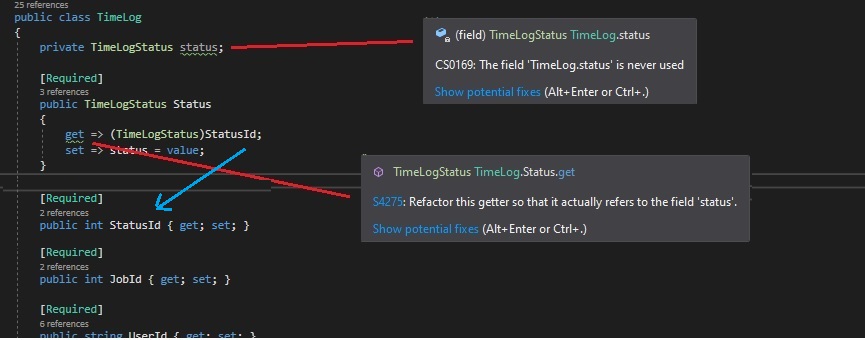
In the TimeLog class I have done this. It works by the way but Intellisense is not happy with the way I have done it.

daaayumson.jpg


Like I said it works, but it's like "wtf bro" and I'm not sure how to resolve this. I've tried a few different things but all of them with egg on face.
 
Change your setter to set the StatusId property and remove the private field.

so then your Status property is just a way to convert an int to a TimeLogStatus and vice versa.

I personally do not use int based enums, as they are impossible to read, say in a database, and if you want to insert another enum value, your existing items are broken because 2 is now 3
 
Change your setter to set the StatusId property and remove the private field.

so then your Status property is just a way to convert an int to a TimeLogStatus and vice versa.

I personally do not use int based enums, as they are impossible to read, say in a database, and if you want to insert another enum value, your existing items are broken because 2 is now 3

Thank-you Kabal!!! Hey I didn't even consider that but a very good point; no way of knowing what it is in the DB. So just a straight forward string based enum then?
 
Thank-you Kabal!!! Hey I didn't even consider that but a very good point; no way of knowing what it is in the DB. So just a straight forward string based enum then?
Yes. And if you are using EF core (dapper too probably) then it can auto convert from enum to varchar and back, so you don’t need to expose the string property
 
Yes. And if you are using EF core (dapper too probably) then it can auto convert from enum to varchar and back, so you don’t need to expose the string property

Nice one awesome thanks I will have a look at this in my project :thumbsup:
 
Top
Sign up to the MyBroadband newsletter
X