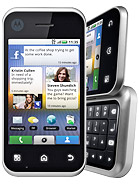
Android phone with full Qwerty keyboard

Oh, and there doesn't seem to be an option to select text, or arrow keys to move through text. I'm a "thoughtful" typist, in that, after I've typed an SMS or email, I read through it before sending and often choose to edit it. So I have to be able to move through the text easily. The touchscreen (like the mouse on a computer) simply isn't accurate enough for me. It can't get me to the exact character that I want. It can get me into the general vicinity, but then an arrow a few characters left or right is often required. (I hardly ever use the mouse to get me to a particular point in text - I use the keyboard (ctrl+arrow keys, end, home, pgup, pgdwn, etc)).
 
@ros_b

You can try the MultiLing Keyboard
http://www.appbrain.com/app/multiling-keyboard/com.klye.ime.latin

Once downloaded from either AppBrain or the Play Store, go to the Multiling app:

In Keyboard settings>Word suggestion settings>
Untick : Auto-correction , and lower down the page ''Always suggest''

I've kept all others ticked.
Find these to be the most optimal settings, but you can amend as you see fit, after testing out.

In "Themes, sizes & layouts" under "ABC Layouts", I have it set to "Language Default", but you can change to QWERTY, or one of many others.

Don't think this has arrow keys to move through the text, but have found it to be pretty accurate at selecting the area of the screen I want in either portrait or landscape, even on a 3.7" smartphone.
 
Last edited:
I was also looking for a hardware qwerty keyboard android at one stage. Then I got a touch screen and got used to it. Now I cant go back. Give it a try, you wont regret it

Even when I type on word I keep on waiting for the autocorrect
 
@ros_b

You can try the MultiLing Keyboard

I actually have a keyboard app that I'm quite happy with on my tablet - Super Keyboard - only now, after downloading Swiftkey, I can't get the damn tablet to go back to using Super Keyboard, and it's gone back to the default keyboard that came on the tablet. Even though I've gone into settings and switched to Super Keyboard. Aaaaarrrggghhhhh!!!
 
@ros_b

You can try the MultiLing Keyboard
http://www.appbrain.com/app/multiling-keyboard/com.klye.ime.latin

Once downloaded from either AppBrain or the Play Store, go to the Multiling app:

In Keyboard settings>Word suggestion settings>
Untick : Auto-correction , and lower down the page ''Always suggest''

I've kept all others ticked.
Find these to be the most optimal settings, but you can amend as you see fit, after testing out.

In "Themes, sizes & layouts" under "ABC Layouts", I have it set to "Language Default", but you can change to QWERTY, or one of many others.

Don't think this has arrow keys to move through the text, but have found it to be pretty accurate at selecting the area of the screen I want in either portrait or landscape, even on a 3.7" smartphone.
I used to use this before I discovered Swiftkey. Swiftkey runs circles around multiling IMO.
Swiftkey will ask you if you are a precise typer or a fast typer that relies heavily on auto correction, and work accordingly. It learns the words + word order you use as you go along. Also has Afrikaans + English (simultaneously) support which is a big + for me as I often mix the two...
https://play.google.com/store/apps/details?id=com.touchtype.swiftkey.phone.trial&hl=en
How many of those are available in SA, and what about price in SA?
No idea.
 
Last edited:
Oh, and there doesn't seem to be an option to select text, or arrow keys to move through text. I'm a "thoughtful" typist, in that, after I've typed an SMS or email, I read through it before sending and often choose to edit it. So I have to be able to move through the text easily. The touchscreen (like the mouse on a computer) simply isn't accurate enough for me. It can't get me to the exact character that I want. It can get me into the general vicinity, but then an arrow a few characters left or right is often required. (I hardly ever use the mouse to get me to a particular point in text - I use the keyboard (ctrl+arrow keys, end, home, pgup, pgdwn, etc)).
SwiftKey does have arrow keys. They are unfortunately hidden away on the third level keyboard (number key followed by {&= key).

Selecting text is very much easier with ICS.
 
SwiftKey does have arrow keys. They are unfortunately hidden away on the third level keyboard (number key followed by {&= key).

Well that's fine... as long as they're there!

But now, how do I select characters? I need to be able to "turn select on", use the arrow keys to select what I want, then "turn select off" and do something with those characters (usually delete).

But I'm starting to warm a bit to Swiftkey.... I still think a physical keyboard is better, though. It's hard to know until one has used both for a period of time.

Selecting text is very much easier with ICS.

Explain please? I downloaded an "ICS keyboard" onto my tablet that's running Android 2.2.2, but I'm not sure that's what you mean. Are you talking generally of the ICS operating system?
 
Explain please? I downloaded an "ICS keyboard" onto my tablet that's running Android 2.2.2, but I'm not sure that's what you mean. Are you talking generally of the ICS operating system?
ICS the operating system. Selecting text is part of the OS, and not the keyboard.
 
Must confess that I find selection / navigating around better on the previous version of android I. E the version running on my phone (3.2) rather than 4.03 on the tablet.

Still, SwiftKey IS the bomb!

Ps have you discovered the split key oard on a tablet?
 
Ps have you discovered the split key oard on a tablet?

Yes... don't like it. With the tablet, it's resting on the table and I'm trying to type as I would on a computer keyboard. I suspect the split keyboard would only be useful when one is holding the device and using one's thumbs only to type.

I'm still not convinced that I wouldn't prefer a hardware keyboard.
 
My sister has the Motorola Backflip - touchscreen + full hardware keyboard:

motorola-backflip-motus.jpg

http://www.gsmarena.com/motorola_backflip-3079.php
 
What is the budget btw? I think you'll find that you have a choice between a outdated phone/os with a hardware keyboard or a current model without one.
 
Yes... don't like it. With the tablet, it's resting on the table and I'm trying to type as I would on a computer keyboard. I suspect the split keyboard would only be useful when one is holding the device and using one's thumbs only to type.

I'm still not convinced that I wouldn't prefer a hardware keyboard.

Lol, I wasn't either, until 2 months later.... Now I wouldn't go back...
 
AfricanTech, you make a compelling argument.... but is it the predictive abilities of Swiftkey that have you so in love with it? In other words, you simply never *have* to type anymore, because it keeps offering you the next word? If that's the case, then yes, I buy your argument. But it's the kind of thing one doesn't know until one has used it for a long time. Perhaps I have to just play with my tablet some more, but who has time for all this playing and testing? I can't believe that any touchscreen keypad would ever beat a hardware keyboard for speed if one actually has to type the words out.

I played a bit today with the Sony Ericsson Xperia Pro and quite liked it. No-one has the Mini Pro, unfortunately.

If I were to abandon the keyboard idea, then what? My budget is mid-range... I don't need all the bells and whistles - main thing for me is responsiveness... I don't like waiting for my hardware to catch up with me. I saw a review mention the Samsung Galaxy Ace as the best mid-range Smartphone?
 
I played a bit today with the Sony Ericsson Xperia Pro and quite liked it. No-one has the Mini Pro, unfortunately.
I have the X10 mini pro, and I still use the on-screen keyboard more than the hardware keyboard, even with the tiny screen.
 
AfricanTech, you make a compelling argument.... but is it the predictive abilities of Swiftkey that have you so in love with it? In other words, you simply never *have* to type anymore, because it keeps offering you the next word? If that's the case, then yes, I buy your argument. But it's the kind of thing one doesn't know until one has used it for a long time. Perhaps I have to just play with my tablet some more, but who has time for all this playing and testing? I can't believe that any touchscreen keypad would ever beat a hardware keyboard for speed if one actually has to type the words out.

It's bit of both - with Swiftkey after a while the prediction becomes so good it's uncanny since the algorithm 'learns' from your most commonly occurring 'clusters' of words - so you can type a complete sentence with just a couple of key-presses.

Also, I came from a TouchPro2 which is hands down the best slide out keyboard on any phone I've ever had - the Desire Z's keyboard,, which was the successor to the TP2, didn't come close - d.a.m.n. yer eyes HTC for not porting Android to the TP2 - I'd probably still be using that phone - LOL.

Swiftkey habituates you to non-tactile typing and after a while, you're so used to it that you don't miss the feel of a 'real' keyboard anymore - now the 'real' keyboard just feels too slow and clunky....the brain is a funny 'ol thing - it'll adjust pretty quickly.

Oh, phone and tab experience is totally different 'cos the keys are so far apart you don't feel the full effect of the good guesses i.e. on tab your typing is inherently slow 'cos the screen is so wide (and yes, sigh!, Apple's screen has a better 'width/height ratio' for screen typing than my Iconia which is just a tad too wide)
 
Last edited:
Swiftkey habituates you to non-tactile typing and after a while, you're so used to it that you don't miss the feel of a 'real' keyboard anymore - now the 'real' keyboard just feels too slow and clunky....the brain is a funny 'ol thing - it'll adjust pretty quickly.

OK, final issue then, is selecting text and moving accurately through text. How does one achieve that with a touchscreen? My fingers are podgy and I cannot get to the exact point in the text that I want by touching the text. On my ancient Blackberry, I use the little scroll button, and I can select lines of text so easily and quickly by using the shift key and the scroll button.
 
Top
Sign up to the MyBroadband newsletter
X