-
- News
-
Categories
- 5G
- ADSL
- AI
- Banking
- Black Friday
- Broadband
- Broadcasting
- Business
- Business Telecoms
- Cellular
- Cloud and Hosting
- Columns
- Cryptocurrency
- Energy
- Enterprise
- Fibre
- Gadgets
- Gaming
- Government
- Hardware
- Industry News
- Internet
- Internet of Things
- Investing
- IT Services
- Motoring
- Reviews
- Science
- Security
- Smartphones
- Software
- Technology
- Telecoms
- Trending
- Wireless
- Press Office
- Forum
- Industry News
- What's Next
- Company hub
- Speed Test
- About us
- Advertise with us
- Contact
- Careers


-
Join the MyBroadband community
South Africa’s biggest forum. Discuss, discover, and connect with thousands of members.
-
Question of the Day: How much would you be willing to pay for a next-generation gaming console?

You are using an out of date browser. It may not display this or other websites correctly.
You should upgrade or use an alternative browser.
You should upgrade or use an alternative browser.
Await without async Task
- Thread starter Solarion
- Start date

Benedict A55h0le not
Honorary Master
- Joined
- Oct 21, 2020
- Messages
- 11,327
- Reaction score
- 8,449
Whatever you say...blahblah is what I see^^^^ Dunning–Kruger

ArmatageShanks
Honorary Master
2011 - Place on Keyboard 1565
If you would like to progress past junior developer you could do worse than reading all my posts in this sub-forumWhatever you say...blahblah is what I see


Solarion
Honorary Master
- Joined
- Nov 14, 2012
- Messages
- 28,193
- Reaction score
- 17,985
If you would like to progress past junior developer you could do worse than reading all my posts in this sub-forum
_kabal_ has raked my code over the coals a few times in the past. It has only pushed me harder to be better tbh.
I have solved that issue with the Async etc. The problem was my login page. Not sure what but I deleted it and recreated it using the standard bootstrap page and went with another time tested example of loging pages from

User Registration And Login Form With E-Mail Notification In MVC
In this article, you will see how to create a user registration form and a login form.
www.c-sharpcorner.com
I am just working now on reading the role and various other user information from the token itself HOWEVER I'm not convinced I need to do that at all. Just figuring out how to get the token information into the Session.
This is from the decoded Token. Getting there slowly.
JWT.IO
JSON Web Tokens are an open, industry standard RFC 7519 method for representing claims securely between two parties.
 jwt.io
Code:
{
  "sub": "[email protected]",
  "jti": "94a9f405-c57e-4271-8df3-2a94a56a92d2",
  "email": "[email protected]",
  "id": "1",
  "role": "Admin",
  "nbf": 1616836176,
  "exp": 1616843376,
  "iat": 1616836176
}
I have noticed this
Code:
          app.UseHttpsRedirection();
          app.UseStaticFiles();
          app.UseRouting();

          #region "JWT Token For Authentication Login"

          app.UseCookiePolicy();
          app.UseSession();
          app.Use(async (context, next) =>
          {
              var JWToken = context.Session.GetString("JWToken");
              if (!string.IsNullOrEmpty(JWToken))
              {
                  context.Request.Headers.Add("Authorization", "Bearer " + JWToken);
              }
              await next();
          });
          app.UseAuthentication();
          app.UseAuthorization();
And This in the authentication controller. Just piecing it together.
HttpContext.Session.SetString("JWToken", token);
Last edited:

DA-LION-619
Honorary Master
Use Identity don’t roll your own authentication which is essentially what that code is doing._kabal_ has raked my code over the coals a few times in the past. It has only pushed me harder to be better tbh.
I have solved that issue with the Async etc. The problem was my login page. Not sure what but I deleted it and recreated it using the standard bootstrap page and went with another time tested example of loging pages from
User Registration And Login Form With E-Mail Notification In MVC
In this article, you will see how to create a user registration form and a login form.www.c-sharpcorner.com
I am just working now on reading the role and various other user information from the token itself HOWEVER I'm not convinced I need to do that at all. Just figuring out how to get the token information into the Session.
This is from the decoded Token. Getting there slowly.
JWT.IO
JSON Web Tokens are an open, industry standard RFC 7519 method for representing claims securely between two parties.
Code:{ "sub": "[email protected]", "jti": "94a9f405-c57e-4271-8df3-2a94a56a92d2", "email": "[email protected]", "id": "1", "role": "Admin", "nbf": 1616836176, "exp": 1616843376, "iat": 1616836176 }
I have noticed this
Code:app.UseHttpsRedirection(); app.UseStaticFiles(); app.UseRouting(); #region "JWT Token For Authentication Login" app.UseCookiePolicy(); app.UseSession(); app.Use(async (context, next) => { var JWToken = context.Session.GetString("JWToken"); if (!string.IsNullOrEmpty(JWToken)) { context.Request.Headers.Add("Authorization", "Bearer " + JWToken); } await next(); }); app.UseAuthentication(); app.UseAuthorization();
And This in the authentication controller. Just piecing it together.
HttpContext.Session.SetString("JWToken", token);
if you don’t need JWT, use cookies. Less management.
Solarion
Honorary Master
- Joined
- Nov 14, 2012
- Messages
- 28,193
- Reaction score
- 17,985
Use Identity don’t roll your own authentication which is essentially what that code is doing.
if you don’t need JWT, use cookies. Less management.
Not every company wants or will allow those Identity tables on their database. I have gone with own solution with my own tables. It's also a good way to learn about all this stuff. I hash and salt the passords myself, verify using BCrypt.Net. Its close now just have to wrap up the token handling on the front end.
DA-LION-619
Honorary Master
That’s fair, each aspect is broken up though.Not every company wants or will allow those Identity tables on their database. I have gone with own solution with my own tables. It's also a good way to learn about all this stuff. I hash and salt the passords myself, verify using BCrypt.Net. Its close now just have to wrap up the token handling on the front end.
You don’t have to use those tables.
You don’t need to use their hashing + salt methods.
There’s already implementations for working with JWT, that take care of things like validation and reading claims etc.
By using Session State to hold the JWT, you’re already using cookies.
Here is a very simple way to use JWT auth in .NET Core
Startup.cs
UserService.cs
User.cs
UserExtensions.cs
UserController.cs
So now your frontend can call `/api/users/authenticate`, and extract `token` from the response, and use that as the Bearer token in ajax calls, and any endpoints with [Authorize] will automatically be protected.
You could quite easily extend this to work with sessions too
Startup.cs
Code:
private static void ConfigureAuth(IServiceCollection services, string secret)
{
var key = Encoding.ASCII.GetBytes(secret);
services.AddAuthentication(x =>
{
x.DefaultAuthenticateScheme = JwtBearerDefaults.AuthenticationScheme;
x.DefaultChallengeScheme = JwtBearerDefaults.AuthenticationScheme;
})
.AddJwtBearer(x =>
{
x.RequireHttpsMetadata = false;
x.SaveToken = true;
x.TokenValidationParameters = new TokenValidationParameters
{
ValidateIssuerSigningKey = true,
IssuerSigningKey = new SymmetricSecurityKey(key),
ValidateIssuer = false,
ValidateAudience = false
};
});
services.AddScoped<UserService>();
}UserService.cs
Code:
public class UserService
{
private readonly List<User> _users = new List<User>
{
new User {Id = 1, FirstName = "Admin", LastName = "User", Username = "admin", Password = "123456"}
};
private readonly AppSettings _appSettings;
public UserService(IOptions<AppSettings> appSettings)
{
_appSettings = appSettings.Value;
}
public User Authenticate(string username, string password)
{
var user = _users.SingleOrDefault(x => x.Username == username && x.Password == password);
if (user is null)
{
return null;
}
// authentication successful so generate jwt token
var tokenHandler = new JwtSecurityTokenHandler();
var key = Encoding.ASCII.GetBytes(_appSettings.Secret);
var tokenDescriptor = new SecurityTokenDescriptor
{
Subject = new ClaimsIdentity(new[]
{
new Claim(ClaimTypes.Name, user.Id.ToString())
}),
Expires = DateTime.UtcNow.AddDays(7),
SigningCredentials = new SigningCredentials(new SymmetricSecurityKey(key), SecurityAlgorithms.HmacSha256Signature)
};
var token = tokenHandler.CreateToken(tokenDescriptor);
user.Token = tokenHandler.WriteToken(token);
return user.WithoutPassword();
}
public IEnumerable<User> GetAll()
{
return _users.WithoutPasswords();
}
}User.cs
Code:
public class User
{
public int Id { get; set; }
public string FirstName { get; set; }
public string LastName { get; set; }
public string Username { get; set; }
public string Password { get; set; }
public string Token { get; set; }
}UserExtensions.cs
Code:
public static class UserExtensions
{
public static IEnumerable<User> WithoutPasswords(this IEnumerable<User> users) {
return users.Select(x => x.WithoutPassword());
}
public static User WithoutPassword(this User user) {
user.Password = null;
return user;
}
}UserController.cs
Code:
[Authorize]
[ApiController]
[Route("/api/users")]
public class UsersController : ControllerBase
{
private readonly UserService _userService;
public UsersController(UserService userService)
{
_userService = userService;
}
[AllowAnonymous]
[HttpPost("authenticate")]
public IActionResult Authenticate([FromBody]User userParam)
{
var user = _userService.Authenticate(userParam.Username, userParam.Password);
if (user is null)
{
return BadRequest(new { message = "Username or password is incorrect" }); // could argue that this should return 401, but IMO that is ambiguous as it could also read "you are not authorised to call this endpoint;
}
return Ok(user);
}
[HttpGet]
public IActionResult GetAll()
{
var users = _userService.GetAll();
return Ok(users);
}
[HttpGet("me")]
public IActionResult Me()
{
var user = _userService.GetAll().FirstOrDefault();
return Ok(user);
}
}So now your frontend can call `/api/users/authenticate`, and extract `token` from the response, and use that as the Bearer token in ajax calls, and any endpoints with [Authorize] will automatically be protected.
You could quite easily extend this to work with sessions too
Solarion
Honorary Master
- Joined
- Nov 14, 2012
- Messages
- 28,193
- Reaction score
- 17,985
This is all on the API side; separate project. My MVC consumes this one.
Mine is a bit different. I'm going to compare because year I do not have the greatest experience this is new to me I was following a video while putting this together.
Mine is a bit different. I'm going to compare because year I do not have the greatest experience this is new to me I was following a video while putting this together.
C#:
public class AuthenticationResult
{
public string Token { get; set; }
public bool Succes { get; set; }
public IEnumerable<string> Errors { get; set; }
}
C#:
public async Task<AuthenticationResult> LoginAsync(string email, string password)
{
var user = await _userService.FindByEmailAsync(email);
if (user == null)
{
return new AuthenticationResult
{
Errors = new[] { "User does not exist." }
};
}
var userHasValidPassword = await _userService.LoginValidate(email, password);
if (!userHasValidPassword)
{
return new AuthenticationResult
{
Errors = new[] { "Username/password combination is wrong!" }
};
}
return await GenerateAuthenticationResultForUser(user);
}
private async Task<AuthenticationResult> GenerateAuthenticationResultForUser(Employee user)
{
var tokenHandler = new JwtSecurityTokenHandler();
var key = Encoding.ASCII.GetBytes(_jwtSettings.Secret);
var claims = new List<Claim>
{
new Claim(JwtRegisteredClaimNames.Sub, user.EmailAddress),
new Claim(JwtRegisteredClaimNames.Jti, Guid.NewGuid().ToString()),
new Claim(JwtRegisteredClaimNames.Email, user.EmailAddress),
new Claim("id", user.Id.ToString())
};
//Check for existing user
string empRole = await _userService.GetRole(user.Id);
//If current user logging in with a role
if (!string.IsNullOrEmpty(empRole))
{
claims.Add(new Claim(ClaimTypes.Role, empRole));
}
var tokenDescriptor = new SecurityTokenDescriptor
{
Subject = new ClaimsIdentity(claims),
Expires = DateTime.UtcNow.AddHours(2),
SigningCredentials = new SigningCredentials(new SymmetricSecurityKey(key), SecurityAlgorithms.HmacSha256Signature)
};
var token = tokenHandler.CreateToken(tokenDescriptor);
return new AuthenticationResult
{
Succes = true,
Token = tokenHandler.WriteToken(token)
};
}Solarion
Honorary Master
- Joined
- Nov 14, 2012
- Messages
- 28,193
- Reaction score
- 17,985
This is where I am at now. Trying to figure out what to do with the token that I get back.
JWT
C#:
public async Task<ActionResult> Validate(Employee employee)
{
if (await _serviceClient.LoginUserAsync(_apiUrl + "Identity/Login", employee.EmailAddress, employee.Password))
{
HttpContext.Session.SetString("email", employee.EmailAddress);
HttpContext.Session.SetInt32("id", employee.Id);
HttpContext.Session.SetInt32("role_id", (int)employee.RoleId);
HttpContext.Session.SetString("name", employee.FullName);
HttpContext.Session.SetString("user_role", employee.EmployeeRole.RoleDescription);
return Json(new { status = true, message = "Login Successfull!" });
}
else
{
return Json(new { status = true, message = "Invalid Login!" });
}
}
C#:
public async Task<bool> LoginUserAsync(string url, string emailAddress, string password)
{
try
{
TokenRequest Token;
HttpClient client = new HttpClient();
var values = new Dictionary<string, string>
{
{ "email", emailAddress },
{ "password", password}
};
var content = new StringContent(JsonConvert.SerializeObject(values), Encoding.UTF8, "application/json");
var response = await client.PostAsync(url, content);
var responseString = await response.Content.ReadAsStringAsync();
Token = JsonConvert.DeserializeObject<TokenRequest>(responseString);
}
catch(Exception ex)
{
throw ex;
}
return true;
}JWT
Code:
{
  "sub": "[email protected]",
  "jti": "94a9f405-c57e-4271-8df3-2a94a56a92d2",
  "email": "[email protected]",
  "id": "1",
  "role": "Admin",
  "nbf": 1616836176,
  "exp": 1616843376,
  "iat": 1616836176
}
Last edited:
Solarion
Honorary Master
- Joined
- Nov 14, 2012
- Messages
- 28,193
- Reaction score
- 17,985
Ignore this. I was just experimenting around poking at sessions a little.
HttpContext.Session.SetString("email", employee.EmailAddress);
HttpContext.Session.SetInt32("id", employee.Id);
HttpContext.Session.SetInt32("role_id", (int)employee.RoleId);
HttpContext.Session.SetString("name", employee.FullName);
HttpContext.Session.SetString("user_role", employee.EmployeeRole.RoleDescription);
HttpContext.Session.SetString("email", employee.EmailAddress);
HttpContext.Session.SetInt32("id", employee.Id);
HttpContext.Session.SetInt32("role_id", (int)employee.RoleId);
HttpContext.Session.SetString("name", employee.FullName);
HttpContext.Session.SetString("user_role", employee.EmployeeRole.RoleDescription);
DA-LION-619
Honorary Master
What is the service you’re getting the token from?
Solarion
Honorary Master
- Joined
- Nov 14, 2012
- Messages
- 28,193
- Reaction score
- 17,985
What is the service you’re getting the token from?
That's from these namespaces from Nuget
using Microsoft.IdentityModel.Tokens;
using System.IdentityModel.Tokens.Jwt;
var tokenHandler = new JwtSecurityTokenHandler();
Just call it here like so
var token = tokenHandler.CreateToken(tokenDescriptor);
Token = tokenHandler.WriteToken(token)
DA-LION-619
Honorary Master
Sorry I meant the API url you’re calling to get the token, what service is that?That's from these namespaces from Nuget
using Microsoft.IdentityModel.Tokens;
using System.IdentityModel.Tokens.Jwt;
var tokenHandler = new JwtSecurityTokenHandler();
Just call it here like so
var token = tokenHandler.CreateToken(tokenDescriptor);
Token = tokenHandler.WriteToken(token)
Solarion
Honorary Master
- Joined
- Nov 14, 2012
- Messages
- 28,193
- Reaction score
- 17,985
It's just a localhost address. An api I set up myself.
_apiUrl + "Identity/Login"
C#:
[HttpPost]
[Route("Login")]
public async Task<IActionResult> Login([FromBody] UserLoginRequest request)
{
    var authResponse = await _identityService.LoginAsync(request.Email, request.Password);

    if (!authResponse.Succes)
    {
        return BadRequest(new AuthFailedResponse
        {
            Errors = authResponse.Errors
        });
    }

    return Ok(new AuthSuccessResponse
    {
        Token = authResponse.Token

    });
}
DA-LION-619
Honorary Master
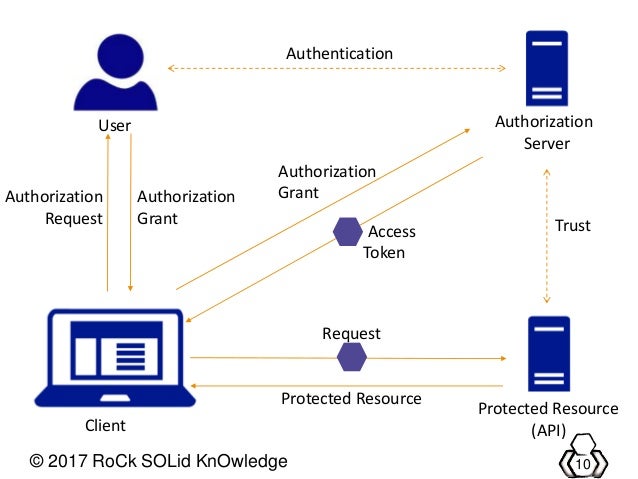
So is this what you were kinda planning?It's just a localhost address. An api I set up myself.
DA-LION-619
Honorary Master
Pass it to the user?This is where I am at now. Trying to figure out what to do with the token that I get back.
This is like SSO using an IdP, think logging in with Google.It's just a localhost address. An api I set up myself.
But normally the user would go there then pass the token onto you.
This explains the concept idea much better than I would.
You should not be catching and throwing. if this is a controller method you should log the exc and return 500. Otherwise (deeper in the call stack) you must just let the exc bubble up to the controller. Dont catch if you are not adding value in the exc handlerHi guys. Please can you guys advise me on something. I have a login page going for my MVC however this "async Task" is actually messing with the way the controller is operating.
Please help me to refactor this so that I can still run these await methods but without the Controller returning an async task. The Login itself is working and returns a token. However having this function in a task is messing with the way the login page redirects to the Home controller. Please assist
C#:public async Task<bool> LoginUserAsync(string url, string userName, string password) { try { TokenRequest Token; HttpClient client = new HttpClient(); var values = new Dictionary<string, string> { { "email", "[email protected]" }, { "password", "Admin123" } }; var content = new StringContent(JsonConvert.SerializeObject(values), Encoding.UTF8, "application/json"); var response = await client.PostAsync(url, content); var responseString = await response.Content.ReadAsStringAsync(); Token = Newtonsoft.Json.JsonConvert.DeserializeObject<TokenRequest>(responseString); client.DefaultRequestHeaders.Add("Authorization", "Bearer " + Token.token); } catch(Exception ex) { throw ex; } return true; }
This is the method behing PostAsync
C#:public async Task<T> PostAsync<T>(string methodUrl, object model) { HttpClient client = new HttpClient(); // Now serialzize the object to json string jsonData = JsonConvert.SerializeObject(model); // Create a content HttpContent content = new StringContent(jsonData); content.Headers.ContentType = new System.Net.Http.Headers.MediaTypeHeaderValue("application/json"); // Make a request var response = await client.PostAsync(methodUrl, content); var responseAsString = await response.Content.ReadAsStringAsync(); // Deserialize the coming object into a T object T obj = JsonConvert.DeserializeObject<T>(responseAsString); return obj; }