c# multithreading and resource locks

Seems to work exactly as expected - the same as every other language I have used.

What languages can you define a static variable inside static method?
If I understand cguy correctly you can do that in C++ (and c ?)
Why would not just do

Code:
static object _lock = new Object()

static void MyFunction() {
}

This is how it is/works????
This is what I did to get it all working, I did not grasp why the various threads entering the method at the same time would not see the same value for the local variable (before I made it global)
 
I will go with this then, c# does not allow the static modifier within the static method, so I am assuming it is somehow not Truly static.

Yeah, so C# doesn't seem to support this, but C/C++ does. You can declare the variable as static outside of the method though.
 
As far as I know and read, async and await should always go together, and should be used for all IO operations. I think you kind of have it wrong way round, not using await will "hog" the thread, and using it will put the thread back in the thread pool to be available for other things.

My understanding is that threads work as follows.

You have your main thread executing your code. This can be an HTTP request handler, main service / app thread or whatever.

In the old synchronous days, you would make a request to read a file, and your thread would wait while the OS reads the file with its own threads. Your app is using 1 thread that whole time. It's not really an issue usually, but for high load applications you can run out of threads in the .Net thread pool.

Now, using async methods with async / await, you have Thread1 for your HTTP request / service / app. When you read a file with async/await, you release your thread while you wait for the file to be read, returning it to the pool. You application / http request now is not using any threads so other requests can use it. When the OS returns the file, you get a thread again to continue execution, so now you are using a thread again.

If you don't use await, you don't release your thread, so your app holds on to that thread until it finishes with whatever it's doing before releasing it. For example, if you write to an error file before returning an HTTP response and you don't use await, your thread will return the response before being released while the OS finishes with the file. You still get release your thread without waiting for anything to finish.
The "catch" is that you then can't react to the result of that write, so the response to the user can't depend on that write.
 
If you don't use await, you don't release your thread, so your app holds on to that thread until it finishes with whatever it's doing before releasing it. For example, if you write to an error file before returning an HTTP response and you don't use await, your thread will return the response before being released while the OS finishes with the file. You still get release your thread without waiting for anything to finish.
The "catch" is that you then can't react to the result of that write, so the response to the user can't depend on that write.
What you said in the 1st few paragraphs are spot on, then it got a bit off rails in the last paragraph:

Don`t ever do this. I think you also release the thread writing the file while its still busy. Always use async and await for both the http call and file write. What you are referring to is the http 202 Accepted pattern and what you described is not correct. If you want the 202 pattern then you still use async and await but instead of writing to the file it will just drop a message in a queue (also await on SendMessageAsync()). Another backend microservice will then read the message and write the file. Your Api method will then return immediately after it sent the queue message, and return a status check url in the location header for the calling client to poll.

 
What you said in the 1st few paragraphs are spot on, then it got a bit off rails in the last paragraph:

Don`t ever do this. I think you also release the thread writing the file while its still busy. Always use async and await for both the http call and file write. What you are referring to is the http 202 Accepted pattern and what you described is not correct. If you want the 202 pattern then you still use async and await but instead of writing to the file it will just drop a message in a queue (also await on SendMessageAsync()). Another backend microservice will then read the message and write the file. Your Api method will then return immediately after it sent the queue message, and return a status check url in the location header for the calling client to poll.


I agree it's not good practice, but I still thinks it works as I describe.

In your earlier link explaining async/await it is effectively what they do here:

Task asyncTask = WriteFileAsync(dirPath, fileName, longString);

They call an async method without an await, thereby continuing execution. They wait for the console.read(), but I suspect it would work regardless.
 
They call an async method without an await, thereby continuing execution. They wait for the console.read(), but I suspect it would work regardless.
No it wont, because it is not awaited the file write will be interrupted if the main thread exits. You can bath me if I`m wrong. This is why 202 exists.
 
By the way the C# lock keyword will not work in the case of an api writing to a file. Maybe it is possible to have some sort of singleton with the lock in it, but that seems wrong. In this case a distributed lock is needed because the api might be called multiple times to operate on the same file.
 
By the way the C# lock keyword will not work in the case of an api writing to a file. Maybe it is possible to have some sort of singleton with the lock in it, but that seems wrong. In this case a distributed lock is needed because the api might be called multiple times to operate on the same file.
But I should be ok in that I am not using an API ? (dependent on your definition of API)
 
But I should be ok in that I am not using an API ? (dependent on your definition of API)
How is it called? Is the lock code in a client app and many users use the app? Then the lock keyword will not work right. You also have to make it lock on the specific file maybe, it can`t be a generic lock, and this will have to be server side and somehow be made to be a singleton on the file object. This seems like legacy to me.

Edit: I looked again and it does look like the lock keyword is the answer in your case. It is still not ideal because async can not be used inside it, and it itself is not async and therefor is not cpu optimized.
 
Last edited:
How is it called? Is the lock code in a client app and many users use the app?
It is a Windows Service, only external stuff is clients that uses TCP sockets to get the status/info of the service running on the server
.
Multiple threads are spawned as HttpListener Contexts are received, the threads call the same static method for logging in the static Program class. So far it seems to be working fine after making the locker object global static (instead of the prior local to the static method variable).
Then the lock keyword will not work right. You also have to make it lock on the specific file maybe, it can`t be a generic lock, and this will have to be server side and somehow be made to be a singleton on the file object. This seems like legacy to me.
 
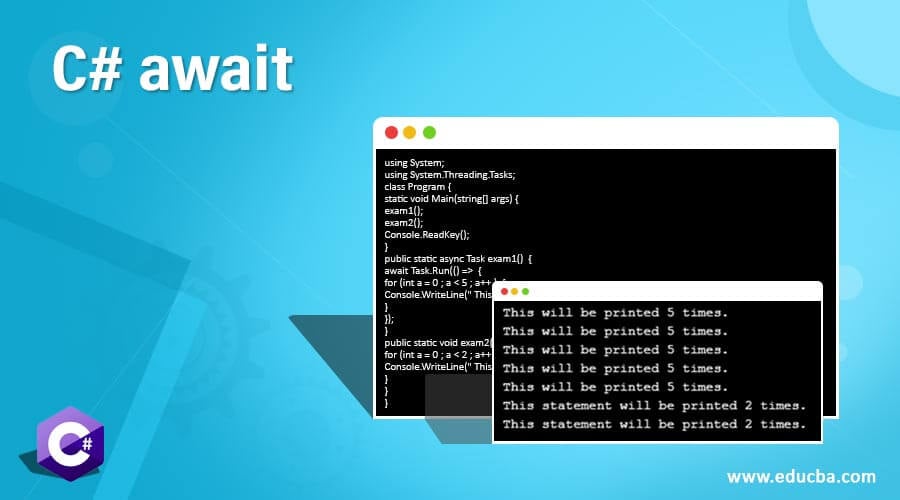
I still don't get the async / await advantage.

Synchronous: things happen one after the other sequentially

Asynchronous call: the call executes but the code after the call can continue immediately.

Await: Wait for the task to complete before continuing with the code after the call statement. So back to square one ?

await1.jpg

Code:
using System;
using System.Threading.Tasks;
class Program {
static void Main(string[] args) {
exam1();
exam2();
Console.ReadKey();
}
public static async Task exam1()  {
await Task.Run(() =>  {
for (int a = 0 ; a < 5 ; a++ )  {
Console.WriteLine(" This will be printed 5 times.");
}
});
}
public static void exam2() {
for (int a = 0 ; a < 2 ; a++ ) {
Console.WriteLine(" This statement will be printed 2 times. ");
}
}
}

 
From the other link:

It is good practice for async methods to return a Task, as demonstrated on Line 25. This enables you to ensure that the task is completed, using asyncTask.Wait() or asyncTask.IsCompleted() before trying to do something with the results of the asynchronously executed code block.

So why go async in the first place ?
 
It is a Windows Service, only external stuff is clients that uses TCP sockets to get the status/info of the service running on the server
.
Multiple threads are spawned as HttpListener Contexts are received, the threads call the same static method for logging in the static Program class. So far it seems to be working fine after making the locker object global static (instead of the prior local to the static method variable).
So does it have the same lock for different files, or a locked object per file? I think you need to run this in parallel and stress test a bit and check performance.
 
So does it have the same lock for different files, or a locked object per file? I think you need to run this in parallel and stress test a bit and check performance.
At the moment, until I refine, there are multiple write methods, most are for a single file and they each use their own lock object (global). There is however one which accepts a parameter that forms part of the filename, so effectively different files.

To my understanding, the block

lock(lockerForThisMethod)
{
series of directory and file/streamwrite commands
}

will never run parallel regardless if it is the same file or different effective files
 
From the other link:


So why go async in the first place ?
Lets say there is only 1 thread and you want to download 2 large files. The thread will start to download 1 file and wait for it to download, then start the 2nd file and wait to download. It will be faster if both files can download at the same time, but it cant because there is not enough threads. And while its downloading the thread is just on hold doing nothing (IO operation). If it is async the thread will start downloading 1 file and not wait and start downloading the 2nd file immediately. Then both tasks are awaited for in parallel, still only 1 thread. So a system has many threads but also many operations. The advantage of async and await can only be seen when the system is under stress. Async and await is cpu optimization for IO operations, without it your system will start slowing down because of the cpu sooner, running less operations at the same time.
 
At the moment, until I refine, there are multiple write methods, most are for a single file and they each use their own lock object (global). There is however one which accepts a parameter that forms part of the filename, so effectively different files.

To my understanding, the block

lock(lockerForThisMethod)
{
series of directory and file/streamwrite commands
}

will never run parallel regardless if it is the same file or different effective files
That depends on what lockerForThisMethod is. You do not want it to wait at the lock if not needed/not the same file. The lock will hold on to the threads until the thread in the lock exits the lock.
 
I still don't get the async / await advantage.

Synchronous: things happen one after the other sequentially

Asynchronous call: the call executes but the code after the call can continue immediately.

Await: Wait for the task to complete before continuing with the code after the call statement. So back to square one ?

You can always take a look at the IL generated code for your code when using "Await".

It generates a lot of code that uses a state machine to bring the processing back into the function after the awaited Task is completed. It DOES NOT sit there blocking processing. It releases the thread back to the ThreadPool for something else (if needed/waiting) to use the/a thread. When that awaited Task finishes, it will get a thread (which might or might not be the same thread) from the ThreadPool and then continue processing code after it. This is why Async/Await is awesome for scalability and performance. .Net does a lot behind the scenes.

Here are some really good tips from the Microsoft Devs:
: https://github.com/davidfowl/AspNetCoreDiagnosticScenarios/blob/master/AsyncGuidance.md
David is "Partner Software Architect at Microsoft on the ASP.NET team, Creator of SignalR". He knows his ****.

Those tips aren't only for .Net Core. A lot is available in .Net Framework as well.
 
Top
Sign up to the MyBroadband newsletter
X