Constant download and Upload?

jojoce

Active Member
Joined
Apr 21, 2010
Messages
37
Reaction score
2
Hi guys,

Just a question, a friend and myself are experiencing the same problems with our connections, the dashboard shows 30kbs download and about 10kbs upload continuously. I have no idea what the cause of this is, but as my connection is on permanently, my cap is used , showing 2gig uploads, which is impossible as I do not use that much data during the day.
I initially thought it was spyware or something but my friend has exactly the same problem. And he uses his connection even less, but even with all programs closed that could upload or download it still shows 30kbs on the dashboard.
 
Yeah I noticed the same thing on my laptop with the iburst dashboard.
Constant up and down at a very low rate, doesnt seem to do it once its plugged into a router though.

Quite strange to be honest.

Have you used any programs like Cports or netlimiter to see if there are any hidden programs eating your cap?
 
Last edited:
Voodooman? Excellent suggestion and surprise? It's the dashboard that is constantly downloading at a steady 30kbs and a steady upload of 10kbs.
 
So Iburst, now that I have proven your dashboard is abusing my cap..

What are you going to do about it?
 
r00i is having some time off, so he prob won't be around to answer your... question.

Here's an idea: How about just not using the dashboard?

Thanks eltherza, but this is something that just started happening since the middle of last month, I could not understand what was happening to my data. Now that I am aware though, I've stopped using the dashboard. However, I've lost quite a bit of data here... And this is not just me it is affecting, every person using the dashboard is actually being cheated here.
 
Thanks eltherza, but this is something that just started happening since the middle of last month, I could not understand what was happening to my data. Now that I am aware though, I've stopped using the dashboard. However, I've lost quite a bit of data here... And this is not just me it is affecting, every person using the dashboard is actually being cheated here.

Yeah, I only ever used the dashboard once.. in like 2007.. Horrible thing. Just keep watching your usage though and let us know if the constant usage stops as a double check. r00i might be around to help next month, we'll have to wait and see.
 
I have actually blocked it, using netlimiter as Voodoomon suggested, and it has stopped.
I'm actually a bit pissed about this, as it is Iburst' own software causing this.
 
I have noticed the same problem and have bypassed Dashboard via the Control Panel, but how do I connect easily without using it as my PC is also used by completely non-technical users so needs to connect automatically. I am using Windows 7.
 
Last edited:
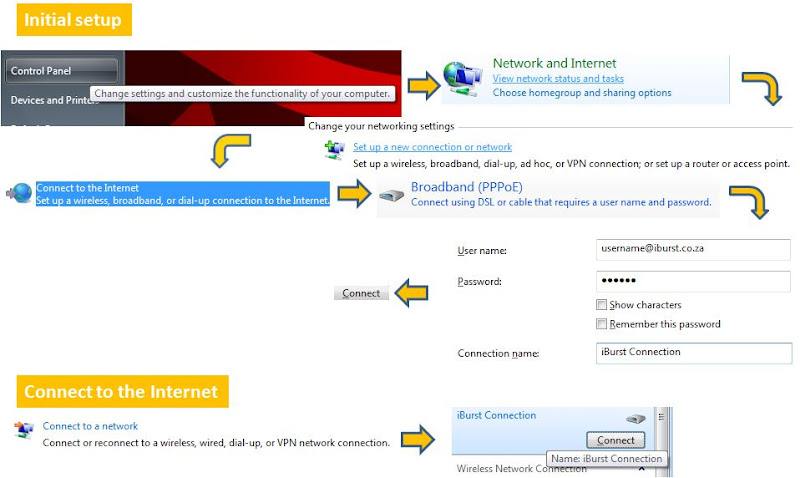
The easiest way to hook up a desktop modem in wondows 7 without a router for me was to connect an ethernet cable from the modem to the pc, do not use the usb cable.

I have never use an Iburst usb modem before so I cant help there.

From here its pretty simple:

Right click on the network icon on your desktop and click properties (or go to the control panel and click "view network status and tasks")
On that page you will see Setup a new connection or network, click that.
A new window will popup wit some other options, choose "connect to the internet".
On the next window click the broadband (PPPoe) option.
Another window will open and you can add your username and password, and name the connection Iburst.
Click connect....

and

Surf the interwebs!

You can now go back to the network properties we visited at the beginning of all this.
Right click on the network icon on your desktop and click properties (or go to the control panel and click "view network status and tasks")

On the left hand side click "change adapter settings" you will see your connection that you named "iburst".
Right click it and make a shortcut to your desktop.

Done.

Hope this helps.
 
Last edited:
iBurst connection using Windows 7

My recommendation is to stop using the iBurst Dashboard.

Windows7-iBurst-Connection.jpg
 
Last edited:
MWEB had a problem with their version of the Dashboard about three years back, but fortunately they were pretty quick to realise the problem, warn users, and we all got a "we're sorry" top-up the next month. I connect by going Start -> Connect To -> select iBurst, panel comes up with my username and password -? click on Connect and off you go.
 
Top
Sign up to the MyBroadband newsletter
X