


![[)roi(]](/forum/data/avatars/m/8/8711.jpg?1563828683)
Ps. @Jack Marlow -- I think you overlooked the date of this post https://mybroadband.co.za/forum/goto/post?id=15816634
-
- News
-
Categories
- 5G
- ADSL
- AI
- Banking
- Black Friday
- Broadband
- Broadcasting
- Business
- Business Telecoms
- Cellular
- Cloud and Hosting
- Columns
- Cryptocurrency
- Energy
- Enterprise
- Fibre
- Gadgets
- Gaming
- Government
- Hardware
- Industry News
- Internet
- Internet of Things
- Investing
- IT Services
- Motoring
- Reviews
- Science
- Security
- Smartphones
- Software
- Technology
- Telecoms
- Trending
- Wireless
- Press Office
- Forum
- Industry News
- What's Next
- Company hub
- Speed Test
- About us
- Advertise with us
- Contact
- Careers
-
Join the MyBroadband community
South Africa’s biggest forum. Discuss, discover, and connect with thousands of members.
-
Question of the Day: Genuinely useful vs overrated camping gear?
You are using an out of date browser. It may not display this or other websites correctly.
You should upgrade or use an alternative browser.
You should upgrade or use an alternative browser.
Data Encryption / Decryption and a Database System
- Thread starter koeks525
- Start date

Batista
Executive Member
- Joined
- Sep 2, 2011
- Messages
- 7,906
- Reaction score
- 266
That is overkill and will serve no purpose.
Rather spend time to do login security and logins that expire after certain minutes/inactivity.
If you insist on encryption then just encrypt the users and admin passwords, not all the data that the app will store.
Rather spend time to do login security and logins that expire after certain minutes/inactivity.
If you insist on encryption then just encrypt the users and admin passwords, not all the data that the app will store.
Literally googled the hash dude. Like I said, there are lists out there (indexed by Google) that allows me to copy and paste the following:Hey Chuck, how the heck do you decrypt a hash? It's made to be one way - and no, not talking about that joke that is MD5
5f4dcc3b5aa765d61d8327deb882cf99
and get a result like this:
https://www.google.co.za/search?q=5...e..69i57j0l2.303j0j4&sourceid=chrome&ie=UTF-8
First result: https://md5.gromweb.com/?md5=5f4dcc3b5aa765d61d8327deb882cf99
That's because plaintext without a unique salt will always hash (one way) the same way.
so if I run the entire known dictionary and hash every word, then use that against whatever unsalted hash you have in your database, I'm more than likely to find your password within a few seconds
Jesus I don't want to know what systems you are responsible for....That is overkill and will serve no purpose.
Rather spend time to do login security and logins that expire after certain minutes/inactivity.
If you insist on encryption then just encrypt the users and admin passwords, not all the data that the app will store.
Batista
Executive Member
- Joined
- Sep 2, 2011
- Messages
- 7,906
- Reaction score
- 266
Jesus I don't want to know what systems you are responsible for....
Lol im in charge of internal business systems, that never face the outside world well except for webservices.There isnt a need to encrypt every piece of data that gets stored in the db.That would slow things down alot on our side seeing that we work with so much data.
My main system only facilitates 5-7 bar worth of transactions a day so its not that big

Most of the hashing algorithms should be avoided; because most of the older ones can easily be brute forced in <6 hours. Ideally pick one which is expensive both on the compute of the salt and the hashing, and then as many have suggested generate a unique salt per password.Literally googled the hash dude. Like I said, there are lists out there (indexed by Google) that allows me to copy and paste the following:
5f4dcc3b5aa765d61d8327deb882cf99
and get a result like this:
https://www.google.co.za/search?q=5...e..69i57j0l2.303j0j4&sourceid=chrome&ie=UTF-8
First result: https://md5.gromweb.com/?md5=5f4dcc3b5aa765d61d8327deb882cf99
That's because plaintext without a unique salt will always hash (one way) the same way.
so if I run the entire known dictionary and hash every word, then use that against whatever unsalted hash you have in your database, I'm more than likely to find your password within a few seconds

Solarion
Honorary Master
- Joined
- Nov 14, 2012
- Messages
- 28,138
- Reaction score
- 17,921
Most of the hashing algorithms should be avoided; because most of the older ones can easily be brute forced in <6 hours. Ideally pick one which is expensive both on the compute of the salt and the hashing, and then as many have suggested generate a unique salt per password.
Where do you store the decryptor key though? Separate database somewhere?
I have a **** ton of work to do this week, building an invoice merger for someone. I want to get back to this encryption thing again at some point. Without the Salt I ran into Hash collision. Was working on the Salt key. Pretty interesting stuff and encryption is definitely something that is a must and will be getting more important in the future.
As @Spacerat mentioned the hashing with salt is aWhere do you store the decryptor key though? Separate database somewhere?
I have a **** ton of work to do this week, building an invoice merger for someone. I want to get back to this encryption thing again at some point. Without the Salt I ran into Hash collision. Was working on the Salt key. Pretty interesting stuff and encryption is definitely something that is a must and will be getting more important in the future.
one way encryption; meaning it cannot be decrypted. The verification of the password is performed by using the combination of the same salt (stored in the database), same algorithm and / or custom hash settings against the password hash (also stored in the database).With the example I showed using https://github.com/BcryptNet/bcrypt.net
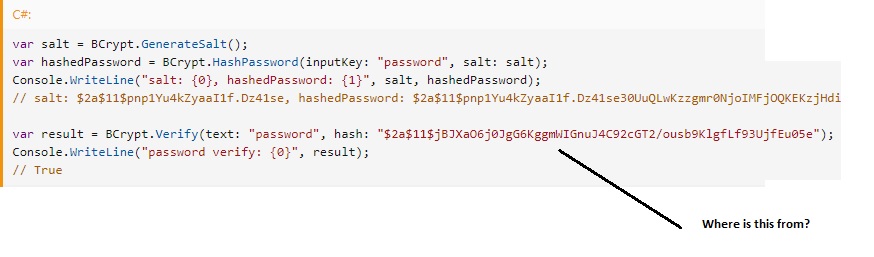
C#:
var salt = BCrypt.GenerateSalt();
var hashedPassword = BCrypt.HashPassword(inputKey: "password", salt: salt);
Console.WriteLine("salt: {0}, hashedPassword: {1}", salt, hashedPassword);
// salt: $2a$11$pnp1Yu4kZyaaI1f.Dz41se, hashedPassword: $2a$11$pnp1Yu4kZyaaI1f.Dz41se30UuQLwKzzgmr0NjoIMFjOQKEKzjHdi

var result = BCrypt.Verify(text: "password", hash: "$2a$11$jBJXaO6j0JgG6KggmWIGnuJ4C92cGT2/ousb9KlgfLf93UjfEu05e");
Console.WriteLine("password verify: {0}", result);
// True
You end up with a hash that the concatenation of the salt and the password hash, for example:
The string
$2a$11$pnp1Yu4kZyaaI1f.Dz41se30UuQLwKzzgmr0NjoIMFjOQKEKzjHdi is the concatenation of:- salt:
$2a$11$pnp1Yu4kZyaaI1f.Dz41se- password hash:
30UuQLwKzzgmr0NjoIMFjOQKEKzjHdiHence passing the single concatenated string to
BCrypt.Verify, together with what the user entered in the password field, we are able to validate if its correct, by hashing their input with the same salt and then comparing the outcome versus the hash stored in the DB. Using a unique salt per password makes it far more difficult for anyone to gain access to all accounts i.e. brute forcing a password with a single salt only exposes a single account. BTW encrypt / decrypt algorithms are more pertinent to send data across an untrusted network for decryption at the end.
Last edited:
If its financial stuff, DUKPT is a good starting point... but encryption in the DB itself...nah!
DUKPT is a key management scheme, not encryption
Lol im in charge of internal business systems, that never face the outside world well except for webservices.There isnt a need to encrypt every piece of data that gets stored in the db.That would slow things down alot on our side seeing that we work with so much data.
My main system only facilitates 5-7 bar worth of transactions a day so its not that big
You don't have to encrypt everything, but passwords should never be stored in the clear, internal facing systems are no exception. Also - if you work with financial data (e.g. card numbers, etc.) you should adhere to standards, like PCI-DSS, etc.
Solarion
Honorary Master
- Joined
- Nov 14, 2012
- Messages
- 28,138
- Reaction score
- 17,921
var result = BCrypt.Verify(text: "password", hash: "$2a$11$jBJXaO6j0JgG6KggmWIGnuJ4C92cGT2/ousb9KlgfLf93UjfEu05e"); Console.WriteLine("password verify: {0}", result);
Just one question on this.
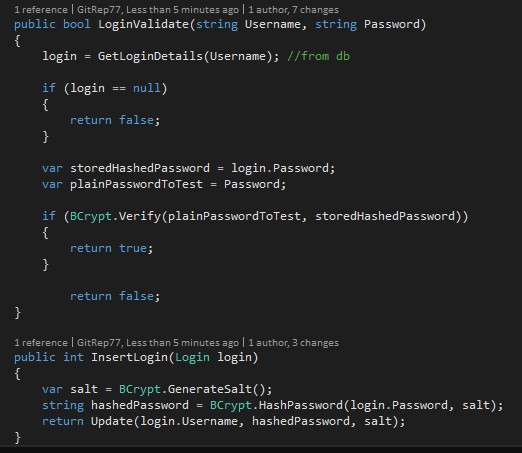
Pretty much the only way I could get the login verify working. I've cleaned the code up, just used this for illustration.
Code:
            string originalPasswordSalt = login.Salt; // retrieve its value from the DB
            string originalPasswordHash= login.Password; // retrieve its value from the DB
            string givenPasswordPlain = Password; // given by the user during login
            string givenPasswordHash = BCrypt.Net.BCrypt.HashPassword(givenPasswordPlain, originalPasswordSalt);

            if (givenPasswordHash.Equals(originalPasswordHash))
            {
               //success
            }
            else
            {
                //Fail
            }
Last edited:
Just one question on this.
Pretty much the only way I could get the login verify working. I've cleaned the code up, just used this for illustration.
Code:string originalPasswordSalt = login.Salt; // retrieve its value from the DB string originalPasswordHash= login.Password; // retrieve its value from the DB string givenPasswordPlain = Password; // given by the user during login string givenPasswordHash = BCrypt.Net.BCrypt.HashPassword(givenPasswordPlain, originalPasswordSalt); if (givenPasswordHash.Equals(originalPasswordHash)) { //success } else { //Fail }
It is the contents of the variable "hashedPassword"
C#:
var storedHashedPassword = LoadPasswordFromDb(username);
var plainPasswordToTest = ExtractPasswordFromRequest(request);
if (BCrypt.Verify(plainPasswordToTest, storedHashedPassword) {
   //supplied password is correct
} else {
   //supplied password is incorrect
}
you dont need to rehash the password on the test, BCrypt will do that for you
Solarion
Honorary Master
- Joined
- Nov 14, 2012
- Messages
- 28,138
- Reaction score
- 17,921
ExtractPasswordFromRequest
Nice! That works thanks _kabal_
I really wanted to use that verify function

Last edited:
Good, but you need to watch for exceptions.,Nice! That works thanks _kabal_
I really wanted to use that verify function
BCrypt.Verify throws 2 and GetLoginDetails certainly also throws
C#:
/// <summary>
///  Verifies that the hash of the given <paramref name="text"/> matches the provided
///  <paramref name="hash"/>
/// </summary>
/// <param name="text">The text to verify.</param>
/// <param name="hash"> The previously-hashed password.</param>
/// <param name="enhancedEntropy">Set to true,the string will undergo SHA384 hashing to make use of available entropy prior to bcrypt hashing</param>
/// <param name="hashType">HashType used (default SHA384)</param>
/// <returns>true if the passwords match, false otherwise.</returns>
/// <exception cref="ArgumentException">Thrown when one or more arguments have unsupported or illegal values.</exception>
/// <exception cref="SaltParseException">Thrown when the salt could not be parsed.</exception>
public static bool Verify(string text, string hash, bool enhancedEntropy = false, HashType hashType = DefaultEnhancedHashType)
{
  return SecureEquals(SafeUTF8.GetBytes(hash), SafeUTF8.GetBytes(HashPassword(text, hash, enhancedEntropy, hashType)));
}