I got a Kingston 8GB DataTraveler a few weeks back, worked great at first but today when I plugged it in I got the message: "The drive is not formatted. Do you want to format it now?"
I had nothing critical on there (everything on there was also on my main PC) so I clicked Yes. I left it as full (as opposed to quick) format and let it do its thing. The progress bar increased until close to the end and then said something like the disk cannot be formatted because it is write-protected. I checked the physical device and there is no switch or anything for write-protection. Then I tried a quick format, no luck.
I then tried the "HP USB Disk Storage Format Tool", which has worked for me in the past on a Sahara disk I was having similar issues with, and this too would not complete (both full and quick).
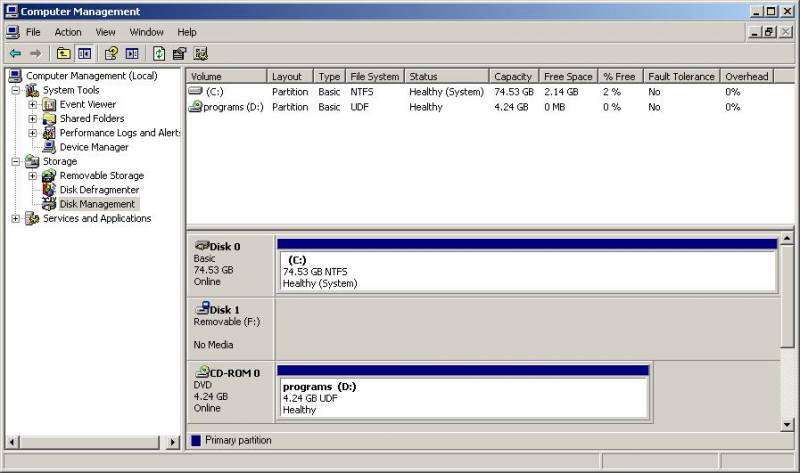
My computer is currently still picking up the disk but when I click on it now it says "Please insert a disk into drive F:". The HP tool picks the device up as having 0MB.
A screen shot of Disk Management is here.
I've tried DISKPART but this drive doesn't even list.
I've tried the "Kingston Boot Utility" but this doesn't detect it.
I've tried "HDD Low level format tool", this doesn't pick it up.
I've tried "HP Drive Key Boot Utility" and this shows F: and seems to complete the process but afterwards nothing on the disk has changed and it is still saying "Please insert a disk into drive F:".
I've tried TestDisk, doesn't pick it up
I've tried PTEDIT32.exe, the flash does not appear in the list of drives
I've even tried uninstalling the flash disk from the PC, rebooting and then re-installing to no avail.
I've tried the flash disk on a different PC with the same outcome. Both PCs used are running Windows.
I have been Googling for the past 3 hours straight and all the above listed things came up, now I don't know what else to do.
I know the disk has a 5 year warranty, and I will make use of it as a last resort but I would preferably like to get it working again.
Seems like hardware trouble though.
Any advice, knowledge, help, tips?!
I had nothing critical on there (everything on there was also on my main PC) so I clicked Yes. I left it as full (as opposed to quick) format and let it do its thing. The progress bar increased until close to the end and then said something like the disk cannot be formatted because it is write-protected. I checked the physical device and there is no switch or anything for write-protection. Then I tried a quick format, no luck.
I then tried the "HP USB Disk Storage Format Tool", which has worked for me in the past on a Sahara disk I was having similar issues with, and this too would not complete (both full and quick).
My computer is currently still picking up the disk but when I click on it now it says "Please insert a disk into drive F:". The HP tool picks the device up as having 0MB.
A screen shot of Disk Management is here.
I've tried DISKPART but this drive doesn't even list.
I've tried the "Kingston Boot Utility" but this doesn't detect it.
I've tried "HDD Low level format tool", this doesn't pick it up.
I've tried "HP Drive Key Boot Utility" and this shows F: and seems to complete the process but afterwards nothing on the disk has changed and it is still saying "Please insert a disk into drive F:".
I've tried TestDisk, doesn't pick it up
I've tried PTEDIT32.exe, the flash does not appear in the list of drives
I've even tried uninstalling the flash disk from the PC, rebooting and then re-installing to no avail.
I've tried the flash disk on a different PC with the same outcome. Both PCs used are running Windows.
I have been Googling for the past 3 hours straight and all the above listed things came up, now I don't know what else to do.
I know the disk has a 5 year warranty, and I will make use of it as a last resort but I would preferably like to get it working again.
Seems like hardware trouble though.
Any advice, knowledge, help, tips?!