Digital video questions.

blue-eye-boy

Expert Member
Joined
Jul 25, 2006
Messages
2,973
Reaction score
5
Hi there, Yesterday I bought a Sony Dcr HC26e video camera, secondhand at cash crusaders for R1050. This morning I downloaded some video onto my pc via normal usb cable. I'm not very impressed with the quaility, as it looks like a very vey compressed file. Now here are my questions:

1. Will a firewire connection be better? Or what are the benefits from such cable?
2. I captured the video with Nero vision, and also with Widows movie maker. Will any other program give me better quality?
3. Will new dv tapes give me better quality? Any makes that are better?
4. Any other suggestions and tips please?

Thanks.
 
Hi there, Yesterday I bought a Sony Dcr HC26e video camera, secondhand at cash crusaders for R1050. This morning I downloaded some video onto my pc via normal usb cable. I'm not very impressed with the quaility, as it looks like a very vey compressed file. Now here are my questions:

1. Will a firewire connection be better? Or what are the benefits from such cable?
2. I captured the video with Nero vision, and also with Widows movie maker. Will any other program give me better quality?
3. Will new dv tapes give me better quality? Any makes that are better?
4. Any other suggestions and tips please?

Thanks.

1. FW will only give you improved throughput ie speed. It won't make the video better. That depends on the internal optics of the camera, the CCD and the codec used to compress the video.

2. Once again it depends on the settings used to capture the video. You
can possibly change the codec used to record the video using the camera itself although if it's using MiniDV tape its probably DV. DV is a very high quality capture codec. If its MPEG2 well you'll get worse quality, the bitrate is
important too.

3. No. Since you're recording in digital format, you'll either have video or you won't have any (or you'll get very corrupted video with data errors).
Panasonic MiniDV MQ, AMQ or PQ are the best MiniDV tapes around,
they're recently upgraded the nomenclature. Those tapes are for professional use. You can probably get away with any name brand tape in
a consumer grade camcorder.

4. Download G-Spot
http://www.headbands.com/gspot/
and let it tell you what sort of codec your captured video has.
Post the results here.

5. If you want to edit your captured video so that it has a very professional look, get hold of Sony Vegas. You can buy it at IC for under R1000.
Its the best editing package short of buying Adobe Premiere Pro (R10.000) or Final Cut Pro (Mac) (also R10.000) or the even more expensive Avid Media Composer.

Get hold of G-Spot, and tell us what codec your downloaded video is encoded with and the bitrate.
 
Last edited:
1. FW will only give you improved throughput ie speed. It won't make the video better. That depends on the internal optics of the camera, the CCD and the codec used to compress the video.

2. Once again it depends on the settings used to capture the video. You
can possibly change the codec used to record the video using the camera itself although if it's using MiniDV tape its probably DV. DV is a very high quality capture codec. If its MPEG2 well you'll get worse quality, the bitrate is
important too.

3. No. Since you're recording in digital format, you'll either have video or you won't have any (or you'll get very corrupted video with data errors).
Panasonic MiniDV MQ, AMQ or PQ are the best MiniDV tapes around,
they're recently upgraded the nomenclature. Those tapes are for professional use. You can probably get away with any name brand tape in
a consumer grade camcorder.

4. Download G-Spot
http://www.headbands.com/gspot/
and let it tell you what sort of codec your captured video has.
Post the results here.

5. If you want to edit your captured video so that it has a very professional look, get hold of Sony Vegas. You can buy it at IC for under R1000.
Its the best editing package short of buying Adobe Premiere Pro (R10.000) or Final Cut Pro (Mac) (also R10.000) or the even more expensive Avid Media Composer.

Get hold of G-Spot, and tell us what codec your downloaded video is encoded with and the bitrate.
you're giving advice without background. The Sony DV cameras offer a DV output @25Mbps via Firewire. The usb output is a downscaled mpeg1 transport stream for use as webcam etc.

To get the max quality you need to use firewire
 
you're giving advice without background. The Sony DV cameras offer a DV output @25Mbps via Firewire. The usb output is a downscaled mpeg1 transport stream for use as webcam etc.

To get the max quality you need to use firewire

If he downloaded G-spot, he'd have told us the what codec the video was at.

I think my advice is far more versatile than yours and more comprehensive
since you failed to even touch on the other points, neither was your post
informative enough to illustrate the above fact (25Mbps via Firewire).
So kindly bug off instead of criticising
others. It may also be possible for him to use USB to capture the original videostream
as encoded on the tape.

The sum total of your post: "Firewire will be far better. no need to do anything else.".
 
Last edited:
Okay, I'm a noob on this, and the info I got was that if I capture the video through windows movie maker, then it's wma file, and with nero it's mpeg2. I suppose you can adjust the bitrate and codec or type of file it must be when capturing? So what I've learned here is that dv codec is best? But I dont see it on the list of possible file types on the settings of both the programs.
 
@PeterCH
all the issues that he highlighted would be solved by using firewire.
1. firewire will be better
2. no other software will improve the quality. Nero and Windows MovieMaker are Dv compliant.. Other software may offer more features but not higher quality.
3. other tape will not improve quality. The only improvement would be a possible reduction in tape drop-out.. the drop-out levels on consumer grade tape is usually way below the level that the error correction of the camera can handle.


happy?
 
Last edited:
Okay, I'm a noob on this, and the info I got was that if I capture the video through windows movie maker, then it's wma file, and with nero it's mpeg2. I suppose you can adjust the bitrate and codec or type of file it must be when capturing? So what I've learned here is that dv codec is best? But I dont see it on the list of possible file types on the settings of both the programs.

You should be able to set up to capture native DV AVI with either. The .avi is the container for the DV stream.
 
If i remember correctly you can only get 640x480 res when you capture with windows movie maker. I could be wrong though.

I remember when i first captured from mine (HC46E) i was very disappointed, after checking out the res, etc. all was good.
 
Hi there, Yesterday I bought a Sony Dcr HC26e video camera, secondhand at cash crusaders for R1050. This morning I downloaded some video onto my pc via normal usb cable. I'm not very impressed with the quaility, as it looks like a very vey compressed file. Now here are my questions:

1. Will a firewire connection be better? Or what are the benefits from such cable?
2. I captured the video with Nero vision, and also with Widows movie maker. Will any other program give me better quality?
3. Will new dv tapes give me better quality? Any makes that are better?
4. Any other suggestions and tips please?

Thanks.
1. Firewire is just a more stable and faster transfer speed.
2. Pinnacle Studio 11 is fantastic, as is Sony Vegas. I had cheap software that came with my cam and the transferred video was utter crap. As soon as I used Pinnacle, it was stunning.
3. No. You will need a better cam. Tape based cams produce the best quality.
 
Last edited:
Hi there, Yesterday I bought a Sony Dcr HC26e video camera, secondhand at cash crusaders for R1050. This morning I downloaded some video onto my pc via normal usb cable. I'm not very impressed with the quaility, as it looks like a very vey compressed file. Now here are my questions:

1. Will a firewire connection be better? Or what are the benefits from such cable? - I have never bothered using the USB because I'd heard it's not worth the trouble. Firewire has worked well for me.
2. I captured the video with Nero vision, and also with Widows movie maker. Will any other program give me better quality? - I have tried Windows movie maker with good results, so I don't think your problem is the software.
3. Will new dv tapes give me better quality? Any makes that are better? - With DV it is either recorded in top quality or none at all i.e. you cant get a lower quality image with DV - possibly loss of frames etc. - I've used high end and cheapies with same results. I use the Sony minDV's.
4. Any other suggestions and tips please?

Thanks.

I have a miniDV (HC 43E) which is much the same as yours and get superb quality video.
I use U-Lead Video Studio and capture with the firewire in raw DV, then once I've done the edits I convert it to a compressed format depending on what I need it for.
I have made S-VCD's which had better quality than the VHS player.
I also send it back to the camcorder in DV and store it like that.

What is the quality like when playing it directly from the camcorder to the TV or on the camcorders screen? You should be able to get the same quality with your PC edited stuff.

What is the file extension of your raw captured video?

As I've not got any experience using the USB capture, I cant be sure but my guess is that the firewire will solve your problems.

http://support.sony-europe.com/dime/camcorders/dv/dv.aspx?l=en&m=DCR-HC26E
 
Last edited:
Thanks for all the replies. I will defenitely get the firewire cable, any suggestions where, or what make to buy? then I will try again. thanks
 
Thanks for all the replies. I will defenitely get the firewire cable, any suggestions where, or what make to buy? then I will try again. thanks
Cable is one thing - you can get those at HiFi or Incredible Corruption iirc.

Does your pc have firewire onboard? (Its often labelled as 1394)
 
Thanks for all the replies. I will defenitely get the firewire cable, any suggestions where, or what make to buy? then I will try again. thanks

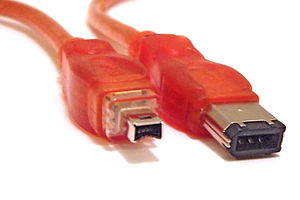
The cables are available at any computer shop. The thing to check is the port on your PC. There are two flavours of Firewire 400 connector: a four pin (like the one on the camera - has no power pins. Many notebooks use this connector) and a six pin (includes power, usually found on desktops/Macs).
300px-FireWire_cables.jpg


Your cable will need to be 4-pin on the one side and you'll need to check what you'll need on the other end.
 
The cables are available at any computer shop. The thing to check is the port on your PC. There are two flavours of Firewire 400 connector: a four pin (like the one on the camera - has no power pins. Many notebooks use this connector) and a six pin (includes power, usually found on desktops/Macs).
300px-FireWire_cables.jpg


Your cable will need to be 4-pin on the one side and you'll need to check what you'll need on the other end.
Do any PCs come with FW800?
 
Okay I just realized that I blew R100. I bought a 4 -6 pin cable online, and my laptop have the 4 pin, and the cam. Next time I will check.
 
Next step, download WINDV (http://windv.mourek.cz/) totally free. With this you will download your videos as DV-AVI files, which is the best quality you gonna get and will give you AVI files that is something like 14GB per hour recorded. Open/edit these DV-AVI files in Windows Movie Maker.

I too was terribly disappointed when I used windows movie maker and USB to download my video, using WINDV and firewire turned my frown upside down!
 
Last edited:
Top
Sign up to the MyBroadband newsletter
X