So [MENTION=14460]Yuu[/MENTION] advised me about it.
Running Telkom LTE-A uncapped and Rain Mobile uncapped I wanted to test it. Results are pretty impressive especially for the speed seekers.
My Setup:
Windows 10
Latest Nodejs
Telkom Uncapped sim in Huawei B618s-65d connected to pc with Ethernet
Rain Mobile uncapped sim in Huawei B618s-22d connected to pc via Wifi dongle
Setup Dispatch proxy
https://imgur.com/a/0snis
Link about Dispatch Proxy on Github
https://github.com/Morhaus/dispatch-proxy
Running it Telkom@6 priority and Rain@4 priority just because my Rain is maxing @ 40Mbps and My Telkom is maxing @90Mbps.
Setup a sock5 proxy also as the HTTP proxy does not work well. Set the proxy in a specific sofware like torrents or download manager or in windows and force all to the dispatch proxy in "Control Panel > Configure Proxy Server"
Now Dispatch can't split single connections between two connections but it can split multi threaded connections like p2p and multithreaded downloads in a download manager. If you force the dispatch proxy in windows browsing will be faster as is each connection is also divided. Take mybb for example. You have the mybb page then all the ads and that all from different link so that will all be split.
Also multi threaded speedtests like speedtest.net will be split.
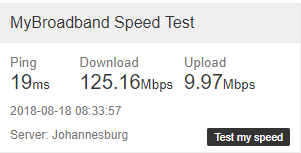
My speeds on speedtest with Dispatch Proxy enabled.


Running Telkom LTE-A uncapped and Rain Mobile uncapped I wanted to test it. Results are pretty impressive especially for the speed seekers.
My Setup:
Windows 10
Latest Nodejs
Telkom Uncapped sim in Huawei B618s-65d connected to pc with Ethernet
Rain Mobile uncapped sim in Huawei B618s-22d connected to pc via Wifi dongle
Setup Dispatch proxy
https://imgur.com/a/0snis
Link about Dispatch Proxy on Github
https://github.com/Morhaus/dispatch-proxy
Running it Telkom@6 priority and Rain@4 priority just because my Rain is maxing @ 40Mbps and My Telkom is maxing @90Mbps.
Setup a sock5 proxy also as the HTTP proxy does not work well. Set the proxy in a specific sofware like torrents or download manager or in windows and force all to the dispatch proxy in "Control Panel > Configure Proxy Server"
Now Dispatch can't split single connections between two connections but it can split multi threaded connections like p2p and multithreaded downloads in a download manager. If you force the dispatch proxy in windows browsing will be faster as is each connection is also divided. Take mybb for example. You have the mybb page then all the ads and that all from different link so that will all be split.
Also multi threaded speedtests like speedtest.net will be split.
My speeds on speedtest with Dispatch Proxy enabled.
Last edited: