Downgrade = Faster browsing!

Borg

Well-Known Member
Joined
Sep 24, 2007
Messages
166
Reaction score
0
So I had my 4Mb line downgraded this week to 384Kb/s as I noticed a substantial decrease in the performance thereof the past three months, and decided it was not worth the truckload of cash that I am forking over to Telkom.

To my amazement my SNR almost doubled, which had some positive side effects. Web browsing is definitely faster now and for the first time I can listen to streaming audio without any buffering or hiccups whatsoever. FTP logins are also much quicker now and I can upload my Web Sites without the connection seeming to die halfway through.

Only downside is of course that I will have to wait longer to download large files. That is fine, because I definitely scratched that itch when I downloaded 70GB in four days once.

Anyone else also noticed the same?
 
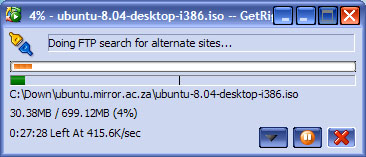
I would rather see this...

Ubuntu1.jpg
 
Very interesting, Borg. I guess the R110 (?) downgrade fee was worth it for you ;)

Do you mind sharing what your pre-downgrade (4Mbps) line statistics were and what they are now?

Did you ever do a speedtest.net test using the 4Mbps? Have you done one after your downgrade for comparison?
 
Do you mind sharing what your pre-downgrade (4Mbps) line statistics were and what they are now?

fz1, what in your opinion would be "good" line stats in terms of the up/down SNR and line attenuation?

BTW..kudos to you man, your posts over the last few weeks have been very helpful. :)
 
Very interesting to know.

Maybe one needs to have two ADSL lines, one a 384k line for general browsing and the such, and a 4Mb line for huuuuge downloads? :D
 
fz1, what in your opinion would be "good" line stats in terms of the up/down SNR and line attenuation?

BTW..kudos to you man, your posts over the last few weeks have been very helpful. :)

Thank you. *bow*

Detailed post on ideal figures: http://mybroadband.co.za/vb/showpost.php?p=1239914&postcount=7

I'd say anything over 20dB downstream (noise margin) and 10dB or so upstream should be trouble free. My line stats are 25dB down, 13 dB up, and although my line is not error free (I pick up 50 or so CRC errors and about 5 or less "errored seconds" per 24/hour period) and my downstream noise margin fluctuates frequently (mostly during the day) I don't actually experience any problems and get 3.4Mbps speeds when doing (local) speed tests.
 
Thank you. *bow*

Detailed post on ideal figures: http://mybroadband.co.za/vb/showpost.php?p=1239914&postcount=7

I'd say anything over 20dB downstream (noise margin) and 10dB or so upstream should be trouble free. My line stats are 25dB down, 13 dB up, and although my line is not error free (I pick up 50 or so CRC errors and about 5 or less "errored seconds" per 24/hour period) and my downstream noise margin fluctuates frequently (mostly during the day) I don't actually experience any problems and get 3.4Mbps speeds when doing (local) speed tests.

Well my stats are:
Code:
Connection Status  	Connected
Us Rate (Kbps) 	  	640
Ds Rate (Kbps) 	  	4096
US Margin 	  	12
DS Margin 	  	20
Trained Modulation 	ADSL_G.dmt
LOS Errors 	  	0
DS Line Attenuation 	9
US Line Attenuation 	5
Peak Cell Rate 	  	1509 cells per sec
CRC Rx Fast 	  	0
CRC Tx Fast 	  	1
CRC Rx Interleaved 	0
CRC Tx Interleaved 	0
Path Mode 	  	Fast Path
and I still get sync loss. Those stats seem pretty good to me.

I tried unplugging the filter and just connecting the router straight into the phone line and the sync loss issue disappeared for a while but alas, it happened now even without a filter.
 
Strangeness. Not to hijack the thread, but here's a couple things you can try:

1. Run RouterStats (assuming you have a compatible router) to monitor (and graph) your line statistics (particularly downstream noise margin) over a period of time rather than the point in time that you get when you look them up in your router on your own: http://www.vwlowen.co.uk/internet/files.htm. Let it run over at least an hour, while you continue with your regular browsing/downloading activities.

2. Remove ALL devices attached to your DSL phone line (filtered or not), and see if that helps. It's possible that something like an alarm (or Teleaid, in my case) is installed on your phone line without you being aware of it (and without it being plugged in to a jack, but rather wired directly into a Telkom "box"/extension). See if you can't isolate the problem being on your side rather than Telkom's (crazy, I know, but then you can nag THEM to fix THEIR $h1t).

3. See if you can pick up some correlation between losing synch, and the affect on your figures (via the graphs in RouterStats), or things like receiving a call or making a call, fax, etc.? Bad wiring may also be an issue. Perhaps you have some wiring running under the carpet or something and stepping on a particular part causes a big enough drop in noise margin to force resynch (this actually happened to me...)?
 
I also don't wanna thread hijack but I think this'll be helpful to the community in general.

Strangeness. Not to hijack the thread, but here's a couple things you can try:

1. Run RouterStats (assuming you have a compatible router) to monitor (and graph) your line statistics (particularly downstream noise margin) over a period of time rather than the point in time that you get when you look them up in your router on your own: http://www.vwlowen.co.uk/internet/files.htm. Let it run over at least an hour, while you continue with your regular browsing/downloading activities.

Will do, I have a Mega 100WR so I'm not sure if this is compatible with RouterStats.

2. Remove ALL devices attached to your DSL phone line (filtered or not), and see if that helps. It's possible that something like an alarm (or Teleaid, in my case) is installed on your phone line without you being aware of it (and without it being plugged in to a jack, but rather wired directly into a Telkom "box"/extension). See if you can't isolate the problem being on your side rather than Telkom's (crazy, I know, but then you can nag THEM to fix THEIR $h1t).

Did that. There is only one phone connected to the line (same jack as the router) and it's currently disconnected. Wit the thing connected (using a filter ofcourse) I got like 10 sync losses but with no phone and filter, I've only lost sync once.

3. See if you can pick up some correlation between losing synch, and the affect on your figures (via the graphs in RouterStats), or things like receiving a call or making a call, fax, etc.? Bad wiring may also be an issue. Perhaps you have some wiring running under the carpet or something and stepping on a particular part causes a big enough drop in noise margin to force resynch (this actually happened to me...)?

Doubt that is my issue but I'll look into it. When my line was still at 384k it NEVER lost sync, well maybe once or twice due to my mom moving the cords around but for the most part, it was rock solid stable.

Also, do you think I should flash the router with new firmware? Currently it's using 99.70.1 and I see that 99.70.2n id available from here.
 
Looking at RouterStats config, I see that as long as you can enter the URL to the page that your router displays line statistics on, you can 'teach' it to read the SNR and attenuation figures. So, compatibility should not be a problem... IN the configuration, on the Graphs tab, click on the Common Settings tab and change the "Sample every" option to as low as it will go (I think it only goes down to 5 seconds) so that we can graph and monitor your line statistics in finer detail and watch for fluctuations.

Strange that your filtered phone causes synch losses. Just to be doubly sure, your line is now connected directly to the wall, not via a filter, and not sharing the line with anything else, correct?

In general, I would not hesitate to upgrade firmware on my devices, so I would go ahead and do that. Especially if you have a copy of your current firmware that you can downgrade to if you need to (although that page you link to say it will not be possible to downgrade to v66, but does not mention if you can still downgrade back to v99.70.1...)
 
Looking at RouterStats config, I see that as long as you can enter the URL to the page that your router displays line statistics on, you can 'teach' it to read the SNR and attenuation figures. So, compatibility should not be a problem... IN the configuration, on the Graphs tab, click on the Common Settings tab and change the "Sample every" option to as low as it will go (I think it only goes down to 5 seconds) so that we can graph and monitor your line statistics in finer detail and watch for fluctuations.

I'm gonna download it now and give it a bash.

Strange that your filtered phone causes synch losses. Just to be doubly sure, your line is now connected directly to the wall, not via a filter, and not sharing the line with anything else, correct?

Correct.

I've just had to reconnect the phone+filter, can't leave it disconnected for too long. ;)

In general, I would not hesitate to upgrade firmware on my devices, so I would go ahead and do that. Especially if you have a copy of your current firmware that you can downgrade to if you need to (although that page you link to say it will not be possible to downgrade to v66, but does not mention if you can still downgrade back to v99.70.1...)

That's what I'm afraid of, not being able to roll back to the earlier firmware. I'll flash the firmware only as a last resort.

Will post my results of the RouterStats graphs in this thread.
 
Given our pathetic caps, 384k makes sense anyway.

It's a crying shame, but it's true. How I manage to scrape through each month on 3GB and 4mb line is like :eek: that's why I have a backup WA prepaid ;)
 
Ummmm something strange is happening. My line stats are staying constant! :confused:

At first I thought I might've set up RouterStats incorrectly but even if I go to the router's page from the browser and refresh the page that gives all the line stats, the figures there do not change. My U/D line attenuation and SNR are pinned at 4/9 and 12/20 respectively.
 
I wouldn't call that strange :P What I would call strange is if your line stats stay constant and you experience a synch loss. If you can, let RouterStats run continuously in the background for as long as possible. Stats can fluctuate at any time or stay stable at any time. Also, did you change the graph update period to 5 seconds (the minimum)?
 
I wouldn't call that strange :P What I would call strange is if your line stats stay constant and you experience a synch loss. If you can, let RouterStats run continuously in the background for as long as possible. Stats can fluctuate at any time or stay stable at any time. Also, did you change the graph update period to 5 seconds (the minimum)?
Yup, the minimum update frequency is 5 seconds which is what I changed it to.

I'll update this post in about 45 minutes time. if I can.
 
I had 384k for about a year a few months ago... then upgraded to 4mbit, then cursed at myself for not upgrading sooner :p
 
Top
Sign up to the MyBroadband newsletter
X