Dumb Intercom - Make smarter?

mrb13676

Well-Known Member
Joined
Sep 30, 2007
Messages
214
Reaction score
51
Have an ancient commax intercom (wired).

I have no interest in installing a wireless system because firstly the outside portion is well outside wifi range and secondly it's just an added expense and complexity.

What I would like to achieve is to have HA send me a notification when the doorbell is rung.. I suspect this will involve using an ESP8266 nodeMCU device.

Anyone done anything like this and have any tips? I want to try and keep it simple i.e. only that it sends a notification when someone pushes the button outside - the reason for this is that I spend a lot of time in the outside office and cannot hear the bell from there.....
 
A cheaper solution will be to have the inside station's calling signal sent to the speaker operate a relay which will switch a short-range transmitter like the ET TX2 micro and place a receiver (ET RX2 micro) in your office. This can sound a buzzer

This combo will easily manage 50 metres through walls, etc. They each need a 12 VDC supply

1641192358727.png
 
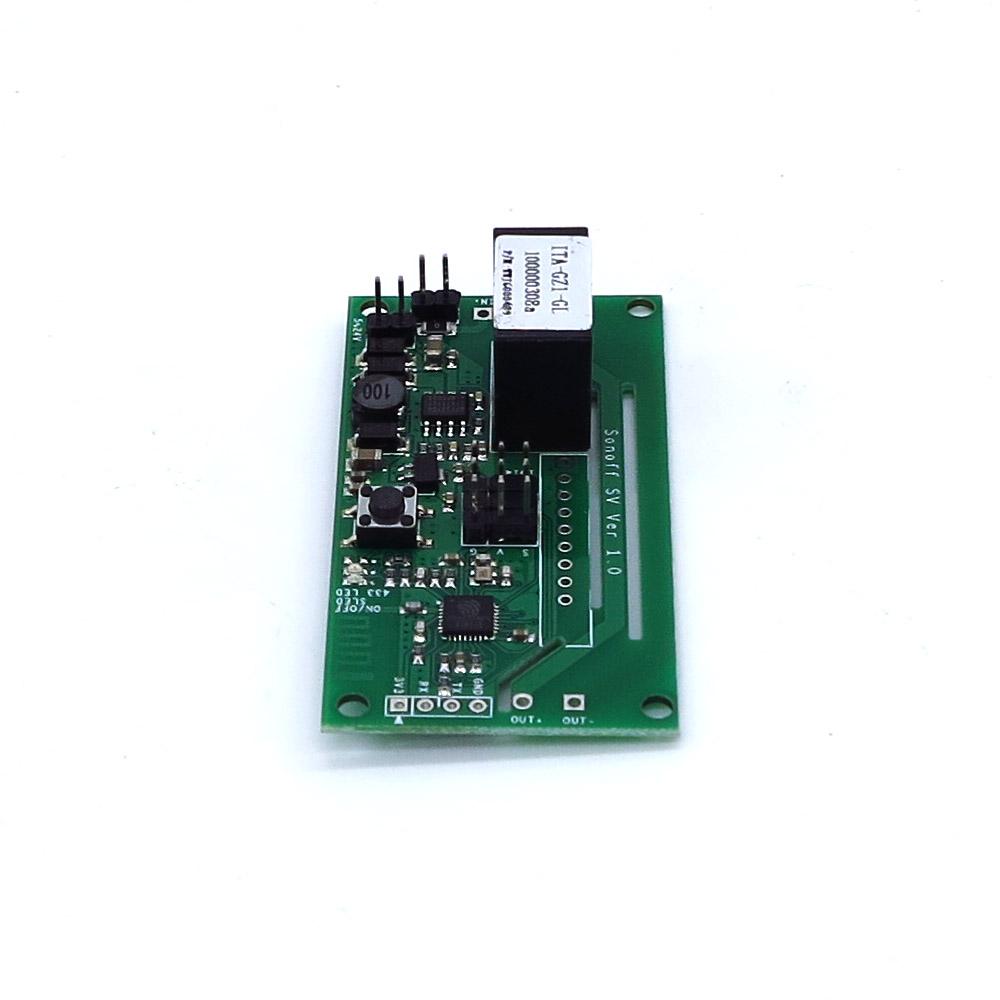
If your inside, wired station is within wifi range then you could hook a Sonoff SV to it and get HA to notify you of bell push via Telegram or suchlike.

 
Have an ancient commax intercom (wired).

I have no interest in installing a wireless system because firstly the outside portion is well outside wifi range and secondly it's just an added expense and complexity.

What I would like to achieve is to have HA send me a notification when the doorbell is rung.. I suspect this will involve using an ESP8266 nodeMCU device.

Anyone done anything like this and have any tips? I want to try and keep it simple i.e. only that it sends a notification when someone pushes the button outside - the reason for this is that I spend a lot of time in the outside office and cannot hear the bell from there.....

I had the same problem, I work in the shed, and I can't hear my doorbell ring. My doorbell has a LED that flashes when the bell is ringing. I used this LED to trigger a circuit that powers up a ESP8266 (Wemos D1 mini, but can be any), which then connects to WiFi, sends an MQTT message to Node-Red which sends a Telegram message to my phone. The same setup also sends me an alert when the door is opened and closed, which helps me check that my boy has not left the door open.

This was a really cheap way to solve it.

The doorbell runs on 2 AA batteries, I changed this to a single LiFoPO4 cell since you can run the microcontroller directly on this battery as well as the doorbell. To keep the power usage low, the microcontroller is shut down completely (i.e. not deep sleep). I have a "power latch" circuit to wake it up, the microcontroller keeps a input high while it needs to do its work, then once done, brings the pin low to power itself down again.

Some challenges:
- The LED flashes more than once, I needed a small circuit using a resistor and capacitor to smooth this out to have a detectable trigger to wake the microcontroller
- The anode of the LED was not connected to the ground of the battery, so I used an optocoupler to connect the doorbell part to the microcontroller circuit part

Caveat: I'm not an engineer, I'm a developer, so I am sure this could have been done much easier and better by someone with deeper engineering knowledge

Improvements I could have made would be to eliminate the need for Node-Red and MQTT completely. It is possible to send a Telegram message directly from an ESP8266. Since I had IOTStack running, I went the MQTT route but it is unnecessary

Video that inspired me:

LiFePO4 video, if you don't know these batteries:
 

Attachments

  • smart doorbell.jpg
    smart doorbell.jpg
    616 KB · Views: 14
this could work - mine is on a constant 12V supply so I could kepe the ESP8266 awake I guess which may reduce delays? I don't have an LED but i suppose the activation of the speaker for the chime could be used to do the same....
 
this could work - mine is on a constant 12V supply so I could kepe the ESP8266 awake I guess which may reduce delays? I don't have an LED but i suppose the activation of the speaker for the chime could be used to do the same....
You don't have to shut the ESP down or put it to deep sleep if you don't have to

I only did it that way because the bell part is inside the house in an area where I don't have a constant power supply. In fact, if you watch the video I posted from the Hookup, he runs it from a 5V power supply.

My one problem was that it takes a while for the ESP8266 to connect to WiFi, using a static IP helps a lot - but if you keep it powered on that becomes less of a problem. Have something in your loop() (if you use Arduino IDE) to check the WiFi connection and reconnect if necessary. WifiManager is a nice library to manage this.

If there is no led, you can check on the intercom PCB which pads lead to the buzzer/speaker and see what voltage is produced. I am guessing the PCB doesn't run on 12V, it probably has some step down to 5V or 3.3V, but either way, you can use that 12V with a simple DC/DC step down or a voltage regulator to power the ESP.

There is a nice video showing how to integrate a TrigBoard to a smoke detector, even though the TrigBoard is an ESP32, its the same concept, using a buzzer / speaker to trigger a digital input. He later changed it to use a LED, but part 1 might give you some ideas, whether its a smoke detector or intercom triggering, the concept is the same:

 
Top
Sign up to the MyBroadband newsletter
X