


Seriously
Honorary Master
- Joined
- Nov 29, 2012
- Messages
- 16,595
- Reaction score
- 220
How to Enable Start Menu in Windows 8 Without Third Party Tool
http://www.jkwebtalks.com/2012/12/how-to-enable-start-menu-in-windows-8.html
http://www.jkwebtalks.com/2012/12/how-to-enable-start-menu-in-windows-8.html
In Windows 8, open Windows Explorer, click view tab, and then enable “Hidden items” and close the Explore window.
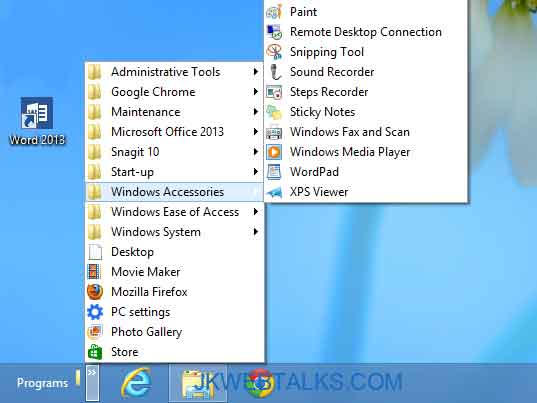
Right click the taskbar and select Toolbar – New Toolbar. It’ll bring a folder selection window. Select the hard drive from the left pane and go to: C – ProgramData – Microsoft – Windows - Start Menu – Programs.
Select it and add it as a toolbar. It appears on the right of the taskbar. Right click the taskbar and un-tick the “Lock the taskbar” option. Drag the placeholder handle to the left of the taskbar.
Lock the taskbar again by right clicking. To open start menu, just click the little arrow next to it to bring the Start menu. [Via – Techtrickz.com]


