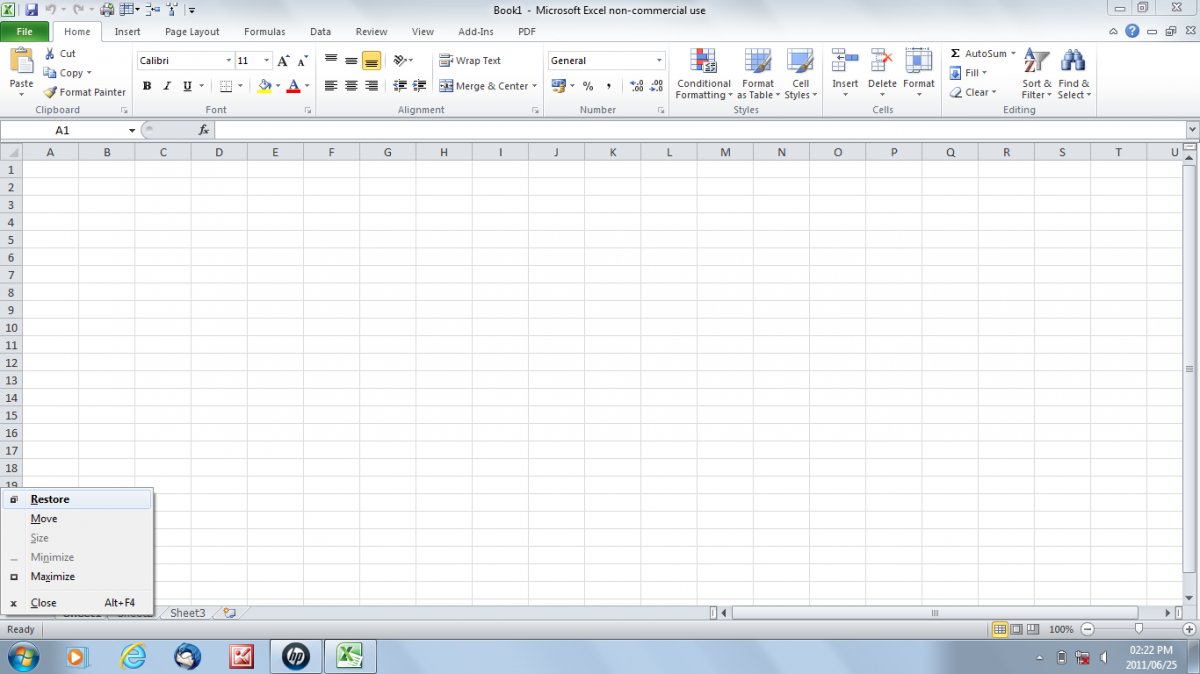
Excel 2010 task bar menu error

MyWorld

Executive Member
Joined
Mar 24, 2004
Messages
5,001
Reaction score
6
Location
Wes Transvaal
A friend of mione has the following problem on their Windows laptop, if someone could have a look at the image and maybe suggest a solution?

http://mybroadband.co.za/photos/showphoto.php?photo=24573&cat=720

Each time one tries to click on the very first tab in a workbook you get the task bar menu instead of the focus being shifted to the tab itself.

If you carefully position the mouse cursour on the top edge of the tab you can switch to that tab, but it is quite irritating trying to work with this "bug".

I think another problem that is related to this is that the document refuses to save every now and then when you click the "save" icon in the workbook.

Anyone have any idea of what causes this or how to rectify this?

HP ProBook 4515
Windows 7
Office 2010
 
Right click on the Taskbar and select properties. Choose Lock Taskbar and Autohide Taskbar, apply, ok and see if the issue is resolved.
 
Sorry if the question needs some more detail, I'm not a Windows user and have to Google what the menu is called in order to put the question on the table.
Some call it the "task bar menu" while others call it the "window control menu" and other still "application menu".

Anyway, if you use the alt+spacebar combo you get the same menu. Only now if you try and click on the very first tab (with a mouse or touchpad, makes no difference) on a spreadsheet this menu keeps popping up.

Check the screen settings, set to a high resolution and switch any magnification off
The laptop is set to best resolution and there is no magnification.

Right click on the Taskbar and select properties. Choose Lock Taskbar and Autohide Taskbar, apply, ok and see if the issue is resolved.
I think my explanation left a bit to be desired, I think I did a better job of it now.
 
can you post a pic of what it looks like when nothing is clicked?

Want to see if the task bar is hidden.


Also that looks almost like the left/right buttons are switched.


Is the person left handed?
 
Ok, the person needs to check the Keyboard layout of the Laptop.

Control Panel>Region and Language>Keyboards and Languages>Change Keyboards,

Generally speaking, check the Number 4 key, if it has a $ it's a US Layout keyboard, if it has a £ it's a UK keyboard.
Once it is changed and set, reboot the laptop and check if it is resolved.

My Language is English South Africa with a US Keyboard Layout, if that helps.
 
Here is the fullscreen screenshot as requested.
http://mybroadband.co.za/photos/data/720/screen022.png

I did change the keyboard settings, but the problem persists. I have now also exhausted my efforts on Google and cannot find anything of value. Id it just me or is Google really starting to go downhill the last year?

Anyway, I'm still open to suggestions.
 
Last edited:
I'll be on at PC in a bit.

In the meantime I suggest that you make sure that the task bar on the bottom(windows) is locked into place.

Maybe switch the bottons on the mouse (that is normally what happens if you press right click in windows) . Could even be that they're switched & need to be put back.
 
After some frustrated searching of the net with weak cell reseption (out of office till Tuesday) I finally found the solution.

It is the HP wireless assistant that is causing the problem.

Just kill and disable HPWAMAIN.exe and problem is solved.
Thanks for the replies!
 
LOL stooooopid HP laptops... Had a same issue last year on another customers laptop. I however only got it working after HP has swopped the mouse / trackpad and the mainboard. They had no solution how to fix it and also did not wanna replace the laptop.
So after the 2nd time reloading the laptop with recovery disc.. I had a brainwave of just doing clean install from a normal Windows 7 disc and just loading basic drivers and none of the cr*ppy HP software.

HP is really pathetic in after service for their useless junk laptops. Had soooo many faulty stuff from their last year. We learned our lesson and are not selling HP junk anymore only Lenovo and Dell and maybe really budget customers the occasional Acer.

HP = Having Problems. :D :D
 
Top
Sign up to the MyBroadband newsletter
X