As requested.You know the forum rules, post pics of the excel sheet/formula, not your nudes.
Thanks for the help.
South Africa’s biggest forum. Discuss, discover, and connect with thousands of members.
As requested.You know the forum rules, post pics of the excel sheet/formula, not your nudes.

Hi, Yes that is correct,

Unforunately i don't get the desired result.Dont create the space, make one word.

Remove the"" and one ,Unforunately i don't get the desired result.
Don't think you can, at least not in Sheets.Maybe try applying two different fonts to the cell.
Is it really that important to have it in the same cells? You can format the two cells to look like one with borders etc.Hi, yes I do.
Regards
Maybe try applying two different fonts to the cell.
That is why you see two barcodes.
You could try paste values over the cells, that will remove the formula, and then change the font for the username.
I don’t have Excel with me right now so can’t test.
apply multiple font colors or fonts in one cell - Microsoft Q&A
apply multiple font colors or fonts in one cell. Example : Hello, my name is Pierre "Pierre" would be in red "Hello, my name is" would be in black And not a formula. I used to be able, but sometimes I can. Anybody knows? I saw only…answers.microsoft.com


Got it working above, no copying of values. And yes, I used the old Concatenate formulaUsing the method I mention above I can get both in a cell.
You have to value copy the cell though.
View attachment 1823730

At home, downloaded the font:
View attachment 1823766
View attachment 1823767
Font used: https://www.1001freefonts.com/idautomation.com-code-39-barcode-font-free-version.font

 fonts.google.com
Hi. Thanks so much for your help. I am able to get the same as you but what I’m after as per your example is Piet under 1234567890 but with one codeAt home, downloaded the font:
View attachment 1823766
View attachment 1823767
Font used: https://www.1001freefonts.com/idautomation.com-code-39-barcode-font-free-version.font


Brain fart:I take it that you are looking for something like this?
View attachment 1823833
It can be achieved by adding a text box (located on "Insert" banner) below the bar code. View attachment 1823840
Select text box then press F2 to edit it in the formula bar. Refence your username cell (=A2 in this example) and press enter.
Move and resize the text box to where you want the text positioned inside the cell. (do this before replicating the section)
Format the shape and choose no fill and no border line.
To replicate, select all the cells with the data (A2 - C2 in this example), copy it and then paste below each other. The text box will replicate along with the selected cells that is being pasted.
Unfortunately you will have to change the username reference in each text box for every row since that information doesn't update dynamically, so it will involve additional upfront work to be done when setting up the template.
I tried that first, the barcode font messes with the sizing of the cell so you can't get the name close to the barcode.Brain fart:
Create two rows per entry, merge cells except the barcode celp, then have the barcode in the top cell and in the cell below have "Piet". Hide grid rows, will look the part.
Just throwing it out there.


Cold sweat running down my forehead hearing the "Ampersand" word again. Damn you C++
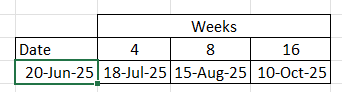
Take the current date and add 28? Then build in what you want to do if it falls on a weekend. The same for the last column - add 56 but account for the weekend days.
Unless the first date would never fall on a weekend - then just add the number of days you want to increase by
Something like this?Can anyone assist me with appointment date generating formula for Excel?
What I need to do is enter a date into a field then the next column must generate a date 4 weeks later or 28 days and the following column needs to show 8 weeks later or 56 days.
Thanks