Excel help

marine1

Honorary Master
Joined
Sep 4, 2006
Messages
50,636
Reaction score
3,183
Location
A black hole in the universe - JHB
Hi guys need some help please.
I for some reason have had to reinstall Office, problem is now when I open my Excel bank statements, the numbers when I try total them dont add up.
Even if I select all the numbers, the total doesnt show in right hand bottom column, please could someone assist me why this is happening?
Tks
 
could you tell me how to do that please?
1.png
 
could you tell me how to do that please?
Not off the top of my head.

You might also check the cell format. If you are using a decimal point instead of a comma or vice versa that could cause the problem you describe. Possibly when you reinstalled it set a different default setting to what you had before.
 
It looks like a column of numbers not a row.

Anyway, looks like you may have pasted text there and not numbers.

Check inside the cell to see if there is a space in there.

If there is a space then remove it, and it should become a number.
If not a space then try removing the minus sign and see if it turns into a number.
 
So frustrating
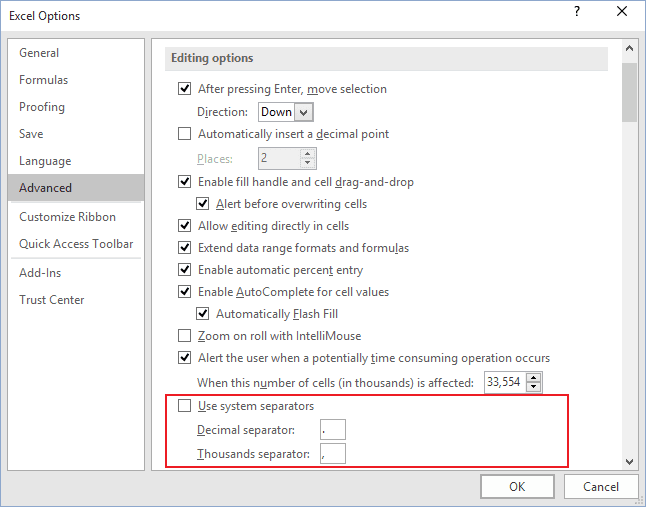
if you untick 'Use System Separators then set decimal point as the decimal separator and comma as the thousands separator, does that help?

Alternatively try using commas instead of decimal points in your list of numbers?
 
1643450326364.png

Thats what the original unzipped file looks like from FNB, however I obviously need to separate the information so I used text to columns.
Then I have the problem where nothing can be totalled
 
View attachment 1234770

Thats what the original unzipped file looks like from FNB, however I obviously need to separate the information so I used text to columns.
Then I have the problem where nothing can be totalled
So you have to use comma seperated values (CSV) in text to columns.
That is why they use a dot for the decimal point in the file instead of a comma, otherwise it would be read as a column.

So highlight the column, press CTRL H to find and replace, and then replace . with ,
 
So you have to use comma seperated values (CSV) in text to columns.
That is why they use a dot for the decimal point in the file instead of a comma, otherwise it would be read as a column.

So highlight the column, press CTRL H to find and replace, and then replace . with ,
You sir are a bloody genius

So how do I make this now a default?
 
When using Text to Columns, on the last dialog (Step 3 of 3), select the amount column, click Advanced, and make sure the Decimal separator is set correctly.

20220129a.png20220129b.png20220129c.png

P.S.: You might want to set your system-wide setting for decimal separator to periods instead of commas.

Open the start menu, type `intl.cpl`, it should open Region settings:

20220129d.png 20220129e.png
 
So you have to use comma seperated values (CSV) in text to columns.
That is why they use a dot for the decimal point in the file instead of a comma, otherwise it would be read as a column.

So highlight the column, press CTRL H to find and replace, and then replace . with ,
This fixed it but would one have it do this by default?
As FNB dont use commas, they use "."
 
When using Text to Columns, on the last dialog (Step 3 of 3), select the amount column, click Advanced, and make sure the Decimal separator is set correctly.

View attachment 1234772View attachment 1234774View attachment 1234776

P.S.: You might want to set your system-wide setting for decimal separator to periods instead of commas.

Open the start menu, type `intl.cpl`, it should open Region settings:

View attachment 1234778 View attachment 1234780
works as well thank you
 
This fixed it but would one have it do this by default?
As FNB dont use commas, they use "."
There are multiple ways of fixing it. The permanent fix as the guys pointed out above is that you need to change either Excel's setting, or go to Windows regional setting and make sure that you are using a dot "." as decimal separator instead of a comma ",".

If you type in a number in Excel using the dot as a decimal separater you can see what the default is.

Mine uses a comma as a decimal. If I type in 123.45, Excel changes that to 123,45.
On your Excel if you type 123.45, it'll stay like that.


For CSV files a comma is seen as a column, so you have to be careful how you use them.

It's been a pain for me since the 90's at least.
 
Top
Sign up to the MyBroadband newsletter
X