Excel Help

Waffl3s

Well-Known Member
Joined
May 9, 2011
Messages
103
Reaction score
14
Have the below test excel spreadsheat. Column A has the Name of the Test and Colomn B has the Number of People who have done the test. Column is spread quarterly.

Now the question, I need to Total the amount of people who have done each test for the full year, any idea how to do this guys??
Any help would be appreciated.

5ouofs.png
 
I tried making a PivotTable but SUM gives me a Zero result for some reason :\
 
Pivot should work, play with the options to get the right results. Make sure you have headings to your columns, put heading of column A in "row label" and but heading of column B in "Value"

Why don't you just sort column A alphabetically. You will then be able to use the sum function.
 
Last edited:
Can't sort alphabetically as when this is done, it will be syncing with a database and I don't know if I can set excel to sort on update(possible?)

Will/ keep trying, maybe I missed something somewhere. I've tried SUMIF and even CALCULATE but still no joy.
 
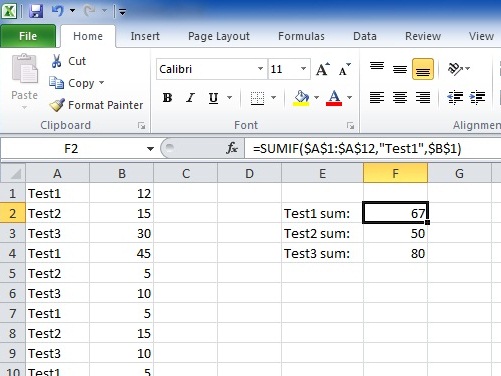
Sumif is the simplest way to go unless you're doing it wrong or i'm understanding wrong ;)
 
Quickly copied your table for illustration purposes:
screen4.jpg
 
Thanks PsyWulf, think I was doing it wrong. :o

Is there a way to automate this ie. Calculate throughout the table without having to set the criteria to "Test1"?
(SUMIF : ??=A1 then SUM kinda statement?). Not a programmer so trying my best here. Thanks for all the help guys.
 
Last edited:
Top
Sign up to the MyBroadband newsletter
X