Exchange server help, getting rid of dynamic dns settings.

AstroTurf

Lucky Shot
Joined
May 13, 2010
Messages
32,118
Reaction score
6,140
Hi,

Previous guy set up dynamic dns for one users mailbox on dyndns.org (when they were free).

Whenever I try to get this guys email set up on his computer it asks me for a password for the dyndns address instead of using the domain passwords.

How do I fix this?

Driving me nuts.
 
You need to log into dyndns and remove the DNS host that's pointing to the mailbox. No other way.
 
dyndns have killed the domain and all settings.

Doesn't make sense then. If it's not pointing to dyndns, why would it request it?

Have you tried removing the Exchange account from Outlook and adding it again?
 
Doesn't make sense then. If it's not pointing to dyndns, why would it request it?

Have you tried removing the Exchange account from Outlook and adding it again?

Will have to I suppose.
 
What's the server address and username under the Account settings screen
 
Remove the computer from the domain, reboot, add it to the domain again and see if it flushes this issue?

Done that, also tried connecting to that mailbox from a different computer.
 
Put the local exchange address in the server address and see if the username resolves
 
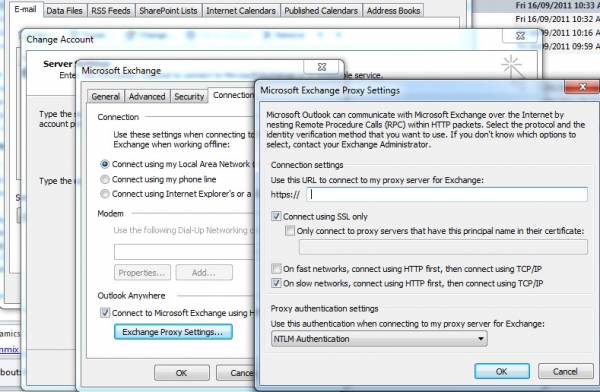
Was this a RPC exchange account?
RPC.jpg
 
Add new mail account

Manually specify details

Type of account: Exchange

Server: your server

Username: The username

Your answers are just short enough to not be exactly sure what's wrong :P
 
Add new mail account

Manually specify details

Type of account: Exchange

Server: your server

Username: The username

Your answers are just short enough to not be exactly sure what's wrong :P

I tried that, it times out and tells me outlook is not connected to the exchange server.
 
Also, it is connected, same as all the other machines, can access via OWA and can access network shares etc.
 
Well if this issue keeps popping up after all this you need to check your DNS Server at the domain. Check if the dyndns address isn't part of the DNS entries and remove it.
 
I tried that, it times out and tells me outlook is not connected to the exchange server.

Points to a DNS resolution failure
Is the clock synchronized with the server?
Can you ping servername and servername.domain.local

Is the PC not just logging in with Cached AD credentials?
Create a new account on AD with email,log into said PC and see if you can access shares/email
 
Points to a DNS resolution failure
Is the clock synchronized with the server?
Can you ping servername and servername.domain.local

Is the PC not just logging in with Cached AD credentials?
Create a new account on AD with email,log into said PC and see if you can access shares/email

Can ping both, I have also tried on a new machine (just added to domain) with the same results.
 
Top
Sign up to the MyBroadband newsletter
X