r00igev@@r
Honorary Master
- Joined
- Dec 14, 2009
- Messages
- 15,646
- Reaction score
- 14,160
- Location
- Draadloos Bantha poo doo in 4ways
Explanation of connectivity and signal optimization
- View your location on the iBurst coverage map. Check if there is suitable coverage.
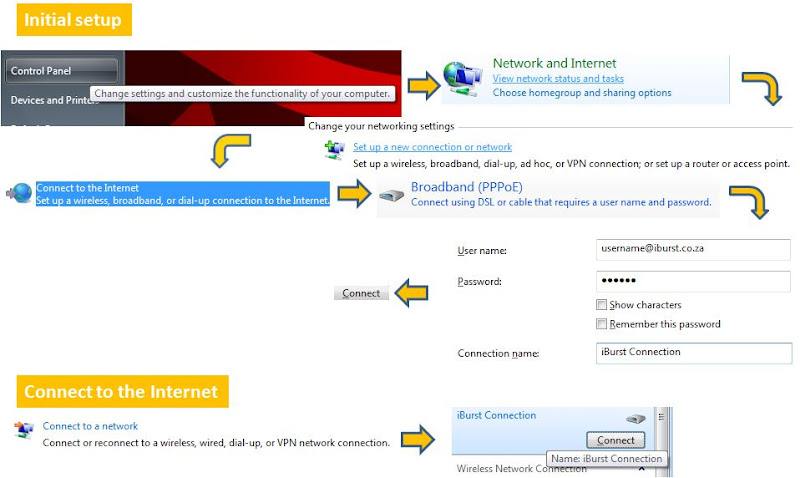
- Connect using these instructions: XP, Vista, Windows 7, Mac Ethernet and Mac USB.
- Check if there are any network issues here.
- Meaning of LEDs

- Test by using different windows at your location. If you have a Batman modem then try and use a longer USB cable. If you obtain a good signal you can use some apiekak to keep it in the correct position.
- The web service or the iBurst Terminal provides signal strength information. The iBurst Terminal provides useful information about your link, see below
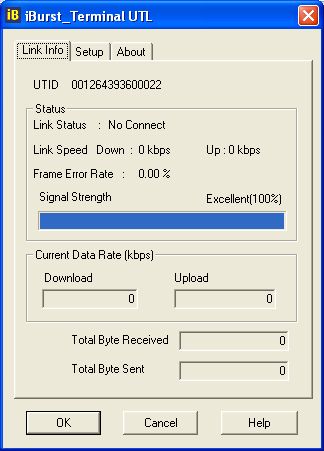 - You can also use putty to view signal information as described here.
- It is possible to improve signal using either an omni or flat panel antennae. The flat panel needs to be pointed directly at a base station while the omni can be mounted at a suitable location. Experiment with various positions such as the building side board or window.
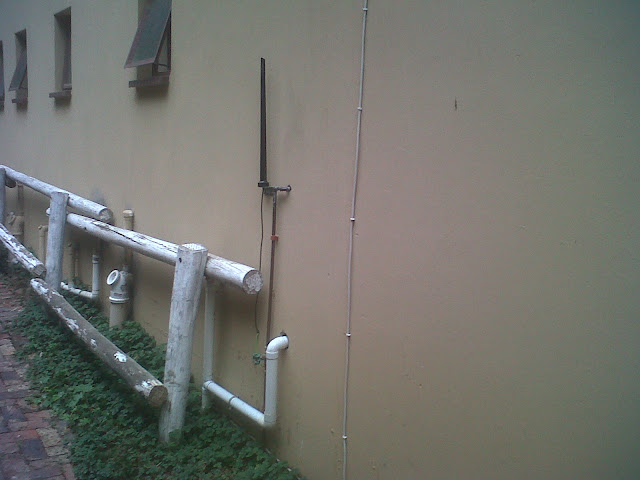
 - A typical iBurst mounting would use the brackets below:
 Often if is advisable to either use a woodworking G-Clamp (either as a temporary measure while searching for an optimal signal or permanently)
 - A full technical overview of iBurst is available on Google Docs here and as a pdf here.
- When you experience slow browsing speeds to certain web sites, check your MTU. iBurst requires an MTU of 1392 for most configurations and a setting of 1352 when using VPN software. DRTCP is a tool that can be used to set the MTU.
- If you have issues where you perceive that you bandwidth usage is high, the it is useful to download TCPView which will give an indication of how the bandwidth is being used.
.jpg) - Dark Knight Drivers
- Dark Knight Drivers
Windows XP
Windows Vista
Windows 7 32bit
Windows 7 64bit
PowerPC Mac OS X 10.5
PowerPC Mac OS X 10.4
PowerPC Mac OS X 10.3
Intel Mac OS X 10.6
Intel Mac OS X 10.5
Intel Mac OS X 10.4
Windows XP/Vista 64-bit
- Grandpa surfer drivers
Windows XP
Windows Vista
Windows 7 32bit
Powerbook G4 - OS X 10.5
Powerbook G4 - OS X 10.4
Powerbook G4 - OS X 10.2-10.3
- Batman drivers
Windows XP
Windows Vista
Windows 7 32bit
Windows 7 64bit
PowerPC Mac OS X 10.5
PowerPC Mac OS X 10.4
PowerPC Mac OS X 10.3
Intel Mac OS X 10.6
Intel Mac OS X 10.5
Intel Mac OS X 10.4
Windows XP/Vista 64-bit
- Blonde Surfer
Firmware update and instructions
- Manuals
Black Canary Manual
Batman specifications
- Your antennae doesn't have to he 100% vertical, depending on the environment, tilting your antennae can improve signal strength (mine is at about 30 degrees off vertical to get from 80% to 96%) I suspect electric fences are a high reason for interference, tilting the antennae can get you into that little interference free zone between your electric fence and the tower
- Error rate is important, rather sacrifice signal strength for better error rates, you should be looking to get less than 2% error rates. If you are finding that pages load nothing but complete loading or if you have unusually high latency - it's more than likely because you have a high error rate. Remember, if there is error, then it has to resubmit the entire packet again, essentially having to send the same data twice (thus the perception of half the speed!)
- Get ad block plus for firefox Sure, sites (like myBB) require adverts to run, and if it's your favourite site - turn off blocking for the site. But mostly adverts are a waste of bandwidth AND load time. Faster cheaper internet.
- Schedule your downloads for after hours. The reason afterhours is so cheap is to keep us whales off the network when people are trying to use the internet. Lets all trying and keep mass downloading when no-one is awake so that when we are awake, we aren't killing the network. Torrents: uTorrent has a scheduler. HTTP/FTP: Free download manager can set the start time for the download. Steam: Learn to use windows scheduler and have steam auto log in.
- Get a firewall and antivirus. The number of applications/games that connect to the internet of some unknown reason is truely amazing. Get a software firewall and only allow connections you want/trust, check out COMODO Firewall.
- iBurst is compatible with most ethernet/wifi broadband routers (compatible with tomato and dd-wrt) If you have better iBurst signal in a part of your house you can install your iBurst modem and router at that location and then access the Internet services using wifi.
* Any additional tips welcome!
- View your location on the iBurst coverage map. Check if there is suitable coverage.
- Connect using these instructions: XP, Vista, Windows 7, Mac Ethernet and Mac USB.
- Check if there are any network issues here.
- Meaning of LEDs
- Test by using different windows at your location. If you have a Batman modem then try and use a longer USB cable. If you obtain a good signal you can use some apiekak to keep it in the correct position.
- The web service or the iBurst Terminal provides signal strength information. The iBurst Terminal provides useful information about your link, see below
- It is possible to improve signal using either an omni or flat panel antennae. The flat panel needs to be pointed directly at a base station while the omni can be mounted at a suitable location. Experiment with various positions such as the building side board or window.
- When you experience slow browsing speeds to certain web sites, check your MTU. iBurst requires an MTU of 1392 for most configurations and a setting of 1352 when using VPN software. DRTCP is a tool that can be used to set the MTU.
- If you have issues where you perceive that you bandwidth usage is high, the it is useful to download TCPView which will give an indication of how the bandwidth is being used.
Windows XP
Windows Vista
Windows 7 32bit
Windows 7 64bit
PowerPC Mac OS X 10.5
PowerPC Mac OS X 10.4
PowerPC Mac OS X 10.3
Intel Mac OS X 10.6
Intel Mac OS X 10.5
Intel Mac OS X 10.4
Windows XP/Vista 64-bit
- Grandpa surfer drivers
Windows XP
Windows Vista
Windows 7 32bit
Powerbook G4 - OS X 10.5
Powerbook G4 - OS X 10.4
Powerbook G4 - OS X 10.2-10.3
- Batman drivers
Windows XP
Windows Vista
Windows 7 32bit
Windows 7 64bit
PowerPC Mac OS X 10.5
PowerPC Mac OS X 10.4
PowerPC Mac OS X 10.3
Intel Mac OS X 10.6
Intel Mac OS X 10.5
Intel Mac OS X 10.4
Windows XP/Vista 64-bit
- Blonde Surfer
Firmware update and instructions
- Manuals
Black Canary Manual
Batman specifications
- Your antennae doesn't have to he 100% vertical, depending on the environment, tilting your antennae can improve signal strength (mine is at about 30 degrees off vertical to get from 80% to 96%) I suspect electric fences are a high reason for interference, tilting the antennae can get you into that little interference free zone between your electric fence and the tower
- Error rate is important, rather sacrifice signal strength for better error rates, you should be looking to get less than 2% error rates. If you are finding that pages load nothing but complete loading or if you have unusually high latency - it's more than likely because you have a high error rate. Remember, if there is error, then it has to resubmit the entire packet again, essentially having to send the same data twice (thus the perception of half the speed!)
- Get ad block plus for firefox Sure, sites (like myBB) require adverts to run, and if it's your favourite site - turn off blocking for the site. But mostly adverts are a waste of bandwidth AND load time. Faster cheaper internet.
- Schedule your downloads for after hours. The reason afterhours is so cheap is to keep us whales off the network when people are trying to use the internet. Lets all trying and keep mass downloading when no-one is awake so that when we are awake, we aren't killing the network. Torrents: uTorrent has a scheduler. HTTP/FTP: Free download manager can set the start time for the download. Steam: Learn to use windows scheduler and have steam auto log in.
- Get a firewall and antivirus. The number of applications/games that connect to the internet of some unknown reason is truely amazing. Get a software firewall and only allow connections you want/trust, check out COMODO Firewall.
- iBurst is compatible with most ethernet/wifi broadband routers (compatible with tomato and dd-wrt) If you have better iBurst signal in a part of your house you can install your iBurst modem and router at that location and then access the Internet services using wifi.
* Any additional tips welcome!
Last edited: