Exporting to word, excel etc

Solarion

Honorary Master
Joined
Nov 14, 2012
Messages
28,059
Reaction score
17,821
Hello guys, I've not done this in a while and the ways I did do this before were quite archaic, like literally loops etc with Interops.

This is for a motor vehicle repair garage. I have DataSet or a List<t> of customers; first name, last name, etc and a break down of each item repaired/replaced and the cost.

What is the quickest way to export each customer into word, excel or pdf so I can email each of them a quote.
 
Why not consider rather rendering to HTML with something like CommonMark; everyone's got a browser.
https://github.com/lunet-io/markdig

... a way to approach this is maybe to create a Markdown formatted file with some custom insert tags for fields (of your own design); that way you these markdown files can integrate similar to form letter template; and it also means you can modify the template without changing your form template code.

...and if you really need PDF; the route from HTML to PDF should be pretty simple.
 
Why not consider rather rendering to HTML with something like CommonMark; everyone's got a browser.
https://github.com/lunet-io/markdig

... a way to approach this is maybe to create a Markdown formatted file with some custom insert tags for fields (of your own design); that way you these markdown files can integrate similar to form letter template; and it also means you can modify the template without changing your form template code.

...and if you really need PDF; the route from HTML to PDF should be pretty simple.

Yeah, that is pretty awesome actually. I did come across Razor templates, you create the template in html with reference values in it. I'll try this one first it's smaller and more compact. Thanks a lot!

Edit: WoW the possibilities are here for creating a really nice reports. This is great thanks Roi.
 
Last edited:
You can also try to use python XLSWRITER library to create decent xlsx extracts
 
There are many ways to do it, but don't use Interop for Excel/PDF's.

You can use Roi's HTML trick.
You can generate PDF's with iTextSharp and do the same type of replacing for embedded tags, along with rendering graphics etc dynamically.
You can create Excel files with NPOI.

There are a lot of other options as well.
 
What I have done is, create a Word template with place holders, like editable regions (In case you've not heard of them). Then while looping through each Customer I create a word object, set it = to my word template, replace the regions such as Firstname, Cell, Totals, Vat and then save it. While saving it you can either save as word, excel or PDF.
 
Word templates work well. Especially if you need to edit after the fact. Personally for reports & document not to be edited I prefer PDF. If you just want to use email,then HTML is very little work
 
I assume it is a text file? If so - just open it with Excel. It will then take you to the import facility. Use delimited. Select the correct delimiter (eg comma) and you can see below if it is correct. If so click ok or whatever the button says for yes or Finish.

Then you save it. Go to Word. Use the Mailings ribbon. Start Mail merge and then Step by step mail merge wizard

1534791236062.png

On the panel on the right select Email messages. Follow the wizard. Select your Excel list as the data source. Filter it as needed in the window that pops up. Use the Insert merge field button to build your email message. Complete the wizard. You will eventually be asked to add a subject and send the emails.
 
I assume it is a text file? If so - just open it with Excel. It will then take you to the import facility. Use delimited. Select the correct delimiter (eg comma) and you can see below if it is correct. If so click ok or whatever the button says for yes or Finish.

Then you save it. Go to Word. Use the Mailings ribbon. Start Mail merge and then Step by step mail merge wizard

View attachment 546389

On the panel on the right select Email messages. Follow the wizard. Select your Excel list as the data source. Filter it as needed in the window that pops up. Use the Insert merge field button to build your email message. Complete the wizard. You will eventually be asked to add a subject and send the emails.
I think what Solarion wants is a way to email a quote directly out of his system. No manhandling files after the fact. I assume the customer email address is part of the info that is captured for the quote. IMHO just make an HTML template with placeholders like the new string interpolation in C# or use T4 templates and embed the HTML result as the emaill body.
 
I use this :

public void ExportDataTableToCsv(string separator, DataTable dataTable)
{
// Abort if there are no rows in the DataTable
if (dataTable.Rows.Count == 0) return;

// Create the CSV file to which grid data will be exported.
StreamWriter streamWriter = new StreamWriter(this.FullPath);

// First we will write the headers.
int iColCount = dataTable.Columns.Count;
for (int i = 0; i < iColCount; i++)
{
string colname = dataTable.Columns.ToString();
streamWriter.Write(colname);
if (i < iColCount - 1)
{
streamWriter.Write(separator);
}
}
streamWriter.Write(streamWriter.NewLine);

// Now write all the rows.
foreach (DataRow dataRow in dataTable.Rows)
{
for (int i = 0; i < iColCount; i++)
{
if (!Convert.IsDBNull(dataRow))
{
streamWriter.Write(dataRow.ToString());
}
if (i < iColCount - 1)
{
streamWriter.Write(separator);
}
}
streamWriter.Write(streamWriter.NewLine);
}
streamWriter.Close();
}
 
I think what Solarion wants is a way to email a quote directly out of his system. No manhandling files after the fact. I assume the customer email address is part of the info that is captured for the quote. IMHO just make an HTML template with placeholders like the new string interpolation in C# or use T4 templates and embed the HTML result as the emaill body.

Ah now see I only really know a bit of SQL and VBA. I am lazy at html. My method works for me. And it goes through Outlook with signatures etc just fine.

Perhaps one day I will look at doing it the complicated way :ROFL: (for me that is)
 
I use this :

public void ExportDataTableToCsv(string separator, DataTable dataTable)
{
// Abort if there are no rows in the DataTable
if (dataTable.Rows.Count == 0) return;

// Create the CSV file to which grid data will be exported.
StreamWriter streamWriter = new StreamWriter(this.FullPath);

// First we will write the headers.
int iColCount = dataTable.Columns.Count;
for (int i = 0; i < iColCount; i++)
{
string colname = dataTable.Columns.ToString();
streamWriter.Write(colname);
if (i < iColCount - 1)
{
streamWriter.Write(separator);
}
}
streamWriter.Write(streamWriter.NewLine);


// Now write all the rows.
foreach (DataRow dataRow in dataTable.Rows)
{
for (int i = 0; i < iColCount; i++)
{
if (!Convert.IsDBNull(dataRow))
{
streamWriter.Write(dataRow.ToString());
}
if (i < iColCount - 1)
{
streamWriter.Write(separator);
}
}
streamWriter.Write(streamWriter.NewLine);
}
streamWriter.Close();
}

Going to give this a try now it looks great
 
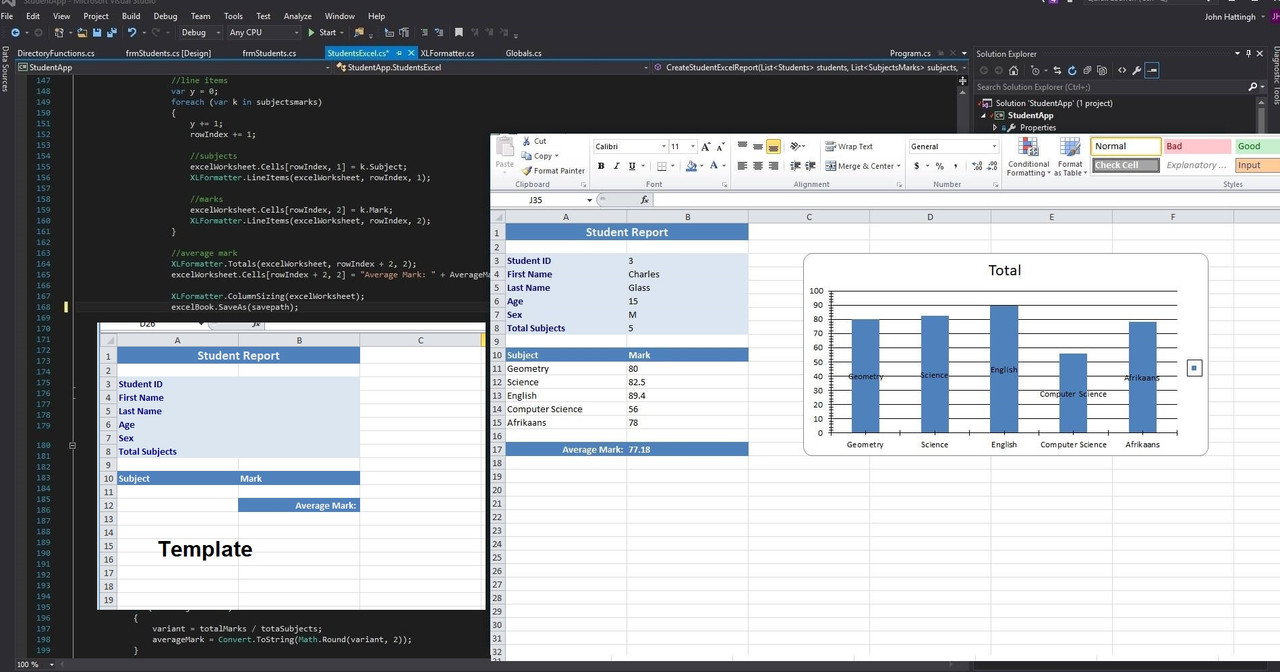
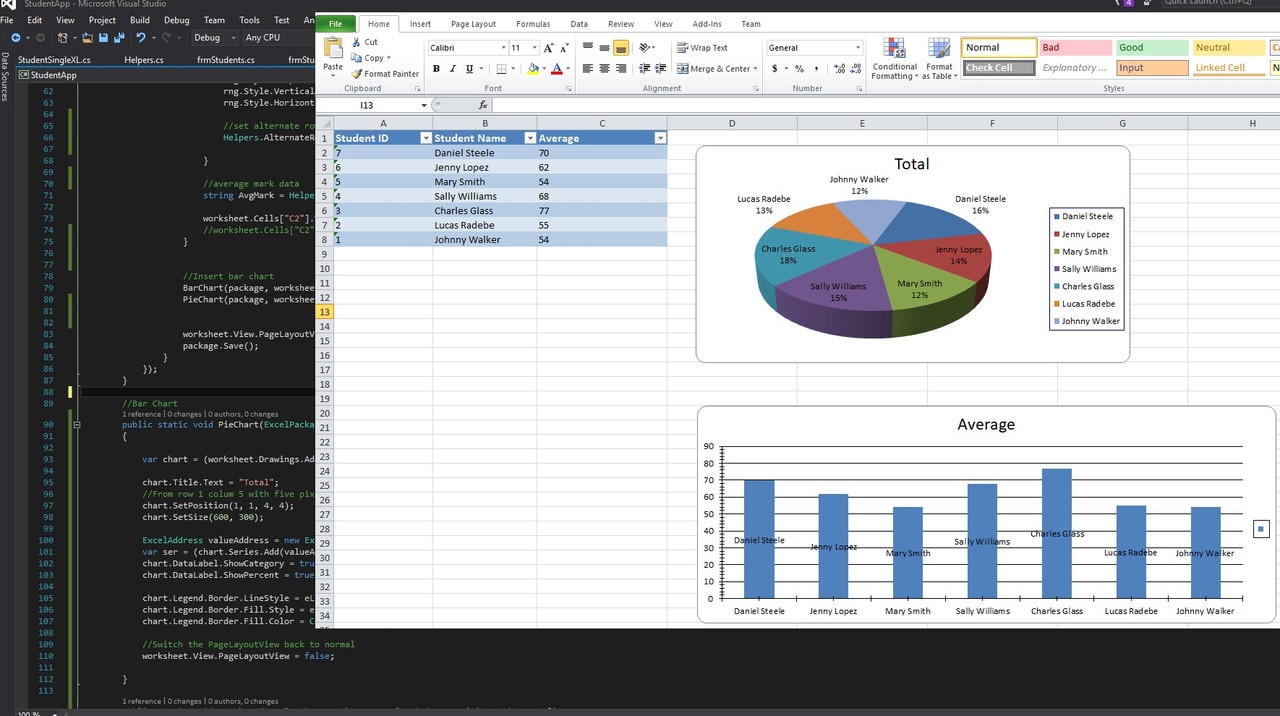
Just an update on this. Started using templates recently with charts (bar and pie so far)

43186974_10217055463524639_7713788987629895680_o.jpg
 
Top
Sign up to the MyBroadband newsletter
X