-
- News
-
Categories
- 5G
- ADSL
- AI
- Banking
- Black Friday
- Broadband
- Broadcasting
- Business
- Business Telecoms
- Cellular
- Cloud and Hosting
- Columns
- Cryptocurrency
- Energy
- Enterprise
- Fibre
- Gadgets
- Gaming
- Government
- Hardware
- Industry News
- Internet
- Internet of Things
- Investing
- IT Services
- Motoring
- Reviews
- Science
- Security
- Smartphones
- Software
- Technology
- Telecoms
- Trending
- Wireless
- Press Office
- Forum
- Industry News
- What's Next
- Company hub
- Speed Test
- About us
- Advertise with us
- Contact
- Careers


-
Join the MyBroadband community
South Africa’s biggest forum. Discuss, discover, and connect with thousands of members.
-
Question of the Day: Have you registered your home solar with Eskom?

You are using an out of date browser. It may not display this or other websites correctly.
You should upgrade or use an alternative browser.
You should upgrade or use an alternative browser.
Fibre Router Suggestions?
- Thread starter rajiv
- Start date


Johnatan56
Honorary Master
Internet speed? Budget?
I have the Archer D5, http://www.wootware.co.za/tp-link-a...ess-dual-band-gigabit-adsl2-modem-router.html
For some reason the D5 is cheaper than the C5 (D5 adds a modem chip). I get good signal, it has a WAN port and I get about 90MB/s within about 10 meters/1 wall on the 5Ghz band. Also, 1ms latency.
The 802.11n band is pretty much the usual, a bit better signal penetration than my old pace router though.
Interface wise, I like it.

it has two settings, DSL Modem Router Mode and Wireless Router Mode. I am currently using it as a wireless router.
EDIT: This is the wireless big brother: http://www.wootware.co.za/tp-link-archer-c7-ac1750-dual-band-wireless-ac-gigabit-router.html
EDIT2: If your budget is huge, you should look at routers that can beam form, but again, depends on your use case. In that case e.g. http://www.wootware.co.za/tp-link-t...e-router.html#product_tabs_description_tabbed
Again, what are is your budget/use case? (also the Archer C9 would probably be cheaper than the above one, but wootware doesn't have stock.)
EDIT3: Rebeltech stocks the C9 for R2865.
I have the Archer D5, http://www.wootware.co.za/tp-link-a...ess-dual-band-gigabit-adsl2-modem-router.html
For some reason the D5 is cheaper than the C5 (D5 adds a modem chip). I get good signal, it has a WAN port and I get about 90MB/s within about 10 meters/1 wall on the 5Ghz band. Also, 1ms latency.
The 802.11n band is pretty much the usual, a bit better signal penetration than my old pace router though.
Interface wise, I like it.
it has two settings, DSL Modem Router Mode and Wireless Router Mode. I am currently using it as a wireless router.
EDIT: This is the wireless big brother: http://www.wootware.co.za/tp-link-archer-c7-ac1750-dual-band-wireless-ac-gigabit-router.html
EDIT2: If your budget is huge, you should look at routers that can beam form, but again, depends on your use case. In that case e.g. http://www.wootware.co.za/tp-link-t...e-router.html#product_tabs_description_tabbed
Even if you have to run a mixed 802.11n/ac network on both bands, it’s worth investing in an 802.11ac adaptor for your older devices stuck on previous versions of the Wi-Fi standard. Using the same T4UH adaptor on the router’s 2.4GHz 802.11n network (there’s no way to create a 5GHz network that isn’t also 802.11ac), we saw quick speeds of 73.4Mbit/s at 10m and 36.8Mbit/s at 25m.
http://www.expertreviews.co.uk/networks/wireless-routers/1404505/tp-link-touch-p5-review
Again, what are is your budget/use case? (also the Archer C9 would probably be cheaper than the above one, but wootware doesn't have stock.)
EDIT3: Rebeltech stocks the C9 for R2865.
Last edited:

cobusv
Senior Member
i would just buy a mikrotik, inexpensive and does the job
Thanks, bud, very comprehensive.
10bmps line but I might bump it up to 20 or 40. Definitely a 100 when it gets cheaper.
Was looking at these as possibles:
https://www.rebeltech.co.za/12657-a...-30-asus-rt-n18u-wireless-n600-gigabit-r.html
https://www.rebeltech.co.za/13252-a...ss-gigabit-router-dual-band-24-5ghz-8021.html
https://www.rebeltech.co.za/9443-tp...witch-usb20-tp-link-ac750-wireless-dual-.html
https://raru.co.za/electronics/5216...-dual-band-router-shop-soiled-images-attached
10bmps line but I might bump it up to 20 or 40. Definitely a 100 when it gets cheaper.
Was looking at these as possibles:
https://www.rebeltech.co.za/12657-a...-30-asus-rt-n18u-wireless-n600-gigabit-r.html
https://www.rebeltech.co.za/13252-a...ss-gigabit-router-dual-band-24-5ghz-8021.html
https://www.rebeltech.co.za/9443-tp...witch-usb20-tp-link-ac750-wireless-dual-.html
https://raru.co.za/electronics/5216...-dual-band-router-shop-soiled-images-attached
Internet speed? Budget?
I have the Archer D5, http://www.wootware.co.za/tp-link-a...ess-dual-band-gigabit-adsl2-modem-router.html
For some reason the D5 is cheaper than the C5 (D5 adds a modem chip). I get good signal, it has a WAN port and I get about 90MB/s within about 10 meters/1 wall on the 5Ghz band. Also, 1ms latency.
The 802.11n band is pretty much the usual, a bit better signal penetration than my old pace router though.
Interface wise, I like it.
it has two settings, DSL Modem Router Mode and Wireless Router Mode. I am currently using it as a wireless router.
EDIT: This is the wireless big brother: http://www.wootware.co.za/tp-link-archer-c7-ac1750-dual-band-wireless-ac-gigabit-router.html
EDIT2: If your budget is huge, you should look at routers that can beam form, but again, depends on your use case. In that case e.g. http://www.wootware.co.za/tp-link-t...e-router.html#product_tabs_description_tabbed
Again, what are is your budget/use case? (also the Archer C9 would probably be cheaper than the above one, but wootware doesn't have stock.)
EDIT3: Rebeltech stocks the C9 for R2865.
Johnatan56
Honorary Master
Thanks, bud, very comprehensive.
10bmps line but I might bump it up to 20 or 40. Definitely a 100 when it gets cheaper.
Was looking at these as possibles:
https://www.rebeltech.co.za/12657-a...-30-asus-rt-n18u-wireless-n600-gigabit-r.html
https://www.rebeltech.co.za/13252-a...ss-gigabit-router-dual-band-24-5ghz-8021.html
https://www.rebeltech.co.za/9443-tp...witch-usb20-tp-link-ac750-wireless-dual-.html
https://raru.co.za/electronics/5216...-dual-band-router-shop-soiled-images-attached
I still don't like rebeltech's incorrect labeling, that router can't do 600MB/s, it can do 600Mbps or 733Mbps etc.
If you're keeping this router for a while, I'd avoid the first one, I'd want ac support. The next two options the 802.11ac is not that fast, but good enough, you won't get bottle-necked even if you decide to upgrade to 100Mbps.
What's the size of the premises you're trying to cover? Number of walls?
Yster21
Senior Member
Ah thank God, I thought I was the only one having a fit over people mixing up MB/s and Mbps. Woosah.I still don't like rebeltech's incorrect labeling, that router can't do 600MB/s, it can do 600Mbps or 733Mbps etc.
In terms of TP-Link and Asus, I've had both and love both. I find the Asus UI to look better, plus you can install a "download manager" app on the Asus router, which will torrent for you at specific times. This is super useful, since I do not have to leave my PC on at night then, plus I can schedule the downloader. The UI also shows you the bandwidth usage per IP on the network, in case you want to see who is using up the cap (something that I have wanted since the first minute we had multiple devices in our home connected to the internet.)
Technical support from TP-Link is usually a non-native English person, which leads to entertaining emails.
My personal preference would be the ASUS RT-AC53, then update its firmware with the latest Asuswrt-Merlin. TP-Link is still great, so that would be option 2.
Johnatan56
Honorary Master
Ah thank God, I thought I was the only one having a fit over people mixing up MB/s and Mbps. Woosah.
In terms of TP-Link and Asus, I've had both and love both. I find the Asus UI to look better, plus you can install a "download manager" app on the Asus router, which will torrent for you at specific times. This is super useful, since I do not have to leave my PC on at night then, plus I can schedule the downloader. The UI also shows you the bandwidth usage per IP on the network, in case you want to see who is using up the cap (something that I have wanted since the first minute we had multiple devices in our home connected to the internet.)
Technical support from TP-Link is usually a non-native English person, which leads to entertaining emails.
My personal preference would be the ASUS RT-AC53, then update its firmware with the latest Asuswrt-Merlin. TP-Link is still great, so that would be option 2.
Yeah, I sent them a message about it, they basically said that they get it from their supplier like that and they're not going to change it.
I checked up on it:Our Dual Band networking equipment will be labelled according to the manufactures site (eg. TOTOLINK AC750 Dual Band Wireless Range Extender (EX750), 2.4/5GHz (802.11 ac/a/b/g/n) @ 733MB/s (300MB/s + 433MB/s)). << Email to me.
http://www.totolink.net/sub/product/detail.asp?product_num=100136
So yeah.Data Rate 2.4GHz: 300Mbps
5GHz: 433Mbps
I didn't know about the download manager option, that's a nice feature. The Archer D5 I am using also has the option to show usage per IP and can rate limit individual/range of IPs.
I haven't used the technical support for a router, ever. Always been plug in, use the set-up, done.
I don't think OP will flash custom firmware on his device.
EDIT:
I deleted the Mac addresses.

Last edited:
I still don't like rebeltech's incorrect labeling, that router can't do 600MB/s, it can do 600Mbps or 733Mbps etc.
If you're keeping this router for a while, I'd avoid the first one, I'd want ac support. The next two options the 802.11ac is not that fast, but good enough, you won't get bottle-necked even if you decide to upgrade to 100Mbps.
What's the size of the premises you're trying to cover? Number of walls?
82m sq with about 3-4 walls. Using a Cisco Linksys E900 right now and it works fine.
Yeah, I sent them a message about it, they basically said that they get it from their supplier like that and they're not going to change it.
I checked up on it:
http://www.totolink.net/sub/product/detail.asp?product_num=100136
So yeah.
I didn't know about the download manager option, that's a nice feature. The Archer D5 I am using also has the option to show usage per IP and can rate limit individual/range of IPs.
I haven't used the technical support for a router, ever. Always been plug in, use the set-up, done.
I don't think OP will flash custom firmware on his device.
EDIT:
I deleted the Mac addresses.
Only gaming is currently happening in the house, lol.
Damn, that's might impressive to schedule d/ls. I'll have a look at that as well, thanks.
Yster21
Senior Member
Here's the page of the Asuswrt-Merlin firmware. Look at the screenshots, and be jelly. You'd have to agree that the TP-Link UI looks years behind that. Graphs are sexy! You can even view the data usage history for each device, then you know when the data was downloaded.
I've been running it for more than a year, without even one single problem. Uploading the firmware is as straightforward as can be. It would actually be silly not to install this firmware, as it is more optimised, more frequently updated and more secure than the default Asus firmware.
I've been running it for more than a year, without even one single problem. Uploading the firmware is as straightforward as can be. It would actually be silly not to install this firmware, as it is more optimised, more frequently updated and more secure than the default Asus firmware.
Johnatan56
Honorary Master
Here's the page of the Asuswrt-Merlin firmware. Look at the screenshots, and be jelly. You'd have to agree that the TP-Link UI looks years behind that. Graphs are sexy! You can even view the data usage history for each device, then you know when the data was downloaded.
I've been running it for more than a year, without even one single problem. Uploading the firmware is as straightforward as can be. It would actually be silly not to install this firmware, as it is more optimised, more frequently updated and more secure than the default Asus firmware.
Well yeah, but that's custom firmware, not stock. I'd rather not take chances with the warranty, maybe once the router was out of warranty.
I'd also handle my routers to be set up and forget tbh, so looking nice isn't that important, only the graph functionality would even make me consider flashing it.
EDIT: A quick google, OpenWRT seems to be the TP-Link alternative.
Last edited:
Yster21
Senior Member
Well yeah, but that's custom firmware, not stock. I'd rather not take chances with the warranty, maybe once the router was out of warranty.
I'd also handle my routers to be set up and forget tbh, so looking nice isn't that important, only the graph functionality would even make me consider flashing it.
EDIT: A quick google, OpenWRT seems to be the TP-Link alternative.
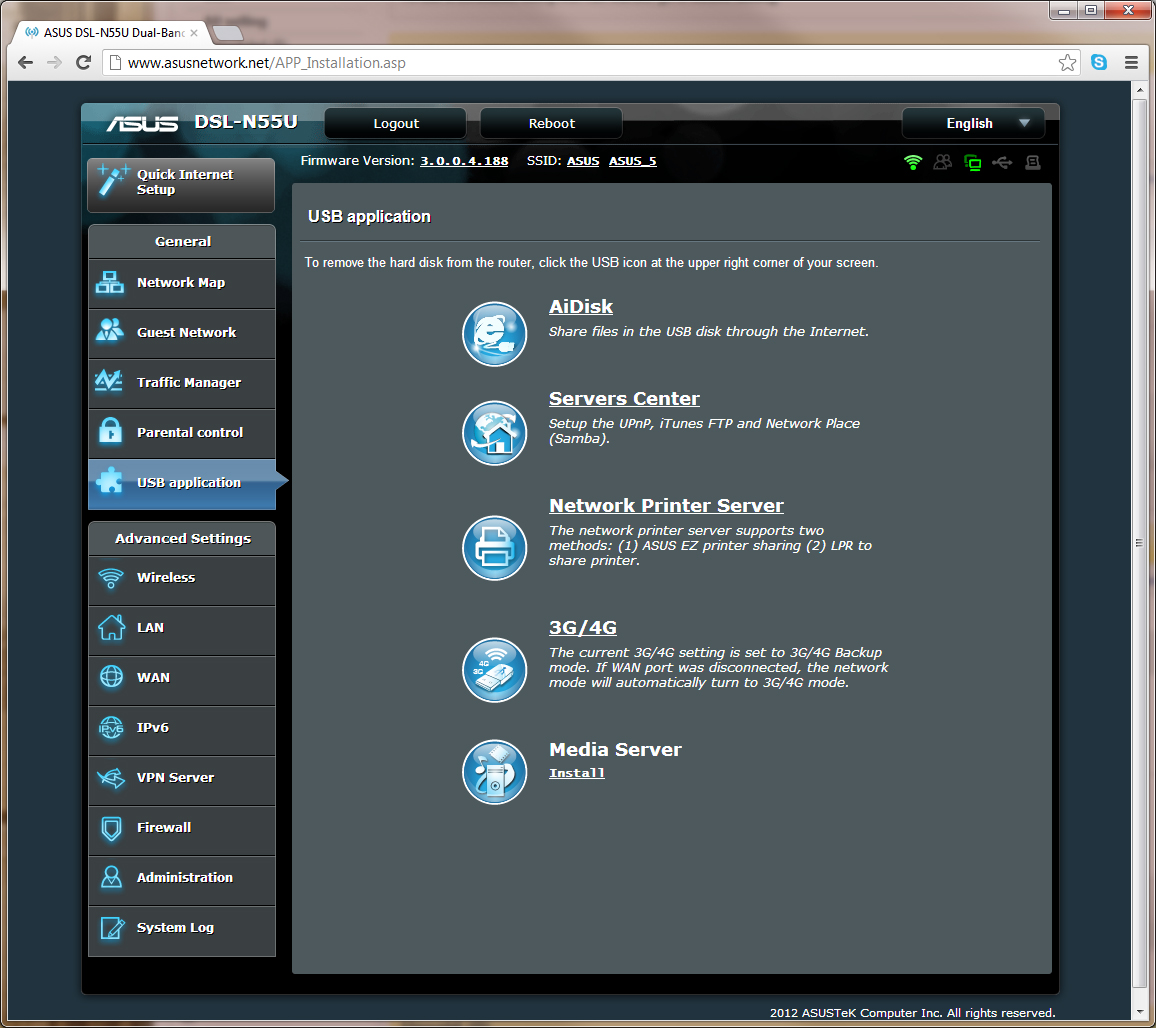
The stock firmware looks exactly the same, just fewer features (or it was back when I bought the router). Flashing to custom firmware is not a hassle, but you don't need to do it. It's just useful for finding the bandwidth hogs in the house, since it shows you a 24-hour live graph per IP.
I log into my router when problems arise in order to see if something is using the bandwidth, or to toggle DNS settings. There are multiple apps to install, but that also comes standard. The "Download Master" app was one, and there were a few others I didn't bother with.
I didn't buy the thing on a whim either. Read quite a few reviews on the best router for a R2000 to R2500 price range, and Asus was the clear winner. I was getting gatvol of buying brands that don't last. Went through two Netgear routers and three TP-Links in the space of two years.
Here's a screenie of the default firmware listing the apps to be installed.