-
- News
-
Categories
- 5G
- ADSL
- AI
- Banking
- Black Friday
- Broadband
- Broadcasting
- Business
- Business Telecoms
- Cellular
- Cloud and Hosting
- Columns
- Cryptocurrency
- Energy
- Enterprise
- Fibre
- Gadgets
- Gaming
- Government
- Hardware
- Industry News
- Internet
- Internet of Things
- Investing
- IT Services
- Motoring
- Reviews
- Science
- Security
- Smartphones
- Software
- Technology
- Telecoms
- Trending
- Wireless
- Press Office
- Forum
- Industry News
- What's Next
- Company hub
- Speed Test
- About us
- Advertise with us
- Contact
- Careers


-
Join the MyBroadband community
South Africa’s biggest forum. Discuss, discover, and connect with thousands of members.
-
Question of the Day: Do you get motion sick?

You are using an out of date browser. It may not display this or other websites correctly.
You should upgrade or use an alternative browser.
You should upgrade or use an alternative browser.
Format 128Gb SD Card FAT32?
- Thread starter LandyMan
- Start date

Speedster
Honorary Master


Haven't used it myself but heard good things

Format 64/128GB SD Card to FAT32 with PowerShell
The SD card is formatted to FAT 32 using PowerShell. It aids in formatting a 64GB SD card to FAT32 and also formatting a 128GB SD card to FAT32. It allows users to go through the formatting process without having to download third-party software applications. The steps for formatting the SD card to FAT32 are listed below.Step 1: Press the Windows key + X. PowerShell (admin) is selected from the dropdown menu, and PowerShell operates as administrator.
Step 2:Insert command in the PowerShell dropdown menu, such as format /FS: FAT32 X:
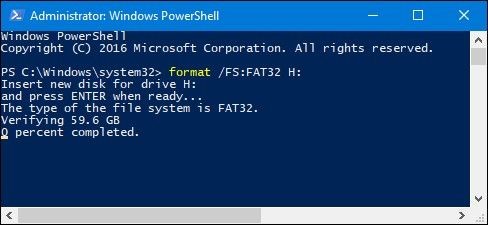
Step 3: The formatting activity will begin and will take approximately 1 hour to accomplish.

LandyMan
Honorary Master
Thanks. I saw this, but thought CMD and Powershell will yield the same result.Format 64/128GB SD Card to FAT32 with PowerShell
The SD card is formatted to FAT 32 using PowerShell. It aids in formatting a 64GB SD card to FAT32 and also formatting a 128GB SD card to FAT32. It allows users to go through the formatting process without having to download third-party software applications. The steps for formatting the SD card to FAT32 are listed below.
Step 1: Press the Windows key + X. PowerShell (admin) is selected from the dropdown menu, and PowerShell operates as administrator.
Step 2:Insert command in the PowerShell dropdown menu, such as format /FS: FAT32 X:
Step 3: The formatting activity will begin and will take approximately 1 hour to accomplish.
I will give it a bash, thanks!

dualmeister
Honorary Master
Another option.
MiniTool Partition Wizard Free | The Best Partition Manager for Windows
As an all-in-one free partition manager and disk manager software, MiniTool Partition Wizard Free helps manage disk partitions safely on Windows 11/10/8/7.
www.minitool.com
LandyMan
Honorary Master
FailThanks. I saw this, but thought CMD and Powershell will yield the same result.
I will give it a bash, thanks!


SirFooK'nG
Executive Member


LandyMan
Honorary Master
Pray tell where you select FAT32?
SirFooK'nG
Executive Member
The faq says dependant on size?Pray tell where you select FAT32?
FAQ - SD Association
FAQ Why do I need to format an SD memory card? What are the benefits of using the SD Memory Card Formatter? What should I know before I begin formatting? Is there an End User License Agreement (EULA)? What is the SD Memory Card Formatter Version Check? (Version 5.0 orlater) Is the old SD...
 www.sdcard.org

LandyMan
Honorary Master
The thread says 128GBThe faq says dependant on size?
FAQ - SD Association
FAQ Why do I need to format an SD memory card? What are the benefits of using the SD Memory Card Formatter? What should I know before I begin formatting? Is there an End User License Agreement (EULA)? What is the SD Memory Card Formatter Version Check? (Version 5.0 orlater) Is the old SD...
View attachment 1194748

Got it sorted with another app, thanks

SirFooK'nG
Executive Member
just out of interest, does the device not have a format function? Mine does, but then again I only have a 32gb in it.The thread says 128GB
Got it sorted with another app, thanks
LandyMan
Honorary Master
Yep, I formatted "manually" before switching the camera on, then reformatted with the camera. Guess I should have started therejust out of interest, does the device not have a format function? Mine does, but then again I only have a 32gb in it.