Free Disk cloning software?

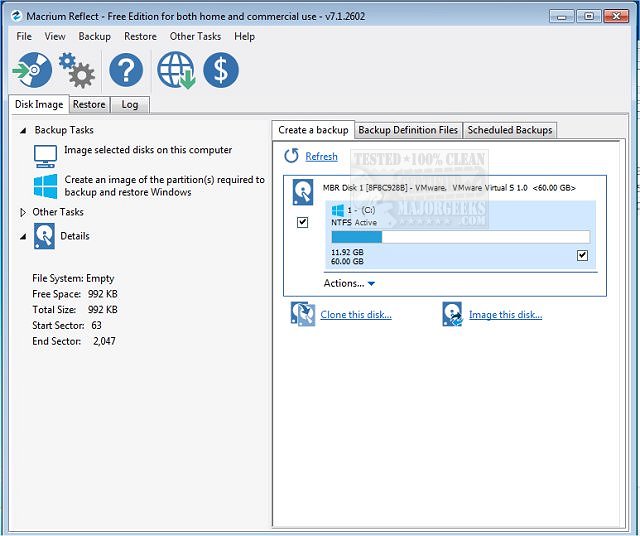
I put free macrium onto several machines years back and automated a daily clone from ssd to old hdd.

Every now and then I notice a machine has slowed down, turns out the SSD is toast and it is running on the HDD, then I just use macrium to clone to a new ssd and carry on like before.

Great program.
 
Some SSDs come with free versions of cloning software.

My Sabrent 2TB came with a free copy of Acronis True Image.
 
AOMEI Backupper Standard

I don't think the updated free version allows it, but if you find a website that has an older free version then you are good to go. Not sure of all the legalities of using older versions of software.
 
Last edited:
Can't recommend Macrium enough if they still offer their non-commercial free version. I have been using it for years and it's never once broken an install, with a bit of tinkering it also handles resizing partitions really well (where it makes sense of course).

Here's a link on how to get the free version:
 
Last edited:
Looking for a free or cheap cloning software.

It must be able to
> Clone existing hard disk to an image.
>Write image to new drive from image.

The idea here is to create an image from old SSD that to small and move it to a bigger SSD but still keep a backup of it on thumbdrive. So if **** hits the fan I can recover the entire install and not lose all the software and settings and all that crap.

I use to use Norton Ghost but it doesn't work with Win11 for whatever reason. It is old software but it worked well.

 
@Jackal46

1. Get Macrium Reflect FREE edition 8.0.7783 (177MB) (Probably 64-Bit for your use case) from Majorgeeks website
2. Install Macrium, Following the prompts > Tickbox Personal Use, Untick Register installation. Wait for install to complete.
3. Launch Macrium > Other Tasks > Create Rescue Media > Select Device - ISO File > Save ISO File and click Build.
4. Once Macrium Rescue Media Builder has completed, the ISO is available where you saved it (default location - C:\MacriumRescue.iso) - Just tested now, my ISO is 1.5GB
5. Use ISO as per normal, or use Ventoy for a self contained backup solution

A note on Ventoy - You can drag/drop ISO files to the Ventoy USB drive, boot them from there and save your .mrimg files to the drive directly. You can use this on various desktops/laptops but in my experience some laptop trackpads don't work if Macrium wasn't built with that specific device (probably missing some drivers, Either Tab through menus or a usb mouse resolves that so not a real train smash)
 
Last edited:
Top
Sign up to the MyBroadband newsletter
X