Kuga
Expert Member
Or the Coolermaster 690. Still waiting to get mine. I bought the Raidmax Smilodon and the place I bought it from said I could trade it back for the CM 690, but they waiting to get stock  .
.
.South Africa’s biggest forum. Discuss, discover, and connect with thousands of members.
.Or the Coolermaster 690. Still waiting to get mine. I bought the Raidmax Smilodon and the place I bought it from said I could trade it back for the CM 690, but they waiting to get stock
yeah, i'd suggest save an extra 200 bucks and do it right.
I spent 900 but I KNOW I don't need to replace the Chassis anytime soon....
you wouldn't want to spend R400 today and when you buy your 4th drive realise you need to buy a R600 case again...
So the Raidmax lost in the end :erm:, was thinking of getting the CM690 initially but then thought about what others said about the Scout and that's the case for LANs.


There is no cable management behind the backplate with the Scout!
Have a look a the cooler master ammo.
@PostmanPot
If there is a will, there is a way. But hey the black scheme of things, a handle, secure holding for your USB devices, made with gamers in mind and for LANs are a win. I for one don't want be the guy bolting a handle on a CM690, whilst trying to push on every other piece of Scout like feature any time soon lol.
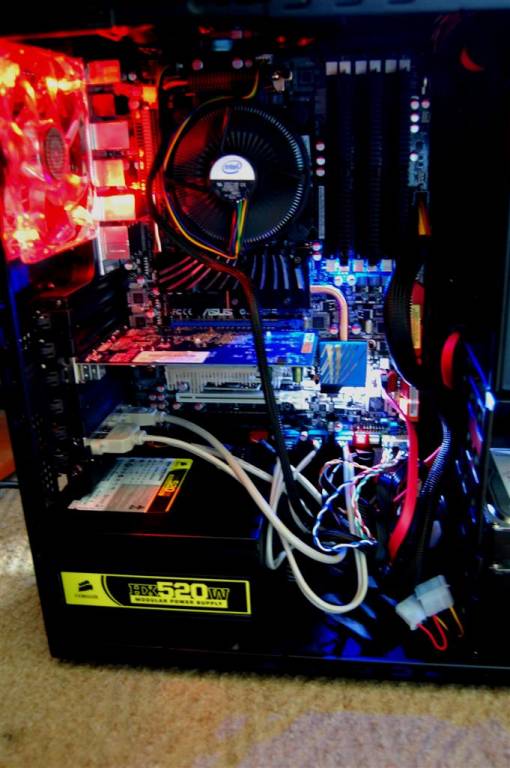
 CPU 4-pin power has to go over the graphics card to get to the mobo connector (in my case it was directly under the Scout's top fan making it very difficult to unplug and replug). I was only able to neaten HDD cabling and DVD/RW cabling. There isn't even a hole in the backplate for graphics card cable neatening.
@kuga
If you really want a "case", then go for the HAF 922 Mid-Tower, HAF 932 Full-Tower.
. But none the less, I have ordered the 690 and should get it end of this week.Something like this I presumeCPU 4-pin power has to go over the graphics card to get to the mobo connector (in my case it was directly under the Scout's top fan making it very difficult to unplug and replug).
Something like thisThe Scout doesn't allow for cable management behind the backplate no matter how much will one has.
Something like this I presume
http://www.pureoverclock.com/images/review/cases/coolermaster_scout/coolermaster_scout_22.jpg
Source:motherboards.org
Something like this
http://www.motherboards.org/images/reviews/hardware/1882_p6_10.jpg?
and this
http://www.motherboards.org/images/reviews/hardware/1882_p6_6.jpg?
Looks quite neat...
Source: PUREOC