HDD Issue.

Mephisto_Helix

Resident Postwhore
Joined
Jan 29, 2008
Messages
33,893
Reaction score
11,780
Location
UK
Ok, so i just got mah new HDD, put it in the new enclosure, plugged it in and ...... err, it's nowhere to be found. Windows made the little *ding* sound, the little box popped up to inform me that new hardware was found and installed, etc but nowhere is the HDD visible. Surely if the HDD was borked it wouldn't 'install'? Is it an enclosure issue? :(

Any suggestions on exactly wth is going on would be most welcome and appreciated.
 
I suspect that your New HDD has not been partitioned.
Right click my computer and click manage.
then go to disk management. it should tell you it found a new disk. follow the wizard and partition then format drive.
 
Right-click My Computer -> Manage
Click on Disk Management
Click on your drive
A Wizard should pop-up
Next
Next
Then format the drive :)

Edit:
Oh. Too late...
 
Right-click My Computer -> Manage
Click on Disk Management
Click on your drive
A Wizard should pop-up
Next
Next
Then format the drive

ah nvm :(
 
I suspect that your New HDD has not been partitioned.
Right click my computer and click manage.
then go to disk management. it should tell you it found a new disk. follow the wizard and partition then format drive.

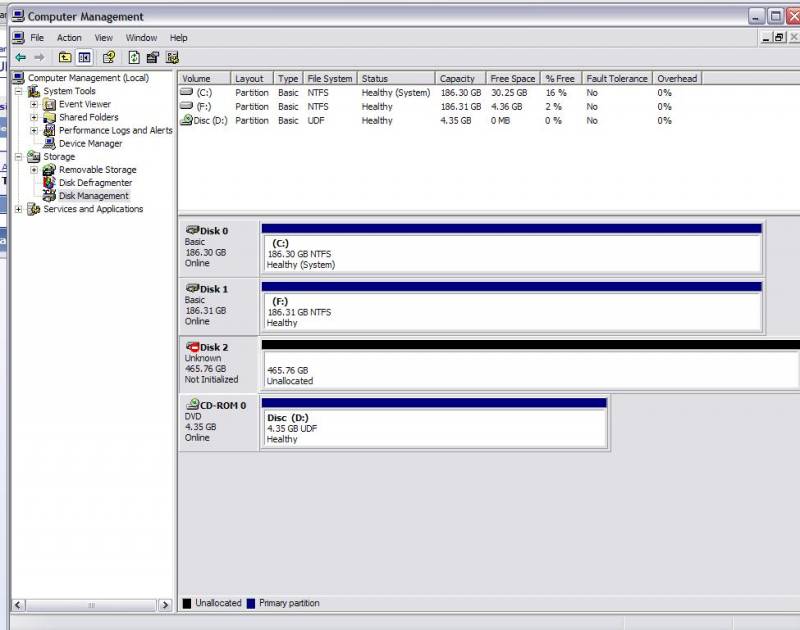
Ok, can you tell me what to do from this screenie?

HDD_Help.JPG
 
dont have the exact commands here but right click on the disk 2 and select create basic disk or partition drive...something along those lines.

Its second nature to me but dont ask the commands :D
 
right click and you should be able to import foreign disk or something alond those lines.
if it's a new disk, the delete/format/import it - nothing to loose on it.
 
Ok, nihilist helped me through Teamviewer and all is good ... well, when it's finished formatting anyway. Thanks peoples :D
 
Meh bit late now, but for future

Right click on disk2, select Initialize Disk and create a partition which will start the format
 
Top
Sign up to the MyBroadband newsletter
X