-
- News
-
Categories
- 5G
- ADSL
- AI
- Banking
- Black Friday
- Broadband
- Broadcasting
- Business
- Business Telecoms
- Cellular
- Cloud and Hosting
- Columns
- Cryptocurrency
- Energy
- Enterprise
- Fibre
- Gadgets
- Gaming
- Government
- Hardware
- Industry News
- Internet
- Internet of Things
- Investing
- IT Services
- Motoring
- Reviews
- Science
- Security
- Smartphones
- Software
- Technology
- Telecoms
- Trending
- Wireless
- Press Office
- Forum
- Industry News
- What's Next
- Company hub
- Speed Test
- About us
- Advertise with us
- Contact
- Careers


-
Join the MyBroadband community
South Africa’s biggest forum. Discuss, discover, and connect with thousands of members.
-
Question of the Day: Will you be subscribing to the new Disney+ R49 streaming package?

You are using an out of date browser. It may not display this or other websites correctly.
You should upgrade or use an alternative browser.
You should upgrade or use an alternative browser.
HDD, this does not look good at all!
- Thread starter ponder
- Start date


MickeyD
RIP
Transfer off all data and email archives, contacts, etc. ASAP!
System drive?
System drive?
Busy copying stuff already.
My 1.5TB backup drive, but I have no originals
Wiped my originals some time ago to make space for a mates data recovery images, the irony
I'm sure I'll be fine. Problem started when using virtual machines images on the backup drive.
My 1.5TB backup drive, but I have no originals
Wiped my originals some time ago to make space for a mates data recovery images, the irony
I'm sure I'll be fine. Problem started when using virtual machines images on the backup drive.

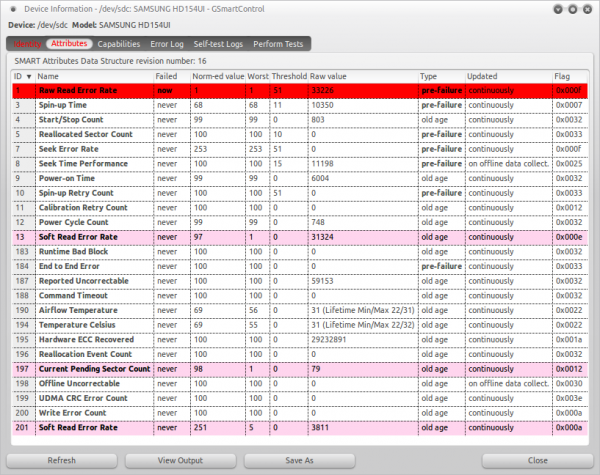
Wikipedia: S.M.A.R.T - Known ATA S.M.A.R.T. attributes said:Read Error Rate: Stores data related to the rate of hardware read errors that occurred when reading data from a disk surface. The raw value has different structure for different vendors and is often not meaningful as a decimal number. Potential indicator of imminent electromechanical failure
Read Error Rate = RAW Read Error Rate. S.M.A.R.T label names are determined by ID and both have the same ID.
Basically the value means that the disk can no longer reliable read data from the platter. According to online sources it has a cascading effect in most cases, so once a single failure has occurred, the disk will fail any S.M.A.R.T test and complete failure is very likely.
Source: http://en.wikipedia.org/wiki/S.M.A.R.T.#ATA_S.M.A.R.T._attributes
MickeyD
RIP
From experience I would also not switch off that hdd until you have extracted all the information you require from it.
I agree, sort of, I would say don't turn it off BUT copy everything IMMEDIATELY. Don't leave it on until later and then start copying.From experience I would also not switch off that hdd until you have extracted all the information you require from it.
Disks with head crashes or any physical particles on the platter for example, would cause more damaged, the longer it stays on.
MickeyD
RIP
He's already busy copying the data off... post #3. So I'm saying that he must not halt the process until it is completed.I agree, sort of, I would say don't turn it off BUT copy everything IMMEDIATELY. Don't leave it on until later and then start copying.
Disks with head crashes or any physical particles on the platter for example, would cause more damaged, the longer it stays on.
True, just put it out there.He's already busy copying the data off... post #3.
MickeyD
RIP
@ponder: how old is the hdd?
@ponder: how old is the hdd?
Don't remember when I purchased it but I reckon about a year or so old. It's still under warranty until 2012-10.
My data is being copied without any problems. Most of the important stuff is copied already, only my movies & pron remaining
All my data was copied with the exception of three files for which I get "Error splicing file: Input/output error" for (Linux Ext4 FS)
Problem is the one is my 15GB Windows XP VM and I'm not keen to redo this one. Other two files are movies which I have not watched yet but I can live without them.
Problem is the one is my 15GB Windows XP VM and I'm not keen to redo this one. Other two files are movies which I have not watched yet but I can live without them.

HapticSimian
Honorary Master
...the important stuff is copied already ... pron remaining
Does not compute.
Once you've run a scan with mhdd it will be interesting to see the results. Can you post a screenshot when the scan's complete?
Judging by the other smart values highlighted on the report it looks like it's just (at this point) some dodgy sectors that you've got. If you had weak or failing heads you would see some different smart values light up in red. The patterns produced on mhdd should look pretty
Judging by the other smart values highlighted on the report it looks like it's just (at this point) some dodgy sectors that you've got. If you had weak or failing heads you would see some different smart values light up in red. The patterns produced on mhdd should look pretty
Once you've run a scan with mhdd it will be interesting to see the results. Can you post a screenshot when the scan's complete?
Judging by the other smart values highlighted on the report it looks like it's just (at this point) some dodgy sectors that you've got. If you had weak or failing heads you would see some different smart values light up in red. The patterns produced on mhdd should look pretty
Busy with the scan (without remap) right now, it's a 1.5TB drive so it's going to take a while. Currently 39% complete without any issues so far.
If I recall correctly F10 will take a screenshot and save it to my flash drive which I'm booting from?
I've looked at MHDD screens so many times the patterns are no longer pretty
1.5TB drive is gonna take a while to scan, that's for sure. My guess is it'll throw some nice red UNC, ABRT or AMNF errors at you sometime soon. Hmm yeah I think it's F10, can't actually remember. F4 is scan, F2 is detect, F8 is to show SMART. Should dump the screenshot to a temp location somewhere on your flash.
Ouch. Lucky you didn't lose too much stuff. One word - RMA.
Just for interest's sake, this is the kind of reading pattern you get with a drive with failing heads.
http://i51.tinypic.com/2ljn576.png
It's a 6 head drive and I've only enabled 2 of them, see how it read fine for a few blocks (green) and then fails to read (black). Not pretty. Luckily your heads are fine, just some nasty sectors.
I haven't seen any new Samsungs with bad sectors like your drive yet. I hope this isn't a sign of things to come.
Just for interest's sake, this is the kind of reading pattern you get with a drive with failing heads.
http://i51.tinypic.com/2ljn576.png
It's a 6 head drive and I've only enabled 2 of them, see how it read fine for a few blocks (green) and then fails to read (black). Not pretty. Luckily your heads are fine, just some nasty sectors.
I haven't seen any new Samsungs with bad sectors like your drive yet. I hope this isn't a sign of things to come.