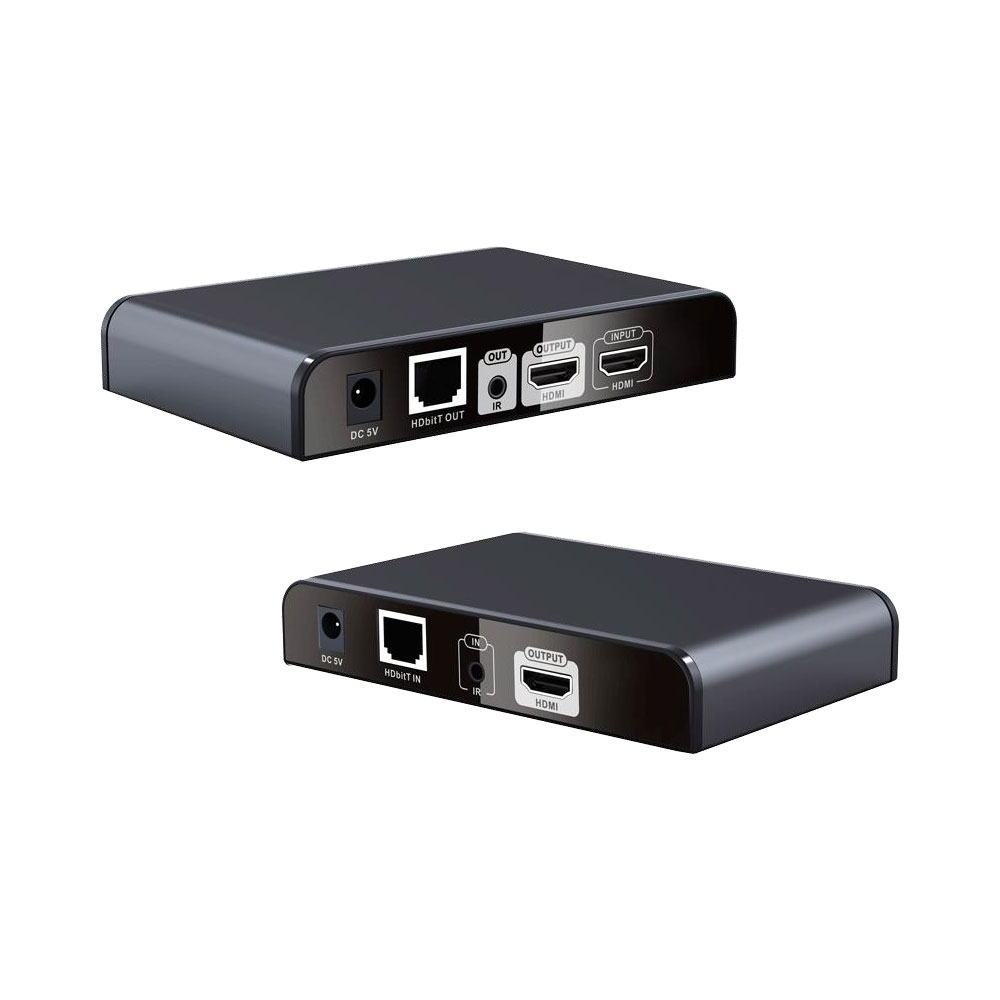
HDMI over Ethernet DIY Guide

capd

Executive Member
Joined
Dec 8, 2009
Messages
8,393
Reaction score
7,703
Location
Cape Town
I'm wanting to replace all my DStv coaxial cabling with HDMI over Ethernet. I'm using an Explora 2A. As I have remote boosters in various rooms, I believe I will still need to run coaxial cable to those rooms in order for the remotes to work with the decoder, and that there is no Ethernet option for this?

Please could you give me a brief run-through of HDMI over Ethernet.

Please could you also link to the best/thinnest coaxial cable from Takealot, 50m or 100m will do. Please also link to the other bits and pieces I will need, such as the Ethernet to HDMI adaptors, end pieces for coaxial cable, any other boxes needed for the upgrade, etc.

I already have Cat6 Ethernet cable and will use existing conduits to run everything.

Thanks!
 
I've got a few of these, they work very well when hooked up to a gigabit switch for distribution.

You'll need 1 TX and however many RX you require

Thanks, this looks great. Would DStv decoder’s HDMI output connect to Lenkeng’s HDMI input; Lenkeng’s HDMI output to main TV at decoder; Lenkeng’s Ethernet output with TX to a Gigabit switch, and then Ethernet cables to each TV with RX?
 
I've got a few of these, they work very well when hooked up to a gigabit switch for distribution.

You'll need 1 TX and however many RX you require

Would be grateful if you could please link to what’s needed for 1x main TV at decoder and 2x TVs elsewhere.
 
Would be grateful if you could please link to what’s needed for 1x main TV at decoder and 2x TVs elsewhere.

Chat to some sales staff at Linkgage or HD Cabling

You'll need 1 Transmitter Unit
1 receiver per TV you wish to view on (so 2)
Any gigabit switch
CAT-6 cable to run between the transmitter, switch, and 2 receivers

I assume you're going to lay and crimp the CAT6
 
I used one of these or similar from Space TV in Randburg and have not had a days issue...


They also have larger units where you can feed a single HDMI and transmit to up to four receiver units.
 
I have had mixed success with HD Cabling's HDMI over Ethernet extenders. On my 3rd set now, a Lengken one. It seems to be working currently. Only using it for getting a signal to a projector though. The conduit in the wall is too small for a 10m HDMI cable.
 
Chat to some sales staff at Linkgage or HD Cabling

You'll need 1 Transmitter Unit
1 receiver per TV you wish to view on (so 2)
Any gigabit switch
CAT-6 cable to run between the transmitter, switch, and 2 receivers

I assume you're going to lay and crimp the CAT6
Thank you. Yes, I'll be doing the cabling. Please could you link to the receivers (and transmitter if different to the Lenkeng)? Also do you have remotes at your other TVs? If so how do you change channels?
 
I used one of these or similar from Space TV in Randburg and have not had a days issue...


They also have larger units where you can feed a single HDMI and transmit to up to four receiver units.
Thanks. I see it mentions:

Allows HDMI Audio/Video and IR signals to be transmitted over a single CAT 5e/6/7 cable

I presume this would be for remote controls to change channels? What would I need for this? Would be great to remove the need for coaxial cable for boosters.
 
Thanks. I see it mentions:


I presume this would be for remote controls to change channels? What would I need for this? Would be great to remove the need for coaxial cable for boosters.

I honestly have no idea, I use it for a CCTv feed from NVR to an old TV in our main garage, so have no need to change channels although I imagine that is what it could be used for.
 
I've only used the Lenkeng units as they use TCP/IP

The 1 -> 4 system that space TV sells isn't bad at all, but I requires a centralized distribution point (which I don't have) and uses proprietary transmission techniques

@capd just ask the salesmen for 1 transmitter and however many receivers you want, I'm not going link diving :)
 
Please let me know? Would like to not have to run coaxial for IR.

All the info you need is in the spec sheet for the various products mentioned :)

As a general rule, most decent devices support IR pass through
 
Going with this one, covers all my needs. Any qualms or are we happy?

 
Going with this one, covers all my needs. Any qualms or are we happy?


Yeah that looks good, just no room to expand later if you want, but for 2 displays it'll do the job
 
We've been using HDMI-ethernet adapters for quite a while, they do the job just fine as long as you stay within the distance spec of the adaptor.

I also recently discovered NDI (I know, was clearly living under a rock). While NDI won't work for OP, it's a great solution for on-campus live streaming of events, presentations and meetings.
 
Top
Sign up to the MyBroadband newsletter
X