Help me extend my display onto 3 screens

hj2k_x

Honorary Master
Joined
Jan 22, 2006
Messages
32,137
Reaction score
1,893
Location
/\/¯¯¯¯¯\/\
Hello. I have a Dell Latitude 5480 laptop and 3 Samsung T260 screens. I would like to run all three screens (I don't need the laptop screen as well) in extended desktop mode.

One screen is connected via HDMI.
One is connected via VGA (analog).
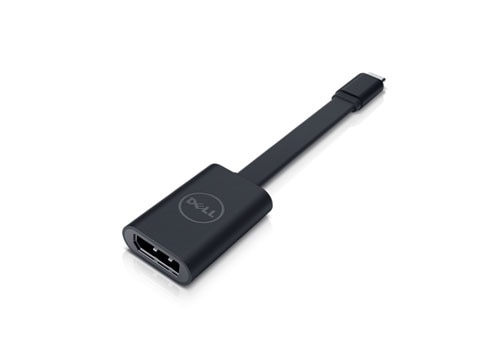
The third is connected via USB-C (using an adaptor to VGA, which works)

I can only get two screens plus the laptop screen to work at the same time.

Any assistance much appreciated!

Do I need a dock of some kind? If so, any recommendations? Google suggests without confirming that I may need a dock :(
 
I don't think you're going to get the answer you're looking for.

Intel HD Graphics 620 engine is capable of driving three DisplayPort (DP) 1.4 streams simultaneously

You have to have one for your laptop screen, which means you can attach a further 2.

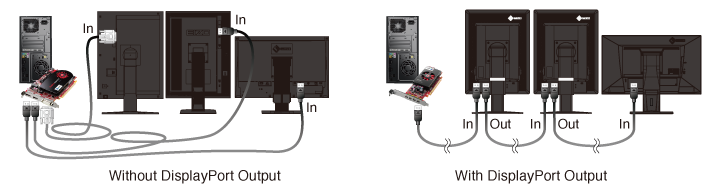
However, you have a displayport, so you could possibly daisy chain the one DP port to 2 monitors but the monitors need to support it. (well I assume at least the first monitor needs to)
daisy_chain.png


apparently there's a multistream port device that allows you to connect multiple monitor types to a single DP Port
 
I had the Dell Latitude e6230 and e6430 with 3x Dell 2412 screens, the only supported way with the docking station was, 1x VGA and 2x DP cables.

I also had to use a special driver from Intel, because with a Win10 update, it screwed the driver and only made 2 screens worked.
 
Hello. I have a Dell Latitude 5480 laptop and 3 Samsung T260 screens. I would like to run all three screens (I don't need the laptop screen as well) in extended desktop mode.

One screen is connected via HDMI.
One is connected via VGA (analog).
The third is connected via USB-C (using an adaptor to VGA, which works)

I can only get two screens plus the laptop screen to work at the same time.

Any assistance much appreciated!

Do I need a dock of some kind? If so, any recommendations? Google suggests without confirming that I may need a dock :(
When I tried to do this on my Dell XPS, I could only have 3 screens enabled, not 4.

Go to settings -> Display. Select whichever number display your laptop screen is. Click on the multiple displays drop-down box and select "Disconnect the display". This will allow your other three (external) screens to be enabled at the same time.

Note: I do have a dock, so I connected two monitors to the dock and one directly to the laptop. But this might be a "settings" issue rather than a physical connection issue.
 
When I tried to do this on my Dell XPS, I could only have 3 screens enabled, not 4.

Go to settings -> Display. Select whichever number display your laptop screen is. Click on the multiple displays drop-down box and select "Disconnect the display". This will allow your other three (external) screens to be enabled at the same time.

Note: I do have a dock, so I connected two monitors to the dock and one directly to the laptop. But this might be a "settings" issue rather than a physical connection issue.
Thanks. I tried disabling the laptop screen first. But that just leaves 2 out of 3 of the other screens connected and the laptop screen off:(
 
I had the Dell Latitude e6230 and e6430 with 3x Dell 2412 screens, the only supported way with the docking station was, 1x VGA and 2x DP cables.

I also had to use a special driver from Intel, because with a Win10 update, it screwed the driver and only made 2 screens worked.
Which docking station in particular? Is it always the same Dell one? That costs like 3 grand?
 
I don't think you're going to get the answer you're looking for.


You have to have one for your laptop screen, which means you can attach a further 2.

However, you have a displayport, so you could possibly daisy chain the one DP port to 2 monitors but the monitors need to support it. (well I assume at least the first monitor needs to)
daisy_chain.png


apparently there's a multistream port device that allows you to connect multiple monitor types to a single DP Port
Is it possible that I don't have a DP port?I find lots of ports and holes but I can't see a DP one. Where should it be? Am I being daft?
 
Is it possible that I don't have a DP port?I find lots of ports and holes but I can't see a DP one. Where should it be? Am I being daft?
Looks like HDMI,but with a odd corner
 
Is it possible that I don't have a DP port?I find lots of ports and holes but I can't see a DP one. Where should it be? Am I being daft?

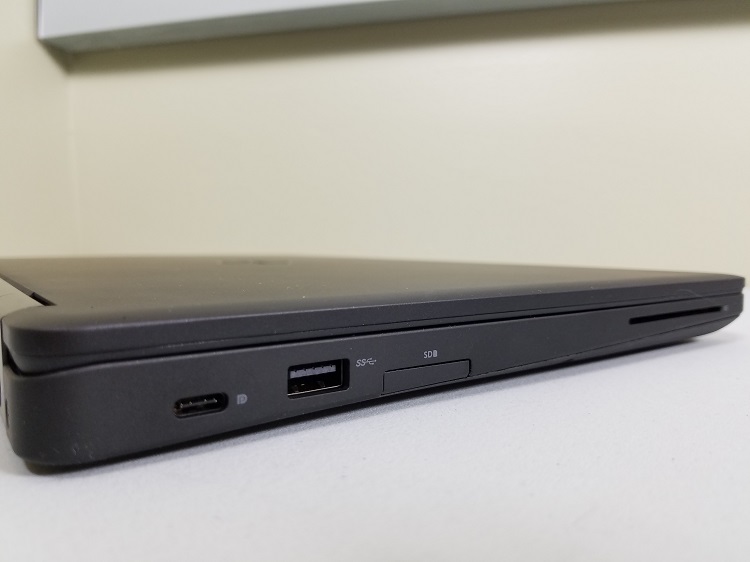
Depends on the exact model. Some have a usb type c port on the left side right at the back that does DP/thunderbolt over USB type C , might require discreet graphics.

ports-left-3.jpg
 
Yeah. Pretty pricey.
Yeah they sure are, and this is still cheap, seen them over R6k here in RSA. I can't justify so much just to have 3 displays, 2 displays is enough, and its free
 
And to be clear, that means you have no laptop screen but 3 external screens which are extended desktops and which each run at 1080p?

I don't run it like that daily, but I did try it once upon a time.

But yes, you disable the laptop screen and enable three external monitors. Two connect to the dock (HDMI, Display Port) and one connects to the laptop (HDMI). All should run at 1080p.
 
I don't run it like that daily, but I did try it once upon a time.

But yes, you disable the laptop screen and enable three external monitors. Two connect to the dock (HDMI, Display Port) and one connects to the laptop (HDMI). All should run at 1080p.
Do you think any doc which will add two monitors would work then? Use one of the ports on the laptop itself to run one monitor and run two additional ones off whatever dock you have?
 
Do you think any doc which will add two monitors would work then? Use one of the ports on the laptop itself to run one monitor and run two additional ones off whatever dock you have?

Yes, probably. There also a question about the graphics card that your laptop has, and how many monitors it can run... To that, I can't answer.
 
Top
Sign up to the MyBroadband newsletter
X