Home Assistant : Q&A, Tips & Tricks, Your Configs

Are you running multiple AP's?

If you are, its most likely trying to roam to another AP.
I have three APs - but the device is about 3m from one of them - not sure why it would try roam so consistently though. Literally every single hour at 43min for 5min then comes online again.

Would be great if their was some sort of logging somewhere on the damn broadlink - no info in the app on what's happening.
 
I have three APs - but the device is about 3m from one of them - not sure why it would try roam so consistently though. Literally every single hour at 43min for 5min then comes online again.

Would be great if their was some sort of logging somewhere on the damn broadlink - no info in the app on what's happening.
Hmmm, every 43 minutes? That's suspiciously similar to how Tasmota devices scan for other AP's every 43 minutes. You don't have any Tasmotised stuff on your network? Just spitballing here.
 
Hmmm, every 43 minutes? That's suspiciously similar to how Tasmota devices scan for other AP's every 43 minutes. You don't have any Tasmotised stuff on your network? Just spitballing here.
Nah - its not every hour, but currently on the 43min park, so 7:43, 8:43, 9:43, etc. (weirdly - if I unplug the device, and plug it back in - it stays using the same x:43 drop off), also nothing about device issues in the unifi logs.

Have quite a bit of Tasmota devices on the network - but they're all stable.
 
Nah - its not every hour, but currently on the 43min park, so 7:43, 8:43, 9:43, etc. (weirdly - if I unplug the device, and plug it back in - it stays using the same x:43 drop off), also nothing about device issues in the unifi logs.

Have quite a bit of Tasmota devices on the network - but they're all stable.
Ah ok, I was reaching a bit but thought that if all the Tasmota devices roam every 43 minutes that it might interfere with the Broadlink. That being said, I have Tasmota and RM Pro and don't see that kinda thing here. Or at least, not that I noticed. The fact that it happens at x:43 might be outside interference? That's why the time doesn't change when you reboot but stays on x:43
 
Ah ok, I was reaching a bit but thought that if all the Tasmota devices roam every 43 minutes that it might interfere with the Broadlink. That being said, I have Tasmota and RM Pro and don't see that kinda thing here. Or at least, not that I noticed. The fact that it happens at x:43 might be outside interference? That's why the time doesn't change when you reboot but stays on x:43
Its really weird - only device that's doing this. Going to try reconnect it to the wifi and see what it does.
 
Any reason why all of a sudden my HA core crashes and displays these errors EXT4-fs below.

When I reboot the NUC it works fine until a day or so

ad3fc7ad2ae1282100139b1b661907ff.jpg
 
Hard drive is dying.

Or it’s full.

I’m using an SSD as below and it’s under 1 year old and 256Gb

How much capacity does HASS need?

How can I test it to see if it’s the SSD?

 
I’m using an SSD as below and it’s under 1 year old and 256Gb

How much capacity does HASS need?

How can I test it to see if it’s the SSD?


I think I’m experiencing the same problem. My log file increases in size to the point where there is no more available disk space. Then the whole thing crashes. The only solution is to restore from backup. I'm thinking of doing a clean install to see if it will make a difference.
 
I’m using an SSD as below and it’s under 1 year old and 256Gb

How much capacity does HASS need?

How can I test it to see if it’s the SSD?


Definitely not capacity then as I run it on a mere 16GB.

Don’t think you can get any native level access via Hass.
 
Don't know how I didn't know about this, but if you have dimmable lights or even colour lights, check out this custom adaptive lightning addon. Adjust the brightness based on time of day, or rather position of the sun taking sunrise and sundown in consideration. It also does the flux effect if you have ability to change colour. I currently use it with my shelly dimmers and it is brilliant after fine tuning it a bit.
 
Definitely not capacity then as I run it on a mere 16GB.

Don’t think you can get any native level access via Hass.

Ok will pop it out and test externally.

Any idea which test I can do on an ssd as I can then try to get a warranty replacement
 
I need to find a reliable host for my HA - experience with RPi 4 + SSD boot has not been great. Every 3rd or 4th OS update it doesn't come back up and I have to do a tedious reload and restore.

I have a Synology NAS but didn't like the Docker method 'cos then you can't run HACS (which is a pita). Apparently it can run in a VM on the NAS but there are conflicting reports on the overhead generated.
 
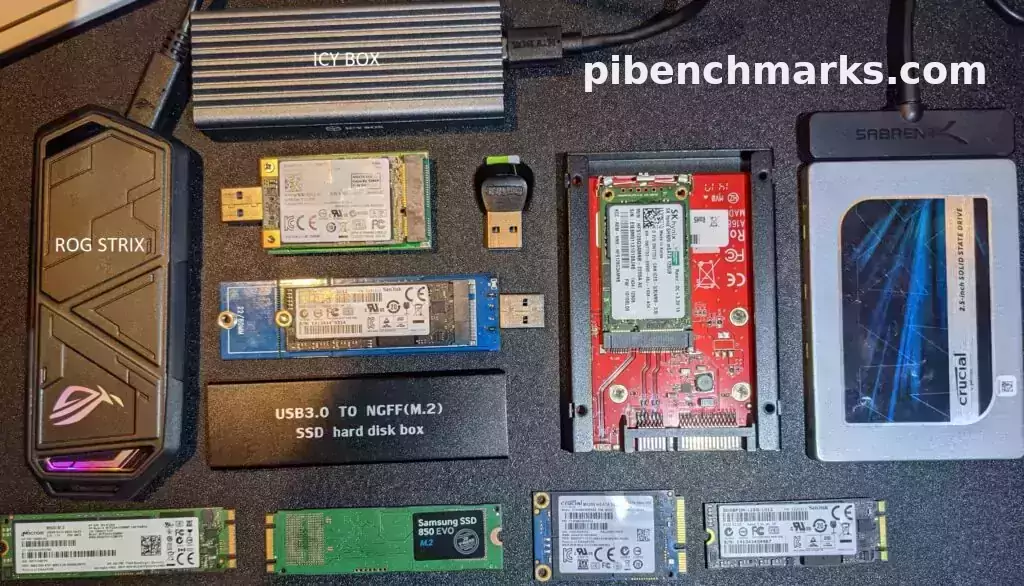
Are you using a USB adapter that is compatible with the PI and UASP?

I had issues sometimes with my Pi4 + Orico enclosure for the SSD. Switched to a confirmed compatible enclosure and it made a world of difference.
 
Are you using a USB adapter that is compatible with the PI and UASP?

I had issues sometimes with my Pi4 + Orico enclosure for the SSD. Switched to a confirmed compatible enclosure and it made a world of difference.

Which enclosure are you using? Where did you purchase it?

I'm using a generic one that I had lying around. Frustrating thing is that generally it runs without issues - it's only after an OS update that I experience issues.
 
Sorry, it's more of an adapter than an enclosure:


Which enclosure are you using? Where did you purchase it?

I'm using a generic one that I had lying around. Frustrating thing is that generally it runs without issues - it's only after an OS update that I experience issues.
Sorry, it's more of an adapter than an enclosure:


I also using a ugreen enclosure from that list in the link. I gave 2 other SSDs in enclosures that never worked. I even have a Samsung T3 SSD which doesn't work on the Pi.
 
Sorry, it's more of an adapter than an enclosure:


that will work.

Thanks
 
Top
Sign up to the MyBroadband newsletter
X