-
- News
-
Categories
- 5G
- ADSL
- AI
- Banking
- Black Friday
- Broadband
- Broadcasting
- Business
- Business Telecoms
- Cellular
- Cloud and Hosting
- Columns
- Cryptocurrency
- Energy
- Enterprise
- Fibre
- Gadgets
- Gaming
- Government
- Hardware
- Industry News
- Internet
- Internet of Things
- Investing
- IT Services
- Motoring
- Reviews
- Science
- Security
- Smartphones
- Software
- Technology
- Telecoms
- Trending
- Wireless
- Press Office
- Forum
- Industry News
- Features
- Company hub
- Speed Test
- About us
- Advertise with us
- Contact
- Careers


-
Join the MyBroadband community
South Africa’s biggest forum. Discuss, discover, and connect with thousands of members.
-
Question of the Day: Google Maps vs Waze vs Apple Maps vs physical paper maps?

You are using an out of date browser. It may not display this or other websites correctly.
You should upgrade or use an alternative browser.
You should upgrade or use an alternative browser.
Home Assistant : Q&A, Tips & Tricks, Your Configs
- Thread starter TedLasso
- Start date
Yes, here is the solution, scroll down to Frencks replyAnyone’s node red die after 14.5.0 update ? Rolling back doesn’t even help.
Node- red not staring after update 14.6.1 · Issue #1701 · hassio-addons/app-node-red
Problem/Motivation My HAS updated to the new node red 14.6.1 Node-red is to working anymore (Why the issue was filed) Expected behavior program to start (What you expected to happen) program not st...
 github.com

semaphore
Honorary Master
- Joined
- Nov 13, 2007
- Messages
- 18,634
- Reaction score
- 9,720
Been there done that, his solution does nothing.Yes, here is the solution, scroll down to Frencks reply

Node- red not staring after update 14.6.1 · Issue #1701 · hassio-addons/app-node-red
Problem/Motivation My HAS updated to the new node red 14.6.1 Node-red is to working anymore (Why the issue was filed) Expected behavior program to start (What you expected to happen) program not st...
Oh worked for me, but I didnt roll back.Been there done that, his solution does nothing.
semaphore
Honorary Master
- Joined
- Nov 13, 2007
- Messages
- 18,634
- Reaction score
- 9,720
Seems like supervisor was going all weird, I hard reset the entire pi and it started.Oh worked for me, but I didnt roll back.

DrJohnZoidberg
Honorary Master
Ok finally got around to getting it installed. It's a bit of pain to install, the mains connector just kind of flaps around in the box with no fixed mounting spot and the transformer and PCB take up so much space in the box that it covers up 3 of the 4 spots where you drill through for mounting.Looks like there's a 4-zone ( read cheaper ) option as well https://henractech.co.za/shop/smart-4ch-irrigation-controller-tuya/
There was a small gap on the one side where I could get 1 screw through and just mounted it with 2 screws which seems plenty strong.
The hardware seems robust though, nice beefy transformer and relays.
Tuya app picked it up instantly when I powered it on, getting it to work in HA with Tuya Local was a bit less obvious as it failed with the default settings, I had to set the protocol version specifically to 3.4 to get it to work, then selected simple 4 way switch (or something like that).
I set up a new button entity for manually running it which will turn the system on for 10 minutes and turn it off again. Unfortunately I found that the original system had all been wired into a single zone, even though there are 3 pumps - I need to spend some more time figuring out what they did there.
Now I just need to spend a bit of time and work on the actual automation.
Card in HA:

Exported via HomeBridge to Homekit:

Neatly in the lapa cupboard:


valiente
Senior Member
- Joined
- Jun 16, 2012
- Messages
- 775
- Reaction score
- 172
If you want to do it right, get this up and running:Ok finally got around to getting it installed. It's a bit of pain to install, the mains connector just kind of flaps around in the box with no fixed mounting spot and the transformer and PCB take up so much space in the box that it covers up 3 of the 4 spots where you drill through for mounting.
There was a small gap on the one side where I could get 1 screw through and just mounted it with 2 screws which seems plenty strong.
The hardware seems robust though, nice beefy transformer and relays.
Tuya app picked it up instantly when I powered it on, getting it to work in HA with Tuya Local was a bit less obvious as it failed with the default settings, I had to set the protocol version specifically to 3.4 to get it to work, then selected simple 4 way switch (or something like that).
I set up a new button entity for manually running it which will turn the system on for 10 minutes and turn it off again. Unfortunately I found that the original system had all been wired into a single zone, even though there are 3 pumps - I need to spend some more time figuring out what they did there.
Now I just need to spend a bit of time and work on the actual automation.
Card in HA:
Exported via HomeBridge to Homekit:
Neatly in the lapa cupboard:
GitHub - rgc99/irrigation_unlimited: ♒Irrigation controller for Home Assistant
♒Irrigation controller for Home Assistant. Contribute to rgc99/irrigation_unlimited development by creating an account on GitHub.
github.com
I have 3 configurations, Summer, Winter and Spring/Autumn - Different settings throughout the year,
Then going further, these times get automatically adjusted based on the amount of rain and the average temperatures I am getting over the last 5 days:
Based on the 0.12mm of rain experience yesterday

My next schedule for Friday, will be reduced by 5%:

3 minutes 48 seconds per zone instead of 4 minutes normal time - This gets adjusted at midnight every day, thus tonight and tomorrow night it will get adjusted again.

Tinuva
The Magician
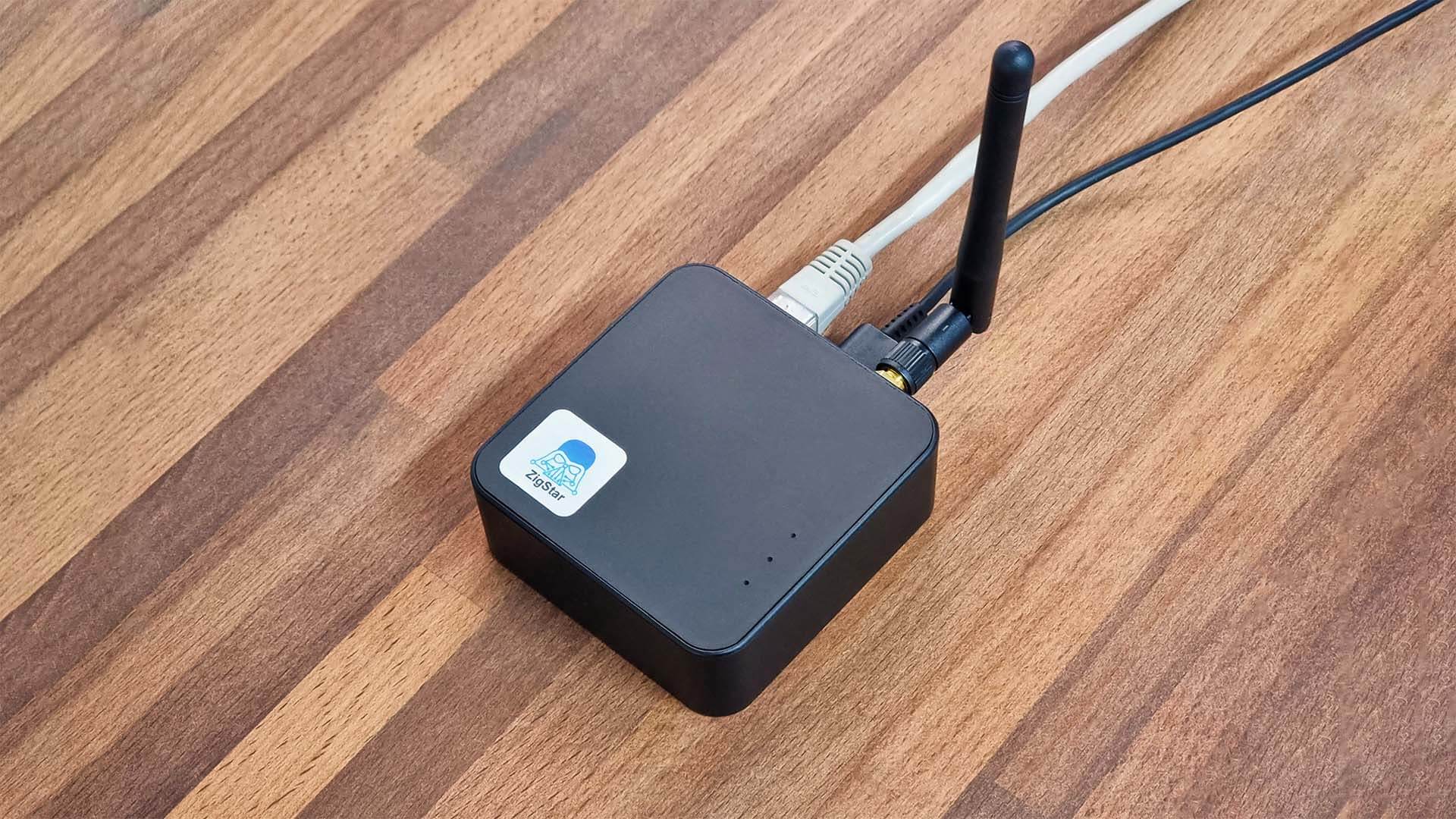
For anyone who has not yet started their zigbee network and is wondering which gateway to buy. The one in the following looks like the one to get:
 smarthomescene.com
ZigStar UZG-01 Zigbee Gateway in Home Assistant
Testing, review and setup of the ZigStar UZG-01 LAN/PoE/USB/Wi-Fi Zigbee Hybrid Coordinator in ZHA and Zigbee2MQTT running on Home Assistant.
smarthomescene.com
Veroland
Executive Member
This looks nice, thanksFor anyone who has not yet started their zigbee network and is wondering which gateway to buy. The one in the following looks like the one to get:
ZigStar UZG-01 Zigbee Gateway in Home Assistant
Testing, review and setup of the ZigStar UZG-01 LAN/PoE/USB/Wi-Fi Zigbee Hybrid Coordinator in ZHA and Zigbee2MQTT running on Home Assistant.
Veroland
Executive Member
I am not sure what you are asking.
Do you have Solar Assistant? If so I can give you the config for sunsynk-power-flow-card.
Do you have Solar Assistant? If so I can give you the config for sunsynk-power-flow-card.

Can you figure out which Segment correlates to which flow? (Battery Flow, Battery SOC, Eskom Flow, House Usage and of course Solar)
Red - Solar
Yellow - House Usage
Light blue - Eskom flow
Dark blue - Battery flow
Green - Battery SOC
How's my aim ?
Looks awesome !
valiente
Senior Member
- Joined
- Jun 16, 2012
- Messages
- 775
- Reaction score
- 172
You got 2 correct.Red - Solar
Yellow - House Usage
Light blue - Eskom flow
Dark blue - Battery flow
Green - Battery SOC
How's my aim ?
Looks awesome !
The Solar is actually Orange, just the camera does funny things to it...
Here is the answer:
Orange - Solar
Light blue - House Usage
Dark blue - Eskom flow
Yellow - Battery flow
Green - Battery SOC
Light blue goes towards the house, thus it makes sense to have it flowing from inverter to the house on the left.
Dark Blue comes from the DB board which is also on the left, but mostly Eskom colour
Battery goes towards the right where the Battery Fuse Holder sits, indicating the flow towards (Charging) or from (Discharging)
Battery SOC and Solar are pretty self-explanatory.
Another note, the speed increases based on the usage, right now I have 3 levels, SLOW (< 700W), MEDIUM (700W < 2500W) & FAST (> 2500W)
I am thinking of doing it on a percentage based, calculate the percentage of Solar generation, then convert that to a value between 0 and 255 and use that as the Speed for the WLED Segment...

Muttley
Expert Member
- Joined
- Jan 6, 2016
- Messages
- 1,904
- Reaction score
- 531
This is awesome!
Little weekend project - not sure if this has been done before...
Can you figure out which Segment correlates to which flow? (Battery Flow, Battery SOC, Eskom Flow, House Usage and of course Solar)
Please share a write up on how you did this...
(I need this in my life)
I'm guessing a WLED instance integrated into HA which is being driven by the inverter entity states ( inverter also integrated into HA )This is awesome!
Please share a write up on how you did this...
(I need this in my life)
Last edited:
valiente
Senior Member
- Joined
- Jun 16, 2012
- Messages
- 775
- Reaction score
- 172
This is awesome!
Please share a write up on how you did this...
(I need this in my life)
I'm guessing a WLED instance integrated into HA which is being driven by the inverter entity states ( inverter also integrated into HA )
Yes basically this.
I got asked multiples times per day, "is there enough solar for this"
I have my inverter linked up with the excellent work from https://github.com/kellerza/sunsynk
Then I purchased 5m of WS2811 with 720LEDs/M COB
Got a controller, Dig Quad which is the best in the business - This was overkill and can easily be done with a single ESP32 as I simply have 1 long LED strip with segments defined within WLED.
Then lastly some basic automations from HA which activates different Presets...
Honestly, very straight forward
Happy wife, happy life ! Oh the things we have to endure to keep the S.O. happy ( swoon ! ) HeheYes basically this.
I got asked multiples times per day, "is there enough solar for this"
Jokes aside, awesome project and super fun way to use of WLED.
ItherNiT
Expert Member
Is anyone here using a gas and/or water meter in HA?
I ordered a Mopeka to start measuring my gas bottle, It's delivered later today.
It looks like it supports % based readings from the reader, I just need to make a conversion entity that can convert the % to m3 so it can show usage in the energy dashboard.
I'm still looking for a nice local smart water meter, if anyone has a suggestion.
I ordered a Mopeka to start measuring my gas bottle, It's delivered later today.
It looks like it supports % based readings from the reader, I just need to make a conversion entity that can convert the % to m3 so it can show usage in the energy dashboard.
I'm still looking for a nice local smart water meter, if anyone has a suggestion.