Home Network Setups

charlieharper

Expert Member
Joined
Jun 1, 2007
Messages
3,865
Reaction score
1,980
Location
South Coast, KZN
For my December DIY project, I've been rewiring the whole house as we recently got Fibre installed. Wanted to make sure every room in the house, plus the granny flat have solid connections.

Basically have ethernet cables going to a few different rooms, each with it's own bridged wifi router.

Got a central router linked to the ONT + switch to ensure I have enough ports for all fixed devices + going to all rooms.

Installed an ethernet wall jack for every room.

About 80% done, it's fully functioning at the moment.
The next few days will be spent tidying up.

Was my first time crimping ethernet connectors and installing female jacks, but so far everything pretty successful.

1609339287347.png

1609339306878.png

My inner OCD is cringing at the cable mess, but will sort it out.

Anyone else who's done something similar?

Mind sharing some pictures?
 
Nope they are gigabit. :)

Looks good then :thumbsup: , I always buy my ethernet cables, I dont trust myself enough.

Consider making all your wifi SSID's the same to provide seamless roaming.

I combine both my 2.4 and 5gHz networks but if i need to force a device to a band i will use MAC banning on both the router and AP.
 
Consider making all your wifi SSID's the same to provide seamless roaming.

I combine both my 2.4 and 5gHz networks but if i need to force a device to a band i will use MAC banning on both the router and AP.

Yeap exactly what I did.
So far roaming is working well.
Still to find a dead spot in the house.
 
I have also cleaned up my network. Had a mini rack 3D printed to house the following:
1 X Ubiquiti USG
2 X Ubiquiti 8-Port POE Switches
1 X Ubiquiti Cloud Key

I have 3 Unifi AP-AC's dotted around the house and have the entire property flooded with wireless internet connectivity. I am also busy with home automation and need to set up some vlans for the IOT devices.
I just need to get myself a patch panel and then I can tidy the cables to my liking.
Network Rack.jpg
 
Needs a serious tidying of cabling (have been adding some camera's the last few days)

CAB in one garage - all rooms have network points + have 5 Uniquiti WAPs around the house.

Have a 2nd 9U cab in other garage with amp and bluetooth for music (often do DIY/woodwork there) + Synology and Seagate NAS.
deb612c5eff13a9399268a39c147ccd1.jpg
adc7f8d7f2b8b975f25d5c5cba3a4b94.jpg
 
Good to see some people rocking ye olde HP Microservers, and Ubiquiti equipment :)
Not going to show mine, as I need to migrate it to a rack soon, and its a mess...

My setup is mostly Unifi: 8 port Unifi PoE + 16 Port Edgeswitch with a Cloudkey2, and a USG.
That goes to a HP Microserver with a NV P400 inside for transcoding purposes running a variety of dockerized bits n bobs, mostly running Plex and some other stuff. Roughly 20TB of storage in ZFS RaidZ1. Backups of essential data go over rsync (and syncthing for computers) to elsewhere where I have more storage.

The PoE's run camera's and AP's + p2p bridge to new house over NanoStation M5s.
Don't really need much faster, as I don't have fibre yet. NAS will move upstairs once the house is ready.

Just bought a 48 port PoE switch for the new main house, will move my 42U up there and wire up in the near future (eta - early Jan), still need to decide on which Unifi AP's I order. Leaning towards the 6 lite's, but Amazon no haz stock yet, and its a pain to order from the ubnt US store from here.
( https://store.ui.com/collections/unifi-network-access-points/products/unifi-ap-6-lite ).
 
Roughly how long do those UPSs last if you dont mind me askingg? And are they powering the whole cabinet or just select components
Hmmmm, good question. I’m not sure hey. They only meant to power the rack for a few minutes for in case the solar system trips. It‘s really for those edge cases where someone plugs a faulty extension or high consumer into the plug outlets (which happened in the beginning). Because of the large home automation setup, the whole house goes tilt when HA or WiFi goes down.
 
Hmmmm, good question. I’m not sure hey. They only meant to power the rack for a few minutes for in case the solar system trips. It‘s really for those edge cases where someone plugs a faulty extension or high consumer into the plug outlets (which happened in the beginning). Because of the large home automation setup, the whole house goes tilt when HA or WiFi goes down.
Ha, I've thought about having one for exactly that purpose myself.

Have had builders building for the last month or so, and their power tools have tripped my inverter more than once or seventeen.

"2kw" power tools can often pull more than a spikey 5kw on startup, which leads to flashy red light and unhappy victron 3kw.

New house has an 8.8KW Sunsynk, so will cope admirably (in theory).

Those little APC ups's usually have a single 12v x 7a or 9a battery, so lifetime is measured in minutes depending on load.

eg - https://www.cnet.com/products/apc-back-ups-700va-ups-390-watt-700-va-bx700ui/ claims
1 min at full load
9 min at half load

Take that with a pinch of salt.
 
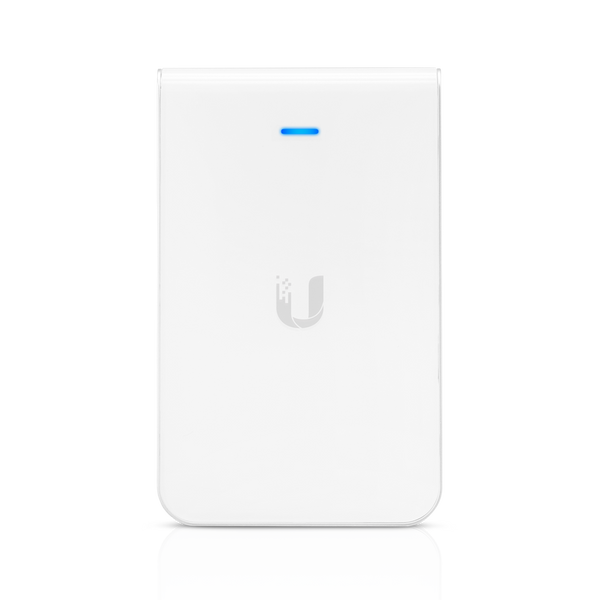
With some forward planning and of course spending some money you could have done every room with one of those.


Then you’d have a ninja wired and wireless network with genuine mesh roaming instead of multiple AP’s fighting each other to the death on the same SSID.
 
Ha, I've thought about having one for exactly that purpose myself.

Have had builders building for the last month or so, and their power tools have tripped my inverter more than once or seventeen.

"2kw" power tools can often pull more than a spikey 5kw on startup, which leads to flashy red light and unhappy victron 3kw.

New house has an 8.8KW Sunsynk, so will cope admirably (in theory).
You think you have reliable power because of your kilobuck inverter setup, only for your garden executive to kill it while mowing the extension cable. Those units where R500 each a few weeks back in the classifieds here, pretty cheap insurance. I replaced their batteries with gel units I had spare.
 
With some forward planning and of course spending some money you could have done every room with one of those.


Then you’d have a ninja wired and wireless network with genuine mesh roaming instead of multiple AP’s fighting each other to the death on the same SSID.
Thats my other option (other than the 6 lite I'm leaning towards), I like the dual port w/PoE on the inwall, so I get another connection, but I've already run cable to the ceiling's for the ap's, so a bit wasted for me.

Reviews on the 6 seem to like it.
 
Still a work in progress here as well. I just hate cable management so battling for motivation to finish
View attachment 985000

Ha ha ha.

Very similar to mine, except running a Unifi Dream Machine and TP-Link POE alongside the Microserver and then an Eaton UPS.

Bit of a waste having the UDM in the Graham though and losing out on the ninja access point in there.

****

What is on top of the Microserver with all the USB ports?
 
You think you have reliable power because of your kilobuck inverter setup, only for your garden executive to kill it while mowing the extension cable. Those units where R500 each a few weeks back in the classifieds here, pretty cheap insurance. I replaced their batteries with gel units I had spare.
Hey, I'm the garden ceo, upgraded myself from executive!

Alas, its Weedeater only for now, hard to mow what with the incline, and building rubble everywhere.
GFI switches for the outside plugs should avoid trippy hazard fun, but nothing is perfect :)

Had uptime of about 4 years before the building ruined that.
 
Top
Sign up to the MyBroadband newsletter
X