HTC Desire and Gingerbread 2.3

Running Cool3D AceS which is on 2.3.5 - works like a dream.

Also tried RunnyMede which is on 2.3.5 but with Sense 3.5 - its too slow on my Desire :(
 
My Desire is on CM 7.1 (Android 2.3.7)

Only issue I have is the radio is giving me problems, still trying to find a decent radio. Hence the not recommending it.

As for launcher its running SPB Shell 3D
 
Hhhmmm mine is not booting into recovery. I just keep getting a black phone icon with a red Triangle and Exclaimation mark. Am i missing something. I rooted my phone so long ago :/

Any thoughts?
 
Hhhmmm mine is not booting into recovery. I just keep getting a black phone icon with a red Triangle and Exclaimation mark. Am i missing something. I rooted my phone so long ago :/

Any thoughts?

That almost sound like recovery is broken, I take it you can still boot normal?

If yes and on Clockwork recovery, just install Rom manager from the market and reflash recovery to the latest version.

You should then be able to boot into recovery.
 
Still not booting to recovery. Im busy downloading that g7tools zip and will try and flash the radio and see if that helps. Im running leedroid and i think it needed a custom radio so maybe thats the issue.
 
Still not booting to recovery. Im busy downloading that g7tools zip and will try and flash the radio and see if that helps. Im running leedroid and i think it needed a custom radio so maybe thats the issue.

Radio will not affect the recovery boot.

Did you install Rom Manager and try to update/flash recovery. If yes did it give an error or complete without any errors.

If you did get an error and see that its not updating maybe your hboot is still S-On
 
Yeah i downloaded the rom manager and then clicked on Flash ClockworkMOd Recovery and it says Current Recovery ClockworkMod 5.0.2.0. It then comes up with My phone "Desire" i click that then it warns about having a stable connection which i do then i click OK and it runs through without error (Green Bar along the top) once its done it says Successfully Flashed, ClockworkMod Recovery.

I click OK and then click Reboot into Recovery and then it reboots and that Red triangle comes up again and stays there. I then have to take out the battery and reboot it to get it back to normal.
 
Yeah i downloaded the rom manager and then clicked on Flash ClockworkMOd Recovery and it says Current Recovery ClockworkMod 5.0.2.0. It then comes up with My phone "Desire" i click that then it warns about having a stable connection which i do then i click OK and it runs through without error (Green Bar along the top) once its done it says Successfully Flashed, ClockworkMod Recovery.

I click OK and then click Reboot into Recovery and then it reboots and that Red triangle comes up again and stays there. I then have to take out the battery and reboot it to get it back to normal.

Once you flashed + normal reboot and then go back into Rom manager is it on 5.0.2.0? if not your hboot is still S-On and needs to be flashed properly.

To conferm you can Power on and press Power + Volume up to go into hboot. what does the top of the screen look like (Numbers)
 
Yip i just did it again to test and when i reopen the Rom Manager after a normal boot up it shows the Current Recovery as 5.0.2.0
 
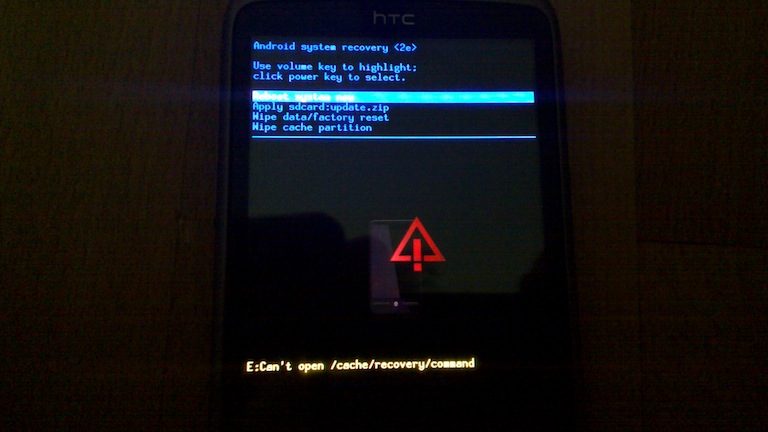
Ok i read another article where they mention pressing volume up and power at that exclaimation screen and i am now on the Android System recovery screen and it has options for Wipe data factory reset i will try that and see. Hope for the best i guess lol
 
Yes i get to that screen if i boot and press volume down and power. But then i go to recovery and i get a screen that is black and has a red triangle and red exclaimation point. Then if i press volume up and power on that screen i get to the Android System recovery <2e>

Like this on in the pic (Not a pic of my phone but my screen looks exactly the same)

20100829_004w6fq.jpg
 
Hi, Can anyone post a quadrant score for the HTC desire on gingerbread ?

MB525 Motorolla defy
Quadrant Standard : 2142
Gingerbread 2.3.5
 
Ok seems like i managed to load it finally lol. Thanks for all the help

LOL dam I was just about to post photo's of hboot and point where to see if your S-OFF as well as Clockwork recovery as your photo looked very different to the colored text found on 5.0.20..
 
lol thanks man it was really weird. I basically had to rename the clockworkmod recovery zip file to update.zip and then from that blue screen flash it again to get to the recovery screen of clockwork. strange but glad it worked.

It looks great by the way. thanks for all your help :D
 
Top
Sign up to the MyBroadband newsletter
X