-
- News
-
Categories
- 5G
- ADSL
- AI
- Banking
- Black Friday
- Broadband
- Broadcasting
- Business
- Business Telecoms
- Cellular
- Cloud and Hosting
- Columns
- Cryptocurrency
- Energy
- Enterprise
- Fibre
- Gadgets
- Gaming
- Government
- Hardware
- Industry News
- Internet
- Internet of Things
- Investing
- IT Services
- Motoring
- Reviews
- Science
- Security
- Smartphones
- Software
- Technology
- Telecoms
- Trending
- Wireless
- Press Office
- Forum
- Industry News
- What's Next
- Company hub
- Speed Test
- About us
- Advertise with us
- Contact
- Careers


-
Join the MyBroadband community
South Africa’s biggest forum. Discuss, discover, and connect with thousands of members.
-
Question of the Day: Main reasons you wouldn't get an EV?

You are using an out of date browser. It may not display this or other websites correctly.
You should upgrade or use an alternative browser.
You should upgrade or use an alternative browser.
Is UCCW only for skilled designers...?
- Thread starter DJ...
- Start date


Maverick Jester
The Special One
That's right.
Excellent!! I will play around with this at some point... Thank you for the write up and PSD, helps a lot...
I cannot believe how easy that was. I went from complete noob to this in about 30 minutes:
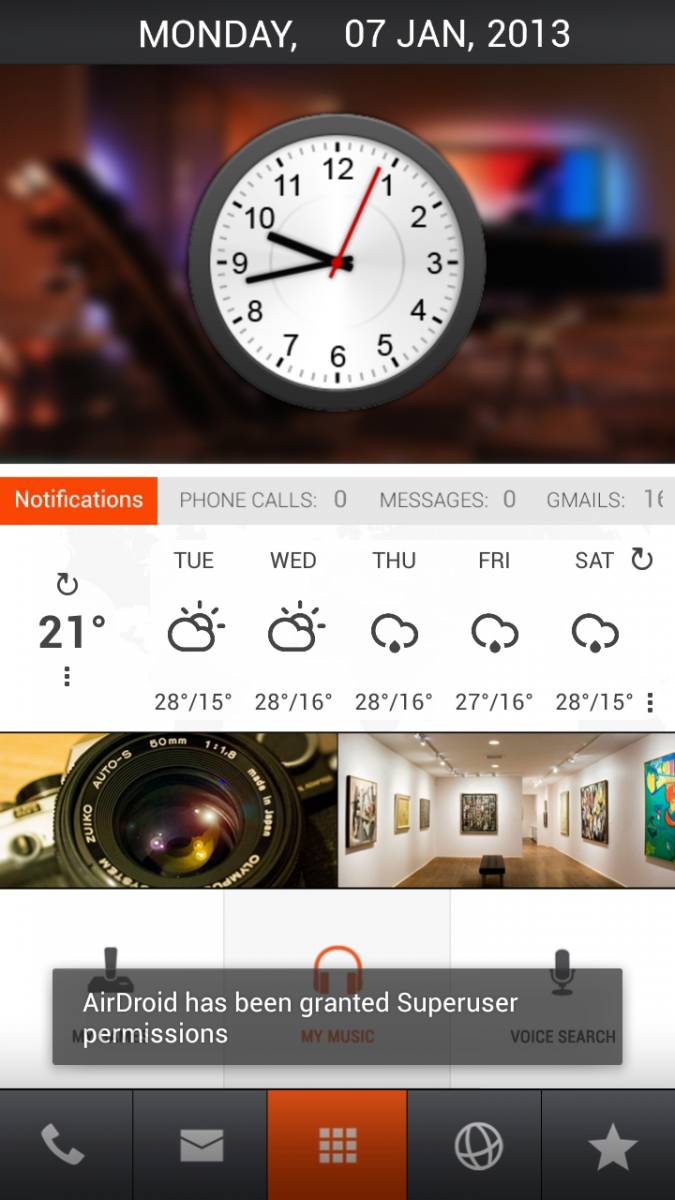
Thanks again Dom1n8tr1x for the brilliant guide. I love my new home screen...
EDIT: okay took the screenshot at the wrong moment, but so be it...
Thanks again Dom1n8tr1x for the brilliant guide. I love my new home screen...
EDIT: okay took the screenshot at the wrong moment, but so be it...

Dom1n8tr1x
Expert Member
I cannot believe how easy that was. I went from complete noob to this in about 30 minutes:
Thanks again Dom1n8tr1x for the brilliant guide. I love my new home screen...
EDIT: okay took the screenshot at the wrong moment, but so be it...
No problem, glad I could help. You see it's easy to do this stuff. It looks a lot more difficult than it actually is.
I see the Gmail notifications are a bit of the screen, you can just adjust the position a little bit to the left.
No problem, glad I could help. You see it's easy to do this stuff. It looks a lot more difficult than it actually is.
I see the Gmail notifications are a bit of the screen, you can just adjust the position a little bit to the left.
I noticed it is that way no matter where I put it. The other thing is that I can't really move it because it tries to snap it way too far out of place. That's the only position where it snaps into place.
EDIT: oh hang on. I can move them within UCCW to the left a little. Didn't think of that at first...


AlphaJohn
Honorary Master
I tried my hand on it over the weekend as well. Only catch was this was on Gingerbread so no Apex access 
ADW Launcher at least helped.
View attachment 34296 View attachment 34294
End result.
Source: http://mycolorscreen.com/2012/12/17/exposed/
ADW Launcher at least helped.
View attachment 34296 View attachment 34294
End result.
Source: http://mycolorscreen.com/2012/12/17/exposed/
Last edited:
Maverick Jester
The Special One
I tried my hand on it over the weekend as well. Only catch was this was on Gingerbread so no Apex access
ADW Launcher at least helped.
View attachment 34296 View attachment 34294
End result.
Source: http://mycolorscreen.com/2012/12/17/exposed/
Why are you on Gingerbread?
AlphaJohn
Honorary Master
Why are you on Gingerbread?
Xperia Play.
I can upgrade to 4.* as its rooted and all that but will lose the controller functions in some games so yeah there is that.....
Shake&Bake
Party Liaison
Man this all looks so awesome and thanks to Dom1n8tr1x for this guide and the other youtube video link - I've just really got to make time to sit aside and get this done.
Been itching for weeks to do a new theme for my homescreen.
Been itching for weeks to do a new theme for my homescreen.
AlphaJohn
Honorary Master
I knew it wasn't gonna take em long to copy this look into Android, but wasn't expecting this quick a response:


Source: http://mycolorscreen.com/2013/01/09/lens-view/
Source: http://mycolorscreen.com/2013/01/09/lens-view/
I must admit that the new theme is incredible looking, but does lack in functionality. I fixed this by duplicating the theme across 3 different homescreens and adding different functionality to each, but it still it doesn't actually give you much in the way of notifications. Unless you memorise the number of each type of message you have at any given point, you won't have actual notifications. I'm gonna have to figure out something out, but at least I now know how to do it thanks to the dominating chick...
Shake&Bake
Party Liaison
I knew it wasn't gonna take em long to copy this look into Android, but wasn't expecting this quick a response:
View attachment 35104 View attachment 35106 View attachment 35108
Source: http://mycolorscreen.com/2013/01/09/lens-view/
MotherTrucker - that's it!

Please - with so many hackers about - this is just in time

AlphaJohn
Honorary Master
I am thinking of going http://mycolorscreen.com/2013/01/05/the-dream/ this weekend.
Its a variant of Dom1n8tr1x on post 16 but with a bit more color.
Edit: Crap no instructions... ok so there goes that idea
Its a variant of Dom1n8tr1x on post 16 but with a bit more color.
Edit: Crap no instructions... ok so there goes that idea
Last edited:
Shake&Bake
Party Liaison
There's too many - may need more phones 
AlphaJohn
Honorary Master
There's too many - may need more phones
I know exactly what you mean...... busy trying to decide what my phone will look like for the next week or so

I am thinking of going http://mycolorscreen.com/2013/01/05/the-dream/ this weekend.
Its a variant of Dom1n8tr1x on post 16 but with a bit more color.
Edit: Crap no instructions... ok so there goes that idea
Would be the same instructions as per Dom's post if he had given you the wallpaper. I supposed if you have some design skills you could simply make the wallpaper, but that's a bit beyond my area of expertise...
AlphaJohn
Honorary Master
I supposed if you have some design skills you could simply make the wallpaper, but that's a bit beyond my area of expertise...
I might as well just do my own, seeing that most of those how-to's go like this:


KleinBoontjie
Honorary Master
LOL
Maverick Jester
The Special One
I must admit that the new theme is incredible looking, but does lack in functionality. I fixed this by duplicating the theme across 3 different homescreens and adding different functionality to each, but it still it doesn't actually give you much in the way of notifications. Unless you memorise the number of each type of message you have at any given point, you won't have actual notifications. I'm gonna have to figure out something out, but at least I now know how to do it thanks to the dominating chick...
What do you mean by this?
Maverick Jester
The Special One
I knew it wasn't gonna take em long to copy this look into Android, but wasn't expecting this quick a response:
View attachment 35104 View attachment 35106 View attachment 35108
Source: http://mycolorscreen.com/2013/01/09/lens-view/
I have wanted this since I saw Ubuntu for Phone... YES!!!
/runs to scour Google for a how-to