Laptop cooling pad

d7e7r7

Executive Member
Joined
May 30, 2009
Messages
8,945
Reaction score
938
Location
Cape Town
Hi guys,

I have a Dell XPS 15 9560 that is having throttling/cooling/overheating issues. It senses overheating and BD PROCHOT (bi-directional processor hot) throttles the machine to 0.78 GHz. See screenshots below of Task Manager and ThrottleStop.

So I'm thinking of trying a laptop cooling pad, there's just so many options (I just browsed Takealot), some with 1 fan, some with 2, some with 4. Some are made out of wood, others plastic. Some are adjustable, others seem to be a fixed design.

Can anyone recommend one they have experience with or do I just go eeny meeny miny moe and just choose one with the most reviews?

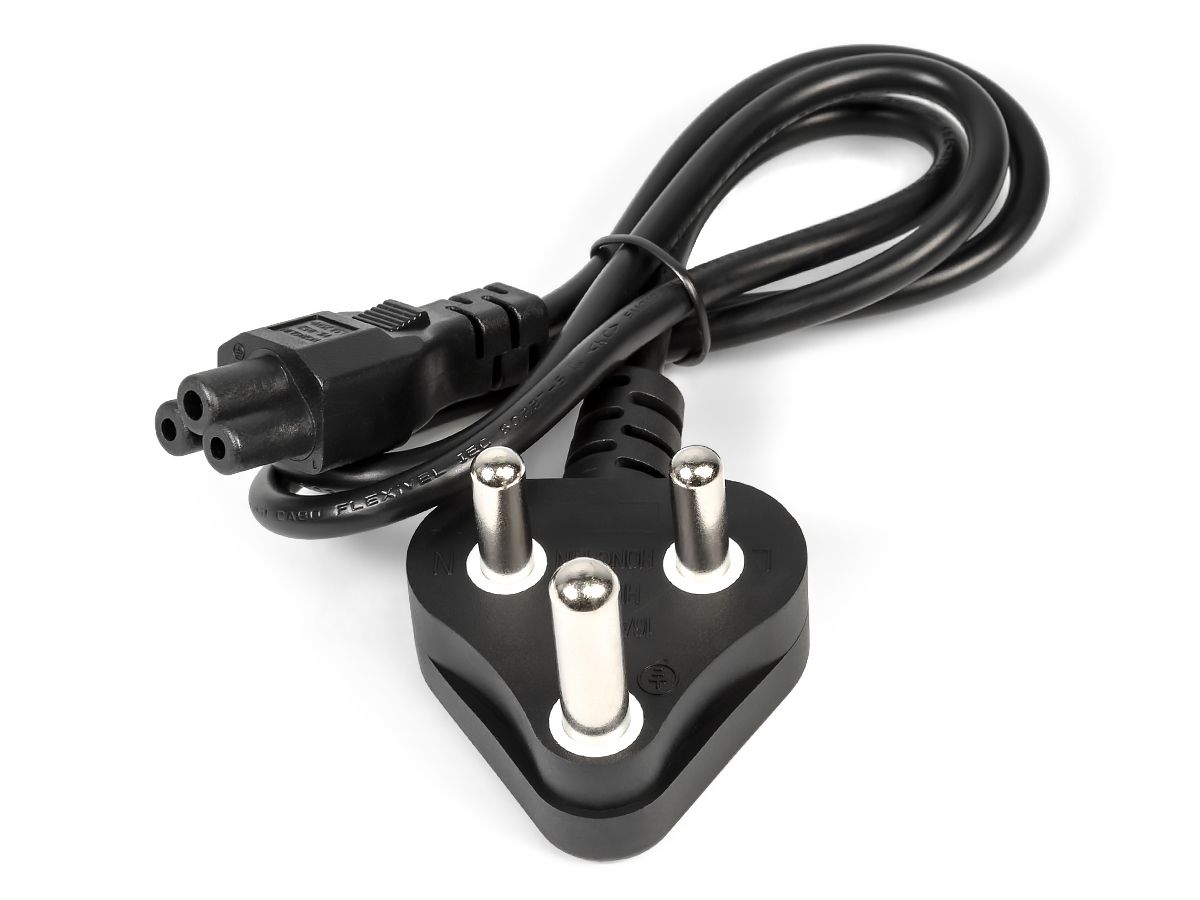
I also need to get a new clover leaf/Mickey Mouse power cable, as the current one has to be held at a certain angle for it to work, probably just wear and tear and old-age. Same question really, how do I choose which one as almost all the listings are almost identical...

2026-01-01 17_00_51-ThrottleStop 9.6.png 2026-01-01 17_00_15-Task Manager.png
 
You should clean out your fans and probably some new thermal paste..

If it's overheating and never has before and your workload hasn't changed, then fans are clogged with dust etc or no longer working..

Do the above before buying a cooling pad, as you can do it yourself for free.. plenty of tear down videos on YouTube to help with this..
 
Hi guys,

I have a Dell XPS 15 9560 that is having throttling/cooling/overheating issues. It senses overheating and BD PROCHOT (bi-directional processor hot) throttles the machine to 0.78 GHz. See screenshots below of Task Manager and ThrottleStop.

So I'm thinking of trying a laptop cooling pad, there's just so many options (I just browsed Takealot), some with 1 fan, some with 2, some with 4. Some are made out of wood, others plastic. Some are adjustable, others seem to be a fixed design.

Can anyone recommend one they have experience with or do I just go eeny meeny miny moe and just choose one with the most reviews?

I also need to get a new clover leaf/Mickey Mouse power cable, as the current one has to be held at a certain angle for it to work, probably just wear and tear and old-age. Same question really, how do I choose which one as almost all the listings are almost identical...

View attachment 1874823 View attachment 1874824

i would take it in to guys who do laptop repairs and get them to open the unit and check out if there's too much dust internally (if you are not confident doing it yourself) and also check if the heatsinks on the CPU are clogged or caked with dust ..... if its dusty then cleaning that will probably win you 50% to 60% of the battle (they will probably call that giving the laptop a "service") and then you can use any of those cooling pads thereafter and it will all be fairly effective in reducing your overheating issues

in terms of the charger - as long as the invertor/transformer has the same voltage, wattage and amperage specs then the brand wont matter but look for brands that are well known and regarded as reputable .... if you are unsure then post here asking about specific brands and units and someone probably has used it and can share their experience
 
Cooling pads (those with the fans) make no difference. Just make sure the laptop is well ventilated and on a laptop stand to make sure the vents get good air flow. Get the fans cleaned. If you can get it serviced and the thermal paste redone by a Dell technician even better.

 
Last edited:
Cooling pads (those with the fans) make no difference. Just make sure the laptop is well ventilated and on a laptop stand to make sure the vents get good air flow. Get the fans cleaned. If you can get it serviced and the thermal paste redone by a Dell technician even better.

In my case where the fan failed on my 12 year old E6530, the temperatures was lower into the 75/80C with a cooling pad idle and any use pushed it into 90-95C, and heavy throttling. This was up to 2 weeks ago and since the USB connection on the pad was flaky I purchased another cooling pad from the local ValueCo Hyper. This new one actually made a big difference, the laptop is idling around 45C right now and the highest I have seen it in this Durban December summer is around 80C.

This fan is silent compared to the previous one. Also I think that the longer and slimmer wire on the previous pad did not help, there may have been a voltage drop across the cable leaving that fan with a smaller voltage.

Thermal paste is in the plan, but my laptop needs to be backed up first in case. The original replacement fan is quite expensive to get. I have been working my way down from 150 tabs in Chrome, 70 in Opera.
 
Agreed with the repaste, thermal paste is cheap and so is an afternoon to watch videos and do the job.
I personally wouldn't trust these repair shops with this type of work, cause it's easy and they overcharge, Unless you know a good honest shop then by all means.
 
i would take it in to guys who do laptop repairs and get them to open the unit and check out if there's too much dust internally (if you are not confident doing it yourself) and also check if the heatsinks on the CPU are clogged or caked with dust ..... if its dusty then cleaning that will probably win you 50% to 60% of the battle (they will probably call that giving the laptop a "service") and then you can use any of those cooling pads thereafter and it will all be fairly effective in reducing your overheating issues

in terms of the charger - as long as the invertor/transformer has the same voltage, wattage and amperage specs then the brand wont matter but look for brands that are well known and regarded as reputable .... if you are unsure then post here asking about specific brands and units and someone probably has used it and can share their experience
Thanks for your reply.

I will take it to the local computer shop then. I don't feel confident to disassemble, clean and thermal repaste the CPU and GPU myself.

Sadly won't be a Dell technician as I'm in a small town in the Garden Route area, so local computer shop will have to do. Hope they do a good job.

Will ask them to replace the CMOS battery while they have it open.
 
Agreed with the repaste, thermal paste is cheap and so is an afternoon to watch videos and do the job.
I personally wouldn't trust these repair shops with this type of work, cause it's easy and they overcharge, Unless you know a good honest shop then by all means.
Thanks for your reply. I don't feel confident or comfortable to try to attempt this myself so the local computer shop will have to do.

What do you think would be a reasonable price for me to accept/expect to pay for this?
 
In my case where the fan failed on my 12 year old E6530, the temperatures was lower into the 75/80C with a cooling pad idle and any use pushed it into 90-95C, and heavy throttling. This was up to 2 weeks ago and since the USB connection on the pad was flaky I purchased another cooling pad from the local ValueCo Hyper. This new one actually made a big difference, the laptop is idling around 45C right now and the highest I have seen it in this Durban December summer is around 80C.

This fan is silent compared to the previous one. Also I think that the longer and slimmer wire on the previous pad did not help, there may have been a voltage drop across the cable leaving that fan with a smaller voltage.

Thermal paste is in the plan, but my laptop needs to be backed up first in case. The original replacement fan is quite expensive to get. I have been working my way down from 150 tabs in Chrome, 70 in Opera.
Can you share the link or make/model of the cooling pad you got recently that works well?
 
Cooling pads (those with the fans) make no difference. Just make sure the laptop is well ventilated and on a laptop stand to make sure the vents get good air flow. Get the fans cleaned. If you can get it serviced and the thermal paste redone by a Dell technician even better.

I have one of these stands, not the exact same but similar and it doesn't help. The laptop still goes into "limp mode".
 
If it is just the cable/chord you probably need something like this. Can maybe check the part number on your power adaptor:

Thanks for the link. How is that cable different to, say this one on Takealot at about half the price? Is it generic vs original?

 
Thanks for the link. How is that cable different to, say this one on Takealot at about half the price? Is it generic vs original?

It's all going to work at the end of the day.. pick whichever..
 
Thanks for the link. How is that cable different to, say this one on Takealot at about half the price? Is it generic vs original?

Get the one from takealot. Send it back it is not what you want.
 
To be honest it is a generic looking cheapie. Mikuso NCP-063...nothing fancy- ymmv.The previous one was Astrum branded.
 
To be honest it is a generic looking cheapie. Mikuso NCP-063...nothing fancy- ymmv.The previous one was Astrum branded.
And astrum is also cheap generic Chinese stuff, only someone decided to add the astrum name to it for a little bit of extra cost..
 
Thanks for your reply. I don't feel confident or comfortable to try to attempt this myself so the local computer shop will have to do.

What do you think would be a reasonable price for me to accept/expect to pay for this?
Personally i wouldn't spend more than R500 depending on the laptop this is a 30min job, an hour if it's someone who is doing testing before and after.

If the thermal paste is the cause then a cooling pad is not really going to help cause the heat cannot get off the CPU in order to be cooled by the internal fan or cooling pad fan, So i would focus the efforts on thermal paste replacement which while they're there the fan/heatsink can be cleaned of dust bunnies.

Have you watched a video on how to do it ? You may find that it's not so bad, These types of tasks may feel overwhelming but once you do it you gain confidence very quickly, with laptops the CPU is not generally removable, meaning that the job is literally taking apart screws until the heatsink comes off, cleaning the cpu with some alcohol, applying thermal paste and putting the screws back.
 
Personally i wouldn't spend more than R500 depending on the laptop this is a 30min job, an hour if it's someone who is doing testing before and after.

If the thermal paste is the cause then a cooling pad is not really going to help cause the heat cannot get off the CPU in order to be cooled by the internal fan or cooling pad fan, So i would focus the efforts on thermal paste replacement which while they're there the fan/heatsink can be cleaned of dust bunnies.

Have you watched a video on how to do it ? You may find that it's not so bad, These types of tasks may feel overwhelming but once you do it you gain confidence very quickly, with laptops the CPU is not generally removable, meaning that the job is literally taking apart screws until the heatsink comes off, cleaning the cpu with some alcohol, applying thermal paste and putting the screws back.
I was told by the local pc shop when I enquired over FB Messenger:

"Some laptops are much harder to take apart than others but guess would be 1.5-2hours thermal paste"

Their hourly rate is R550/hr.
 
I was told by the local pc shop when I enquired over FB Messenger:

"Some laptops are much harder to take apart than others but guess would be 1.5-2hours thermal paste"

Their hourly rate is R550/hr.
This is why I dpn't trust these shops.

If this is the same laptop then honestly this is as easy as it gets, give the video a watch and you'll see what i mean. Just screws, clean, repaste, screws back, done. This is a 30min job max, without stress tests and 1h with stress tests.
 
Top
Sign up to the MyBroadband newsletter
X