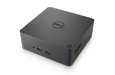
Laptop Docking Station

Dolby

Honorary Master
Joined
Jan 31, 2005
Messages
39,132
Reaction score
6,138
Do you eagle eyed PC folk see any issue with the below ?


I have 7 cables going into the laptop - and every time I need to move the laptop, I have to unplug 7 x cables - move the laptop - and plug all 7 x cables back . I'm thinking plugging as many cables into this, and only one cable to my laptop. It loks like it'll work - but wondering about the dual screens I have that plug into laptop USB C and HDMI.
 
I can't comment on teh above dock but just make sure you buy a proper docking station, saving R 500 is not worth teh hassle you get with some of the cheaper docs
 
  • Like
Reactions: rh1
Do you eagle eyed PC folk see any issue with the below ?


I have 7 cables going into the laptop - and every time I need to move the laptop, I have to unplug 7 x cables - move the laptop - and plug all 7 x cables back . I'm thinking plugging as many cables into this, and only one cable to my laptop. It loks like it'll work - but wondering about the dual screens I have that plug into laptop USB C and HDMI.
That hub only has one Usb-C connection and it seems to be power out.

I have been searching for a hub that supports two USB-C video but couldn't find and seems the docks have too many things I don't need like VGA, USB A and memory card.

I couldn't even find a UBC splitter that supports two video out e,g, USB 3.1 and higher. With USB standard continously being improved and we have USb 4.0 but all these hubs I imagine will take another 5 years to support them
 
Last edited:
too many things I don't need like VGA, USB A and memory card.
Yea I'm exactly the same .

Maybe then I'll just buy a cheap hub for the time being and get my USB headset, webcam etc - saves on a few plugs at least
 
Do you eagle eyed PC folk see any issue with the below ?


I have 7 cables going into the laptop - and every time I need to move the laptop, I have to unplug 7 x cables - move the laptop - and plug all 7 x cables back . I'm thinking plugging as many cables into this, and only one cable to my laptop. It loks like it'll work - but wondering about the dual screens I have that plug into laptop USB C and HDMI.
What are the 7 cables you're plugging in? Also, what laptop?
 
Dell makes excellent docking stations.
It’s a work PC - I don’t want to spend excessively cash on it. I’m not a laptop fan anyway, so I’d never buy one myself
 
What are the 7 cables you're plugging in? Also, what laptop?
So 1 is the charging, which I can’t replace.

But then 2 x monitors (USB C and HDMI)
Wireless recover for keyboard (USB)
Wired mouse (USB)
Headset (USB)
Ethernet cable

And I’ve still got a USB webcam that I need fit in somewhere.

Btw, using the laptop only as a processor and laptop is actually sitting closed behind a monitor. Hence I can’t use its webcam
 
So 1 is the charging, which I can’t replace.

Barrel (round) charging connector?

Btw, using the laptop only as a processor and laptop is actually sitting closed behind a monitor. Hence I can’t use its webcam

I use mine in the same way.

Oh an HP something

A model number would help.

I use a one-cable system... but that's because my laptop has a Thunderbolt port... and thus the USB-C port supports power+displays+additional USB peripherals+Ethernet+Audio.
 
So 1 is the charging, which I can’t replace.

But then 2 x monitors (USB C and HDMI)
Wireless recover for keyboard (USB)
Wired mouse (USB)
Headset (USB)
Ethernet cable

And I’ve still got a USB webcam that I need fit in somewhere.

Btw, using the laptop only as a processor and laptop is actually sitting closed behind a monitor. Hence I can’t use its webcam
Well a standard USB dock can cut all the USB and Eth to a single USB
Your laptop's ability to use thunderbolt or not would affect the monitors bit
 
I use a Universal Dock like the UD22 for non-thunderbolt machines,it utilizes displaylink for multiple monitors (which does use CPU to handle the extra displays) but just needs a USB port and drivers
 
I use a Universal Dock like the UD22 for non-thunderbolt machines,it utilizes displaylink for multiple monitors (which does use CPU to handle the extra displays) but just needs a USB port and drivers
And it still does 96W power delivery over USB-C. Nice.
 
I use a Universal Dock like the UD22 for non-thunderbolt machines,it utilizes displaylink for multiple monitors (which does use CPU to handle the extra displays) but just needs a USB port and drivers
Sorry for bumping an old thread.

Would this dock work (or be a good option) for a MacBook?
I need:
- Ethernet
- HDMI
- At least 2x USB-A
- At least 2x USB-C
 
Sorry for bumping an old thread.

Would this dock work (or be a good option) for a MacBook?
I need:
- Ethernet
- HDMI
- At least 2x USB-A
- At least 2x USB-C
Displaylink does work on Mac,though I think it caps at 2 or 3 monitors
 
Top
Sign up to the MyBroadband newsletter
X