


Hi all, so today some computers at our office have done some update that has just broken everything.
It loads to a blank desktop with only the recycle bin and the taskbar is frozen as well as the start menu.
The PC loads directly to the windows startup repair asking for me to choose a language then it has all the blocks saying system recovery, cmd prompt, repair startup issues and all that jazz but none work, ive also noticed that it shows 3 bootable "partitions"
One named Windows rollback - which reboots the pc and puts me back in the same as above.
Another one named Windows 10 on Volume 4 - does nothing too
and another one named Windows 10 Pro on volume 4 this one brings me to the blank desktop.
Google says i must "Step 1. Launch File Explorer in Windows 10, 8.1, 8 or 7, directly go to C drive, click into Users folder and then your username. Find the Desktop folder there.
Step 2. Copy the Desktop folder using Ctrl+C or whatever method you get used to. Go and navigate to C:\Windows\system32\config\systemprofile, under systemprofile paste the Desktop folder there."
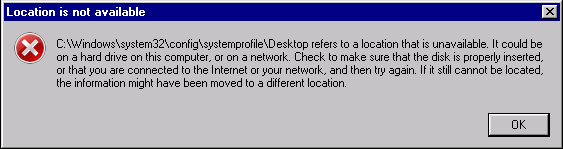
But i cant open the explorer because it cant be found.
Ive tried to use parted magic to bypass the above issue but it was nearing home time so i didnt have much time to fiddle.
Anyone else seen this?
Sorry for wall of text, shyte thing is we have 45 of identical (HP) PC's and they will all most likely have this issue as 3 have already done it.
It loads to a blank desktop with only the recycle bin and the taskbar is frozen as well as the start menu.
The PC loads directly to the windows startup repair asking for me to choose a language then it has all the blocks saying system recovery, cmd prompt, repair startup issues and all that jazz but none work, ive also noticed that it shows 3 bootable "partitions"
One named Windows rollback - which reboots the pc and puts me back in the same as above.
Another one named Windows 10 on Volume 4 - does nothing too
and another one named Windows 10 Pro on volume 4 this one brings me to the blank desktop.
Google says i must "Step 1. Launch File Explorer in Windows 10, 8.1, 8 or 7, directly go to C drive, click into Users folder and then your username. Find the Desktop folder there.
Step 2. Copy the Desktop folder using Ctrl+C or whatever method you get used to. Go and navigate to C:\Windows\system32\config\systemprofile, under systemprofile paste the Desktop folder there."
But i cant open the explorer because it cant be found.
Ive tried to use parted magic to bypass the above issue but it was nearing home time so i didnt have much time to fiddle.
Anyone else seen this?
Sorry for wall of text, shyte thing is we have 45 of identical (HP) PC's and they will all most likely have this issue as 3 have already done it.
