Linux / Ubuntu question

BigAl-sa

Executive Member
Joined
Dec 26, 2006
Messages
6,652
Partition 1 (sda1) and 2 (sda2) are the windows partitions and your linux partition is sda5. You may want to download a gparted iso, make a CD and boot from that. You will then be able to delete partitions sda1 and sda2, expand sda3 and then sda4 to fill the gap. A better option will be to delete sda2, then expand sda1 to fill the gap. Change the new sda1 to ext3 and format it, then move /home to sda1 (I'll put up a link as how to do this when I get to my desktop. I think I put the link in one of the stickies).

A good exercise in learning the nuts and bolts of the Linux file system.
 

atomcrusher

Expert Member
Joined
Jun 27, 2006
Messages
4,208
(I'll put up a link as how to do this when I get to my desktop. I think I put the link in one of the stickies).

A good exercise in learning the nuts and bolts of the Linux file system.

Yes please .. I'll need those instructions though.

But ... would it nor be easier for me to just re-format then entire HDD (I realise that this will delete everything from the laptop drive), and start from scratch with installing only the Ubuntu 11.04 I have burned to a CD-R?

If the above is possible then all I would need is advice on how to re-format the entire HDD, and what method to use (it is currently NTFS)
 
Last edited:

ponder

Honorary Master
Joined
Jan 22, 2005
Messages
92,823
But ... would it nor be easier for me to just re-format then entire HDD (I realise that this will delete everything from the laptop drive), and start from scratch with installing only the Ubuntu 11.04 I have burned to a CD-R?

If the above is possible then all I would need is advice on how to re-format the entire HDD, and what method to use (it is currently NTFS)

Yes it would probably be the simplest/easiest option seeing how quick & painless the installation procedure is.

Reboot the laptop from the installation CD, once you have a live session running try and find gparted or gnome disk utility (I have not used the new unity interface so not sure where you find them, usually under system or admin tools. If gparted is not installed you can simply install it in the live session). With these you can remove, create & format partitions. I suggest you remove all existing partition and create two new ones for root & home. Make the first partition 15-20GB in size and the second one to take up the remainder of the drive. Format both as Ext4.

Now reinstall ubuntu but select manual partitioning and assign / (root) to the 15GB partition and /home to the remaining big one.

Oh, BACKUP any data you might have on the Windows partition.

EDIT:
Just for the record, Ubuntu 11.10 will be released in three days time so you might wanna wait a bit and get that one or get a current daily build cd and install that which you can just update although there are usually minimal changes between today and 3 days from now.
http://cdimage.ubuntu.com/daily-live/current/
 
Last edited:

fantasticfred

Banned
Joined
Apr 8, 2011
Messages
288
Ubuntu is great but at first appearance it might seem a little gimped. You just need to download all the updates after the install and then you should find you have a nifty little operating system.
 

BigAl-sa

Executive Member
Joined
Dec 26, 2006
Messages
6,652
Yes please .. I'll need those instructions though.

post #12 in this thread.

But ... would it nor be easier for me to just re-format then entire HDD (I realise that this will delete everything from the laptop drive), and start from scratch with installing only the Ubuntu 11.04 I have burned to a CD-R?

If the above is possible then all I would need is advice on how to re-format the entire HDD, and what method to use (it is currently NTFS)

It prolly would be better, but not half as much fun :D

BTW, I wouldn't follow Ponder's advice about waiting three days for the release of 11.10. The first release is always hugely buggy, if you want to do 11.10, wait a month and then do the install with all the updates (live network install) as mentioned by fantasticfred.
 

ponder

Honorary Master
Joined
Jan 22, 2005
Messages
92,823
BTW, I wouldn't follow Ponder's advice about waiting three days for the release of 11.10. The first release is always hugely buggy, if you want to do 11.10, wait a month and then do the install with all the updates (live network install) as mentioned by fantasticfred.

If he install 11.04 now how many MB/GB of updates will it pull in for the last 6months?
 

atomcrusher

Expert Member
Joined
Jun 27, 2006
Messages
4,208
I greatly appreciate all the advice and tutorials / how-to's given to me by so many Linux users in this thread ... many thanks to all.

BUT ... I don't think I have made it clear enough just how much of a novice I am at 'all things computers'

I really do think that it would be easier for me (i.e. less of a challenge for my rapidly fossilising brain after 40+ years of Camel filters & a multitude of barrels of beer ..) to reformat the entire C:\ drive of my laptop.

I am assuming that would completely clear the laptop of all traces of Win7, and the currently running Ubuntu 11.04, as well as all and any other data / drivers / documents / apps & programs from my laptop.

I could then reboot with the 11.04 Ubuntu in the CD/DVD drive, and install Ubuntu - I know the CD works, because that OS is what I am using right now, booted from the same CD-R.

But that in itself leads to more questions ..

1. When I format the drive (my laptop only has one disc drive), in which format should I format it? e.g. NTFS, or other? If other, what other file system?

1.1 I guess that to format the drive I have to revert to the old DOS command, i.e. " format C:/ " ?

2. Is it really necessary to create multi-partitions on the newly-formatted C: drive? i.e. can it not be just one partition?

3. If at least 2 x partitions are needed, I assume Ubuntu install sits on one, and all my own - yet to be created data (now created using Ubuntu) would be on another partition?

4. How would I create more than one partition during the format operation?

5. How to determine the optimal size of each partition (assuming I should have more than one)?

I really do think that a re-format of the HDD, and a new start in Ubuntu 11.04 would be the easiest for my limited knowledge of hardware, OS's, and software.

6. Would I have to download drivers for all things like display / wireless / bluetooth / audio & video cards, etc. etc?

.. and finally - thanks in advance to all :love:
 

bin3

Senior Member
Joined
Jun 22, 2005
Messages
976
Initialising disks involves 2 things ...

1. Partitioning
2. Formatting

Partitioning is the practice of separating your disk into logical separate units.

Linux, in general, requires at least 3 different logical allocation units.

1. boot partition
2. root partition
3. swap partition

1. Boot
The kernel and bootloader is placed here. In general you can get pass with < 10MB but usually allocate at least 100MB or so to the boot.

3. Swap
This should be (as a general rule of thumb) 1.5 Times your physical memory.

2. Root
Allocate the rest of your space here.

Use GPart / cfdisk / fdisk to partition your disk as you require.

File Systems / Formats.

1. I recommend that boot is set to ext2 -- This is one of the oldest filesystems available for Linux, and very reliable. More importantly, most kernels have support compiled into it, so that you can actually boot. You can't boot a filesystem if your kernel doesn't understand that filesystem.

2. In general I use ext4 for my root file system, ext 3 is also pretty good. You are more than welcome to use something, but if you are not sure, stick to Ext3 or Ext4.

3. Swap is formatted as a specific file system.

So after you have partitioned your disks, you need to format those partitions.

Lets say you have sda1 == boot, sda2 == swap, sda3 == root

You would then need to go something like

mk.ex2fs /dev/sda1
mkswap /dev/sda2
swapon /dev/sda2
mk.ext4fs /dev/sda3

Hope this helps ...
 

ponder

Honorary Master
Joined
Jan 22, 2005
Messages
92,823
1. When I format the drive (my laptop only has one disc drive), in which format should I format it? e.g. NTFS, or other? If other, what other file system?

1.1 I guess that to format the drive I have to revert to the old DOS command, i.e. " format C:/ " ?

You can use the ubuntu install CD to partition & format the drive. When it comes to the part of disk management/partitioning select the manual option or just say use entire disk, and it will use the defualt format of Ext4.


2. Is it really necessary to create multi-partitions on the newly-formatted C: drive? i.e. can it not be just one partition?

No it's not required. You need at least two partitions, / & swap which is what the installer will create by default and format to Ext4 for /, swap does not get formatted per se.


3. If at least 2 x partitions are needed, I assume Ubuntu install sits on one, and all my own - yet to be created data (now created using Ubuntu) would be on another partition?

It's personal preference but it's nice to have a / (root), /home & swap (same function as windows page file) partition. Having a separate /home is nice incase you ever need to reinstall etc as all your documents & personal data as well as config files are store in /home. You set these when selecting the manual partitioning option in the installer.


4. How would I create more than one partition during the format operation?

See the manual partitioning option in the installer. Alternatively launch Gnome Disk Utility from the live CD menu on the destop and create your partitions before installing. Another option is to install Gparted and create the partitions with that if not already installed on the livecd.


5. How to determine the optimal size of each partition (assuming I should have more than one)?

I really do think that a re-format of the HDD, and a new start in Ubuntu 11.04 would be the easiest for my limited knowledge of hardware, OS's, and software.

15-20GB will be more than enough for your / partition. Make your swap partition 1.5-2x your RAM/Memory size. Let /home take up the rest of the space.
So I would say create 4GB swap partition (sda1), 15GB / partition Ext4 (sda2), Remainder /home partition Ext4 (sda3)

I agree.


6. Would I have to download drivers for all things like display / wireless / bluetooth / audio & video cards, etc. etc?

.. and finally - thanks in advance to all :love:

No, 99% of the drivers will be in the kernel. If you have a nVidia or ATI gfx card you might want to install the drivers from the vendor but even that you can do from within ubuntu with a simple mouse click. To playback stuff like mp3, DVD etc you will just have to install the restrictred extras which is another simple mouse click but let's cross that bridge when you get there. Edit: Wireless you might or might not have to install, it all depends on the card in your laptop.


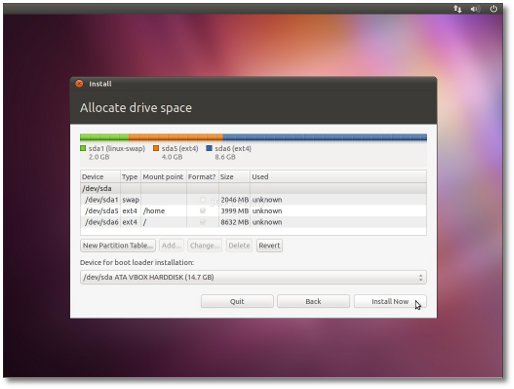
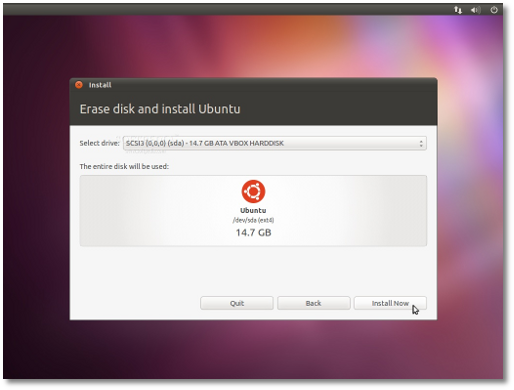
Here is a nice guide for you; http://news.softpedia.com/news/Installing-Ubuntu-11-04-196660.shtml
See section Allocate drive space, you might be interested in;
3. Erase and use the entire disk. (This will wipe the entire disk clean, both windows & linux partition but won't create a separate /home partition)
4. Something else (advanced). (This will allow you to manually wipe all the partitions on the drive and create swap, / & /home partitions)
ubuntu1104installation-small_004.png

From the above screen you can use the "Delete" button to remove all the current partitions on the disk and create new ones.

ubuntu1104installation-small_005.png

If you are still uncertain about the partitioning/formatting PM me, I'll give you my number and talk you through it over the phone.


Not required but optional and you might find interesting;
Top Things to do after installing Ubuntu 11.04 and 11.10 Oneiric Ocelot
http://www.unixmen.com/linux-tutori...do-after-installing-ubuntu-1104-natty-narwhal
 
Last edited:

Dion Disco

Senior Member
Joined
May 18, 2011
Messages
597
Partition 1 (sda1) and 2 (sda2) are the windows partitions and your linux partition is sda5. You may want to download a gparted iso, make a CD and boot from that. You will then be able to delete partitions sda1 and sda2, expand sda3 and then sda4 to fill the gap. A better option will be to delete sda2, then expand sda1 to fill the gap. Change the new sda1 to ext3 and format it, then move /home to sda1 (I'll put up a link as how to do this when I get to my desktop. I think I put the link in one of the stickies).

A good exercise in learning the nuts and bolts of the Linux file system.

This is exactly why I abandoned my efferts to install Linux Mint 11 to dual boot with Win 7

I am not prepared to invest hours in studying how to install a program that should run "out of box" for a Linux newbie

The above quoted text gives you a good idea of the hoops you have to jump through

Good luck Mr ATOM, I admire you for tackling this at 60. ;-)

No wonder Linux haven't taken over the OS world - less mention about it in mainstream press
 

Dion Disco

Senior Member
Joined
May 18, 2011
Messages
597
How hard is it to select "install side by side" in the setup?

Until the part where it presents you with a cryptic partion manager that does not explain where is Win and what you have to shrink, expand or delete - I should not have to see this in 2011

As Steve Jobs once said "It is a bag of pain"
 

BigAl-sa

Executive Member
Joined
Dec 26, 2006
Messages
6,652
This is exactly why I abandoned my efferts to install Linux Mint 11 to dual boot with Win 7

I am not prepared to invest hours in studying how to install a program that should run "out of box" for a Linux newbie

The above quoted text gives you a good idea of the hoops you have to jump through

Good luck Mr ATOM, I admire you for tackling this at 60. ;-)

No wonder Linux haven't taken over the OS world - less mention about it in mainstream press

I'd hardly call linux a program. Trying to make a dual boot system is easy - our OP, Mr ATOM did it successfully :p

If you want to do something like dual booting, you have to invest some time...
 

ponder

Honorary Master
Joined
Jan 22, 2005
Messages
92,823
This is exactly why I abandoned my efferts to install Linux Mint 11 to dual boot with Win 7

Lets try the reverse, try and install Windows in a dual boot configuration after you have installed Linux and see how kindly that treats you ;)
It won't allow you to resize partitions, it cannot read file systems other than FAT & NTFS, it feels fsckall for your MBR etc etc etc.

You are barking up the wrong tree here, probably due to ignorance.

Oh, and you COMPLETELY missed the fact that the OP installed a dual-boot setup all on his own having never seen or touched linux before. He's trying to get rid of windows and that's what most of this thread has been about so far. Think you just got owned :D

If you can't follow this http://news.softpedia.com/news/Installing-Ubuntu-11-04-196660.shtml then you should rather not be touching a computer at all.
 
Last edited:

Dion Disco

Senior Member
Joined
May 18, 2011
Messages
597
Apologies to ATOMCRUCHER - I am not hijacking your thread

"Trying to make a dual boot system is easy - our OP, Mr ATOM did it successfully"
Yes, after 50 posts and 5 pages of guiding him there

"Lets try the reverse, try and install Windows in a dual boot configuration after you have installed Linux and see how kindly that treats you"

Why reverse my problem ? Win is the dominant OS here, Linux should learn to play niclely with it if it wants to get new users
 

ponder

Honorary Master
Joined
Jan 22, 2005
Messages
92,823
Yes, after 50 posts and 5 pages of guiding him there

Are you really that thick or just being obtuse?

Go read the thread again and apply some comprehension but let me try and summarise it for you:

1.) The OP had some preliminary install questions before he even downloaded or attempted it.
2.) He downloaded it and then he had problems, BECAUSE the download was never completed.
3.) He downloaded it again and did a dual boot install all on his own, no issues or hassles.
4.) He's trying to get rid of Windows.

1,2 & 4 does not relate to his install experience (3) which went smoothly.

Why reverse my problem ? Win is the dominant OS here, Linux should learn to play niclely with it if it wants to get new users

See 3 above. It played perfectly nice with windows doing a dual boot. It automatically resized his windows partitions, created new ones for linux and installed itself without any hassles.

WTF are these issues and hassles you keep on referring to?

On second though I think you are just being obtuse.
 

atomcrusher

Expert Member
Joined
Jun 27, 2006
Messages
4,208
@ Ponder ... thanks for your detailed instructions on post # 50, and also to everyone else for their valuable inputs. I'll take a while to digest all of this.

I am really grateful that I have an 'old' laptop (my Dell Precision M90) to test Linux on .... the PC I am writing this post on is shared between my partner and myself, so I don't dare experiment with Linux on this PC. Her wrath is not worth it.

The laptop (which now has the Linux install - but I only want to optimise it now .... READ: Get rid of all Windows traces) is where I will try the instructions in this post - I don't pretend to understand all (...any??) of it, but I guess I can't 'brick' my laptop - the worst I could do is need to reformat the only HDD in it, and start all over.

I have all the time in the world, being retired from Jhb rat-race, and now living in Swellendam ( .. it was 37 deg C here today!), so I have lots of spare time to play around (but not with the local lasses ... some okes living here are larger cousins of, or at least seem to be, of Bakkies B).

Finally .. @ Dion Disco - please start your own anti-Linux thread, but your apology for jacking my thread is accepted

My significant other is missing a Woolies Food Store, so we have to take a 200km round-trip to Worcester tomorrow, to keep her happy. So a long trip to end up buying a pack of English Muffins .. but at least I'll give y'all some respite from my questions.
 

ponder

Honorary Master
Joined
Jan 22, 2005
Messages
92,823
I have all the time in the world, being retired from Jhb rat-race, and now living in Swellendam ( .. it was 37 deg C here today!), so I have lots of spare time to play around (but not with the local lasses ... some okes living here are larger cousins of, or at least seem to be, of Bakkies B).

Does it still look like there is some inbreeding going on there? :D Got that impression last time I was there in the late 80's.
 
Top