-
- News
-
Categories
- 5G
- ADSL
- AI
- Banking
- Black Friday
- Broadband
- Broadcasting
- Business
- Business Telecoms
- Cellular
- Cloud and Hosting
- Columns
- Cryptocurrency
- Energy
- Enterprise
- Fibre
- Gadgets
- Gaming
- Government
- Hardware
- Industry News
- Internet
- Internet of Things
- Investing
- IT Services
- Motoring
- Reviews
- Science
- Security
- Smartphones
- Software
- Technology
- Telecoms
- Trending
- Wireless
- Press Office
- Forum
- Industry News
- What's Next
- Company hub
- Speed Test
- About us
- Advertise with us
- Contact
- Careers


-
Join the MyBroadband community
South Africa’s biggest forum. Discuss, discover, and connect with thousands of members.
-
Question of the Day: At what point do you sell your car?

You are using an out of date browser. It may not display this or other websites correctly.
You should upgrade or use an alternative browser.
You should upgrade or use an alternative browser.
Look ahead to web-based mail
- Thread starter aott
- Start date


LazyLion
King of de Jungle
I am using it. Got all my mail synched back to three years ago. Very nice! Chewed some bandwidth at first... but all is good now.

I don't see the use really. My Gmail accounts are configured accordingly:
Enable POP
Enable Archiving of mail when mail is downloaded.
Configure my mail account in Outlook/Thunderbird, as soon as a message is downloaded, it's still in my Gmail account, but I don't see it in the Inbox.
If I ever need an email, which is like once every 3 months, then I log into Gmail and search for it.
I never use the Gmail Web Interface, unless I check from a location other than my own computer.
Enable POP
Enable Archiving of mail when mail is downloaded.
Configure my mail account in Outlook/Thunderbird, as soon as a message is downloaded, it's still in my Gmail account, but I don't see it in the Inbox.
If I ever need an email, which is like once every 3 months, then I log into Gmail and search for it.
I never use the Gmail Web Interface, unless I check from a location other than my own computer.

AirWolf
Honorary Master
I don't see the use really. My Gmail accounts are configured accordingly:
Enable POP
Enable Archiving of mail when mail is downloaded.
Configure my mail account in Outlook/Thunderbird, as soon as a message is downloaded, it's still in my Gmail account, but I don't see it in the Inbox.
If I ever need an email, which is like once every 3 months, then I log into Gmail and search for it.
I never use the Gmail Web Interface, unless I check from a location other than my own computer.
Same here - I've got mine in WinMail (Outlook Express).
Google offers like 7GB + of storage and even if you are using 1GB, how long will that take to cache, and more importantly how much will it cost?
LazyLion
King of de Jungle
I also have it backed up through POP3 downloads.
But it is nice to have all the access to the Webmail interface even when I am offline.
I like the search feature and the tags feature. I don't have access to those through offline e-mail in an e-mail client... it is dependent on the e-mail client then.
I much prefer the web interface.
But it is nice to have all the access to the Webmail interface even when I am offline.
I like the search feature and the tags feature. I don't have access to those through offline e-mail in an e-mail client... it is dependent on the e-mail client then.
I much prefer the web interface.

eltherza
Expert Member
But I discovered a new add-on for Gmail that totally blew me away and convinced me more than ever that web-based e-mail is the future.
Web based email was the future back when 'hotmail' was still popular
Downloading your emails to your machine for "when you are offline" is also 'old', If you ever lose connectivity, just use your cellphone to check your mail and do searches. Gmail has cellphone clients that are pretty awesome. If you dont have cellphone reception, and your internet went down - checking your emails is the last thing you should be doing.
Roadrunner
Expert Member
- Joined
- Jun 11, 2008
- Messages
- 1,653
- Reaction score
- 1
Storing your e-mail on a mail server overseas is also a good idea, especially for us in crime-ridden South Africa.
If some low-life decides to take the burden of ownership of a PC or laptop off your shoulders, then at least your mail will be safe.
Same can be said for your files if you use Microsoft's SkyDrive or soon-to-be-announced GDrive from Google.
If some low-life decides to take the burden of ownership of a PC or laptop off your shoulders, then at least your mail will be safe.
Same can be said for your files if you use Microsoft's SkyDrive or soon-to-be-announced GDrive from Google.
Last edited:
I like the idea of Google, the online interface as well as the offline access. Since I typically retrieve my mail on 2 PCs and per phone, I need to keep it online, or use IMAP.
However, the problem is that I have 3+GB worth of emails, so syncing ALL of it won't do. I wish Google provides a way to limit from which point offline access are to be granted. That way I can provide offline access to all my recent mail (say for 2009) since the possibility of needing something offline of previous years are remote.
However, the problem is that I have 3+GB worth of emails, so syncing ALL of it won't do. I wish Google provides a way to limit from which point offline access are to be granted. That way I can provide offline access to all my recent mail (say for 2009) since the possibility of needing something offline of previous years are remote.
2CentsWorth
Senior Member
- Joined
- Dec 1, 2008
- Messages
- 674
- Reaction score
- 2
The true power of Gears si for their other apps, such as their office like suite of apps. They're gonna make a big shove into the desktop office and productivity apps market, especially as chrome includes gears: http://blogoscoped.com/google-chrome/34
LazyLion
King of de Jungle
I like the idea of Google, the online interface as well as the offline access. Since I typically retrieve my mail on 2 PCs and per phone, I need to keep it online, or use IMAP.
However, the problem is that I have 3+GB worth of emails, so syncing ALL of it won't do. I wish Google provides a way to limit from which point offline access are to be granted. That way I can provide offline access to all my recent mail (say for 2009) since the possibility of needing something offline of previous years are remote.
By default it only goes one year back. I also have several Gigs of e-mail stored in my Gmail, but it only synched back to February 2008.
I'll grab a screen-shot of the settings for you.
LazyLion
King of de Jungle
Here's what the Gmail Offline settings look like....
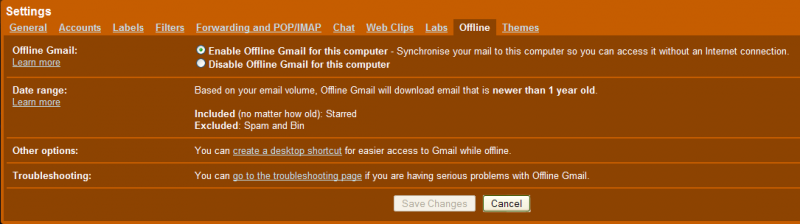
Shows that it only synchs back to one year by default.
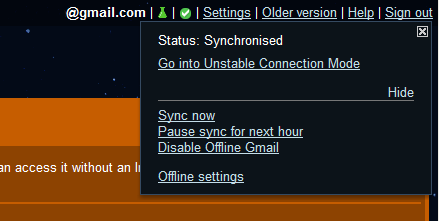
Shows that you can pause the synch for a while if you want to.
Shows that it only synchs back to one year by default.
Shows that you can pause the synch for a while if you want to.
I started [-]using[/-] playing around with it when it came out last week or 2? i dunno.. lifehacker had an article on it. Anyway the intial release was crappy as it didn't specify what to do with attachments(the newer release you can set what size attachment is 'ok' to get offline). Uhm it apparently is set to download & maintain an offline cache 1000 emails*(time length is based on this)
But if you have a router connected 24/7 i was trying to weigh up whether it really is worth it, for notebooks tho this is must have particularly if u on the move using various types of network points(reliable, unreliable, and need access to email every so often while u one the run.. no more connecting needed)
btw if you an intrepid fan of using google products(as i am) please note this thing is also available/or coming? on google calender, reader and soon a better docs version.
But if you have a router connected 24/7 i was trying to weigh up whether it really is worth it, for notebooks tho this is must have particularly if u on the move using various types of network points(reliable, unreliable, and need access to email every so often while u one the run.. no more connecting needed)
btw if you an intrepid fan of using google products(as i am) please note this thing is also available/or coming? on google calender, reader and soon a better docs version.
Last edited:
DJNgoma
Expert Member
My tools for GMail are Gears, IMAP and the best is the lab extras.
Last edited:
<moLe>
Expert Member
hmmm.... Gmail is awesome, yes I agree..but I dont like the "security" risk of all my emails lying in my cache.