Make cheap intercom smart

Tinuva

The Magician
Joined
Feb 10, 2005
Messages
13,988
Reaction score
4,994
Location
Virgo Super Cluster
Anyone have an idea how I can make this intercom smart?
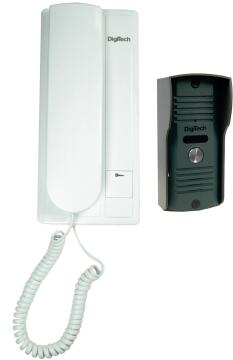

It was already installed when I moved in. Seeing how cheap it is, even if I break it, easy to replace. So the question is, if the button is pressed, I want to have it trigger in home assistant. Only question is, what is the easiest way if possible. Smart intercoms I have seen cost like R2k which is erm lots.
 
Yank it out and replace it with an ESP32 CAM board.
Install ESPhome and use the direct HA integration for it.

That was pretty much as far as I got when I was looking at a similar setup, I still need add an external AP before I can do the setup, my driveway is around 50m(panhandle) and my Unifi's dont reach.
 
ok. While the camera part is cool, I dont need that, already have a camera that can see fine into the street. Just need a button that rings in the house and send notifications.

I guess I will have to build my own cheaper thingy then.
 
ok. While the camera part is cool, I dont need that, already have a camera that can see fine into the street. Just need a button that rings in the house and send notifications.

I guess I will have to build my own cheaper thingy then.

Do you have a multimeter? One of the incoming wires should go from low to high when you press the button. Branch this wire to something like an ESP board. Write program waiting for input and sends out whatever.
 
ok. While the camera part is cool, I dont need that, already have a camera that can see fine into the street. Just need a button that rings in the house and send notifications.

I guess I will have to build my own cheaper thingy then.
If you dont need the camera, then why not just add a momentary switch to an ESP and use those events to trigger the rest of the functions you need?
All you would need to do is power it and have it in wifi range.
 
This may help?

Not quite sure how it works - but says it can hook up to analogue sensor and make dumb products smart.

 
Do you have a multimeter? One of the incoming wires should go from low to high when you press the button. Branch this wire to something like an ESP board. Write program waiting for input and sends out whatever.
With these old analogue intercoms it's usually not as simple as that because they often use just two wires between the inside & outside units, and those wires carry power to the outside unit and audio in both directions. I have a legacy Aiphone intercom and initially battled to work out a bell press signal I could reliably detect with an A/D, but eventually figured out it was easier to detect a change on the pair of wires that connect the primary indoor unit to additional indoor units if you have them. The listing for your Digitech unit seems to suggest it supports additional indoor units, so if it's at all similar to the Aiphone that may be a useful thing for you to check. (Note that a multimeter won't give you the full story - the line is most likely to carry the analogue ring tone to the sub units. I used an oscilloscope in my initial testing but found that a simple threshold detection did the trick despite the AC nature of the signal you're looking for.)

I now have a little box containing a Wemos D1 mini and a relay module mounted below my internal intercom unit. The Tasmotised D1 mini monitors the voltage on one of the connections to additional indoor units (via a voltage divider) and interprets a change above or below a threshold as a button press. My internal unit also has a gate release button that's just a dry contact compatible with your typical gate release. I use the relay module in parallel with that so I can open the gate via the same D1. As a bonus, the D1 & relay are powered (via a little buck regulator) from the intercom, so there wasn't any new wiring required to the intercom point.

To round it off, the button press now triggers Home Assistant to save snapshots from two cameras that cover the driveway & intercom and then fire off an actionable notification to the HA app, from which I can choose to open the gate or ignore.
 
Lipstick on a pig. Install the one that you really want on your front door.

If you want to play around, install it on the door of your man-cave, and mess with it to your heart's content.
 
Lipstick on a pig. Install the one that you really want on your front door.

If you want to play around, install it on the door of your man-cave, and mess with it to your heart's content.
If you have a reliable old pig already installed, there's nothing wrong with a little lipstick to make your old pig smart so it talks nicely to your home automation system. :)
 
If you have a reliable old pig already installed, there's nothing wrong with a little lipstick to make your old pig smart so it talks nicely to your home automation system. :)
On the man-cave, yes, lots of fun. Once it's proven and tested, release it into production on your perimeter, preferably with an IP rated vandal-proof stainless-steel housing.
 
With these old analogue intercoms it's usually not as simple as that because they often use just two wires between the inside & outside units, and those wires carry power to the outside unit and audio in both directions. I have a legacy Aiphone intercom and initially battled to work out a bell press signal I could reliably detect with an A/D, but eventually figured out it was easier to detect a change on the pair of wires that connect the primary indoor unit to additional indoor units if you have them. The listing for your Digitech unit seems to suggest it supports additional indoor units, so if it's at all similar to the Aiphone that may be a useful thing for you to check. (Note that a multimeter won't give you the full story - the line is most likely to carry the analogue ring tone to the sub units. I used an oscilloscope in my initial testing but found that a simple threshold detection did the trick despite the AC nature of the signal you're looking for.)

I now have a little box containing a Wemos D1 mini and a relay module mounted below my internal intercom unit. The Tasmotised D1 mini monitors the voltage on one of the connections to additional indoor units (via a voltage divider) and interprets a change above or below a threshold as a button press. My internal unit also has a gate release button that's just a dry contact compatible with your typical gate release. I use the relay module in parallel with that so I can open the gate via the same D1. As a bonus, the D1 & relay are powered (via a little buck regulator) from the intercom, so there wasn't any new wiring required to the intercom point.

To round it off, the button press now triggers Home Assistant to save snapshots from two cameras that cover the driveway & intercom and then fire off an actionable notification to the HA app, from which I can choose to open the gate or ignore.

I would like to try the same with the Centurion intercom and Polophone handset.. I have a wemos D1 and relay .. would I require any other other components?

My electronics skills are limited, but have a few wemos projects I been running

you mention voltage divider. Which lost me.. I was hoping to plug into the wemos directly .. would you be able to share your wiring schematics?
 
if it's just to let yourself in (I live in an apartment building and just want an alternative to a key for the building door), you could use a simple 2 channel wifi relay wired to the answer and unlock buttons, then just set up a sequence to answer, buzz for 2 seconds, hang up. I used this relay with great success:


to let guests in I just have them call me on my mobile when at the front door, that way I can hear when the apartment ringer goes off
 
Top
Sign up to the MyBroadband newsletter
X