Measuring iBurst signal strength

r00igev@@r

Honorary Master
Joined
Dec 14, 2009
Messages
15,645
Reaction score
14,160
Location
Draadloos Bantha poo doo in 4ways
Ok, all the usual disclaimers apply! (and for some reason McAfee doesn't like the stuff below) (Hell hath a special place for them - but I digress)

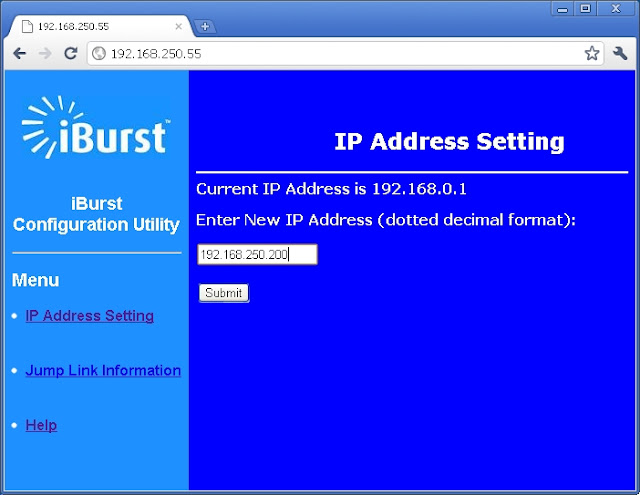
Step 1
2m01.jpg


Step 2
2m02.jpg


Step 3
2m03.jpg


Step 4
2m04.jpg


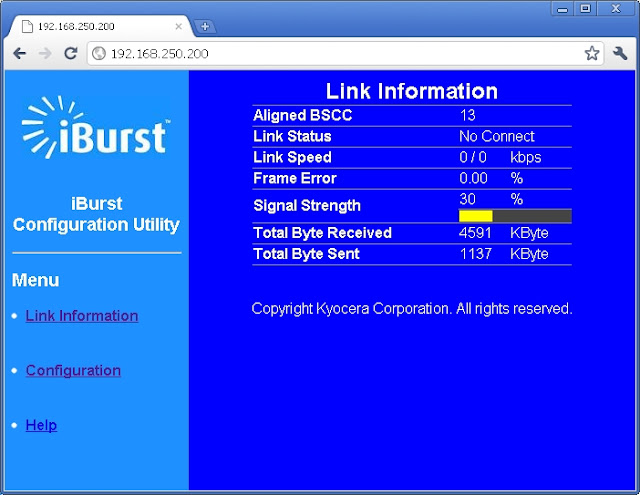
All the useful stuff in a web page (including the BTS)
 
@r00igev@@r - I did this test with Iburst 2mb modem with no Omni and got 98% strength.Then i connected the Omni and received 100%.Does this mean that this is the best signal i can get.I get under 1MB download speeds with 140ms ping.I get disconnected from XBOX Live quite a bit.
 
How can I measure the signal strength of my 2mb modem while connected ?
 
How can I measure the signal strength of my 2mb modem while connected ?
What do you mean "while connected"?

Using the instructions in the first post I can check the signal strength while the modem is dialled in to iBurst.
 
how to check iBurst signal strength over network?

Hi,

I hope someone can help me. Our ADSL line is faulty and I had to revert to using a friend's iBurst modem, connected to the Linksys broadband router, to share the internet to the whole LAN.

Does anyone know how to check the signal strength on the iBurst, through the router? I know there's a web interface for this, but I can't remember the IP address at all.

Any suggestions?
 
Damn! It looks like the WRT54GL Firmware Version: v4.30.7 doesn't allow the change and I don't want to flush the firmware right now. Our exchange has been offline for a few hours this morning and we have work to catch up to.

I currently use a
Model Netgear WNR3500L/U/v2
Chipset Broadcom BCM4716 chip rev 1 pkg 10
with 1.28.7500 MIPSR2Toastman-RT K26 USB VLAN-Std and show the WAN modem IP.
 
Top
Sign up to the MyBroadband newsletter
X